Installs into .claude/skills of the current project.
Sponsors
SSkills DirectorySkills Directory
Know which skills are safe — weekly.
SSkills DirectorySkills Directory
Is that skill safe to install?
Are you the author of 131 Wecom?
Add the live security badge to your README. It updates with every re-scan.
[](https://www.skillsdirectory.com/skills/winlem2024-131-wecom)
---
name: wecom
description: "Send messages to WeCom (企业微信) via webhooks using MCP protocol. Works with Claude Code, Claude Desktop, and other MCP clients."
---
# WeCom Skill
Send text and markdown messages to `WeCom` (`企业微信`) via incoming webhooks (ENV: `WECOM_WEBHOOK_URL`).
`WeCom` is the enterprise version (using in office) of the famous all-in-on IM `WeChat` envied by Elon Musk.
## Setup
```bash
# Navigate to skill directory
cd skills/wecom
# Install dependencies
npm install
# Build TypeScript
npm run build
# Set webhook URL
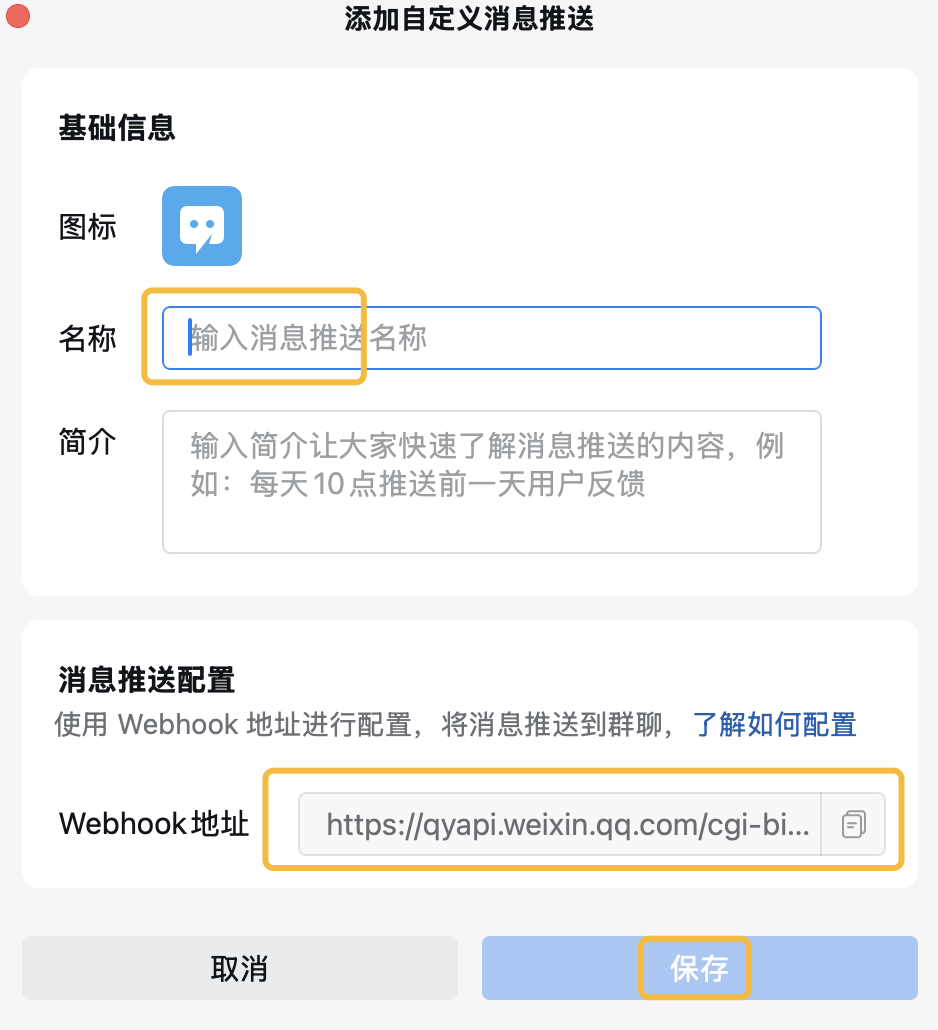
export WECOM_WEBHOOK_URL="https://qyapi.weixin.qq.com/cgi-bin/webhook/send?key=YOUR_KEY"
```
## Usage with Claude Code
Add to your `~/.config/claude_code/mcp.json`:
```json
{
"mcpServers": {
"wecom": {
"command": "node",
"args": ["/path/to/clawdbot/skills/wecom/dist/index.js"],
"env": {
"WECOM_WEBHOOK_URL": "https://qyapi.weixin.qq.com/cgi-bin/webhook/send?key=YOUR_KEY"
}
}
}
}
```
Then restart Claude Code. You'll have three new tools:
# Tools
## `send_wecom_message`
Send a text message to WeCom.
```bash
# Simple message
await send_wecom_message({ content: "Hello from OpenClaw!" });
# With mentions
await send_wecom_message({
content: "Meeting starting now",
mentioned_list: ["zhangsan", "lisi"]
});
```
## `send_wecom_markdown_v2`
Send a markdown_v2 message to WeCom. **Recommended** — supports tables, code blocks, nested blockquotes, H1-H3 headers, and all standard markdown.
```bash
await send_wecom_markdown_v2({
content: `# Annual Report
## Revenue by Quarter
| Quarter | Revenue | Growth |
| :---- | -----: | ----: |
| Q1 | ¥1.2M | +15% |
| Q2 | ¥1.8M | +50% |
| Q3 | ¥2.1M | +17% |
## Notes
> Key insight: mobile revenue grew 80%
>
>> Detail: driven by short video ads
>
>> Another point: new user acquisition cost down 30%
## Code Example
\`\`\`python
def hello():
print("Hello WeCom!")
\`\`\`
---
More info [here](https://work.weixin.qq.com/api/doc)`
});
```
# WeCom Markdown v2 Features
markdown_v2 supports everything the original markdown supports, **plus**:
| Feature | Syntax | Example |
|---------|--------|----------|
| Tables | `\| col \| col \|` with `\| :--- \| -----: \|` | Supported with alignment |
| Nested blockquotes | `>>>` or `>>` | Up to 3 levels |
| H1/H2/H3 | `#` `##` `###` | Three heading levels |
| Code blocks | `\`code\`` and `\`\`\`lang` | Inline and multi-line |
| Horizontal rule | `---` | Dividers |
| Links | `[text](url)` | Standard markdown |
| Images | `` | Direct URL |
# WeCom Markdown (v1) Tags
The original `send_wecom_markdown` supports these limited tags:
| Feature | Syntax |
|---------|--------|
| Bold | `**text**` or `<strong>text</strong>` |
| Italic | `*text*` or `<i>text</i>` |
| Strikethrough | `~~text~~` or `<s>text</s>` |
| Mention | `<@userid>` |
| Link | `<a href="url">text</a>` |
| Image | `<img src="url" />` |
| Font size | `<font size="5">text</font>` |
| Color | `<font color="#FF0000">text</font>` |
⚠️ **v1 does NOT support tables, code blocks, or H1-H3 headers.** Use `send_wecom_markdown_v2` when you need those.
# Environment Variables
| Variable | Required | Default | Description |
|----------|----------|---------|-------------|
| `WECOM_WEBHOOK_URL` | Yes | - | WeCom webhook URL |
| `WECOM_TIMEOUT_MS` | No | 10000 | Request timeout (ms) |
# How To
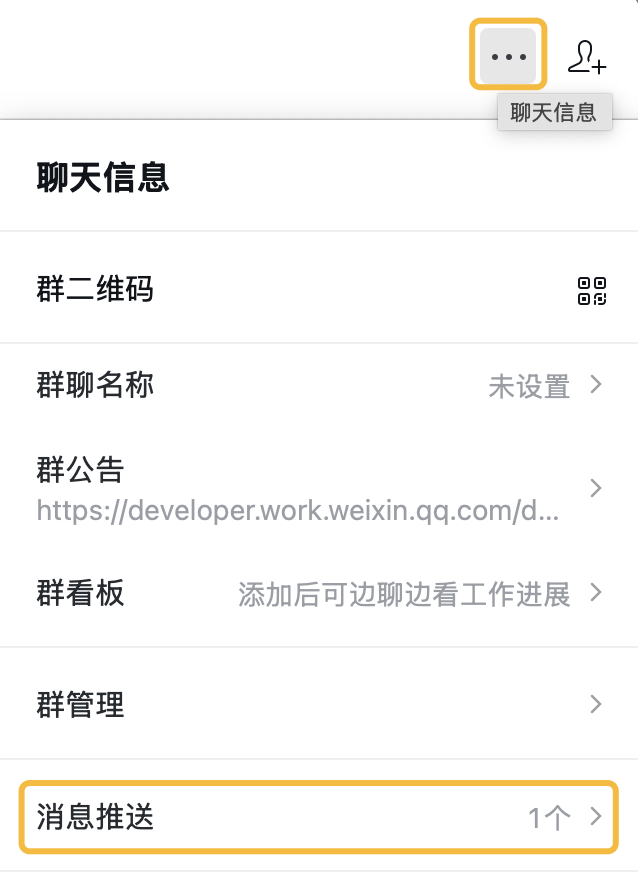
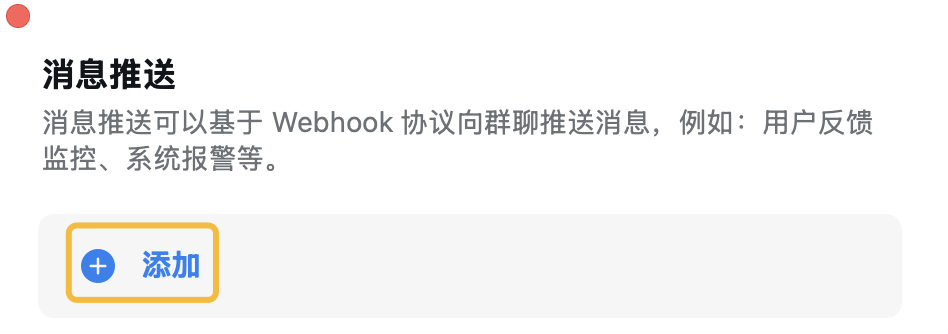
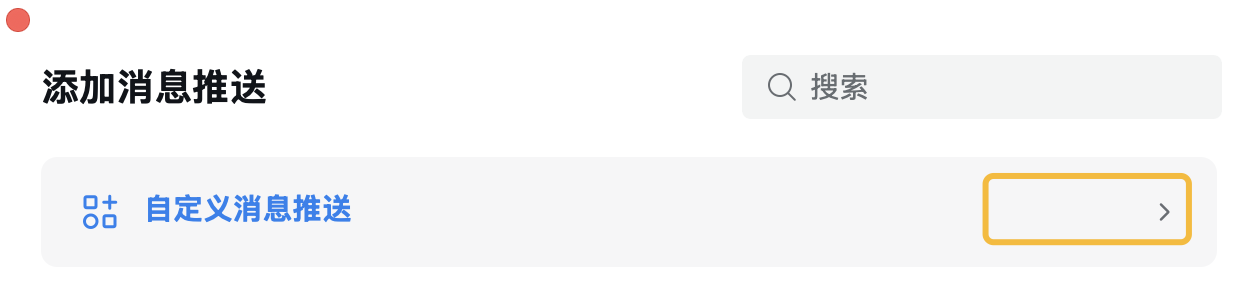
Get `WECOM_WEBHOOK_URL` following steps here, and envolve it as a bot into a group chat:
(Tip: You should get the `WECOM_WEBHOOK_URL` entirely as a URL, NOT just a KEY )
### STEP 1
### STEP 2
### STEP 3
### STEP 4
# Reference
[Message Receiving and Sending in a Group Chat](https://developer.work.weixin.qq.com/document/path/99110)
[Download WeCom Apps](https://work.weixin.qq.com/#indexDownload)

