Skills Directory
Chrome extension
Skill grades on GitHub, where you find skills
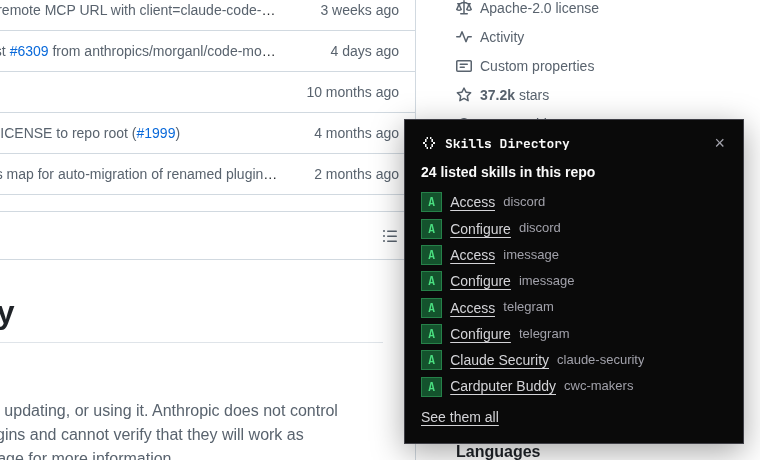
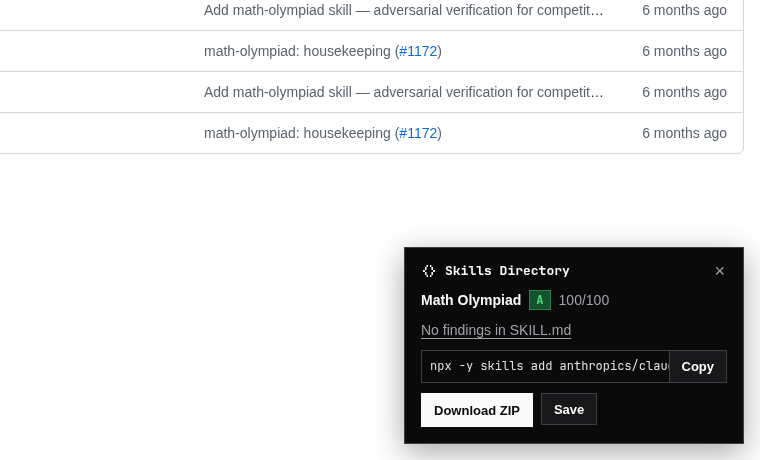
Open a Claude skill on GitHub and see what Skills Directory knows about it: its security grade, what the scan found, and the command to install it. No switching tabs.
Free
- The security grade and findings for any listed skill you open on GitHub
- Its install command, one click to copy
- Every listed skill in a repo or folder, with grades
- A one-click scan for skills that aren't listed yet
- Search the directory from the toolbar
With Pro
- Download any skill as a ZIP for Claude.ai, straight from GitHub
- Save it to your library, so you hear when it changes
- See how many library skills changed, from the toolbar
Install
It isn't in the Chrome Web Store yet. Until it is, installing takes about a minute:
- Download the ZIP below and unzip it.
- Open
chrome://extensionsand turn on Developer mode (top right). - Click Load unpacked and choose the unzipped folder.
Works in Chrome, Edge, Brave, and Arc.
What it sends us
Only on GitHub pages that show a SKILL.md or a skills folder, it sends the repository name and folder path to look the skill up. It doesn't run on other sites, doesn't send your browsing history, and has no analytics. To show Pro buttons, it checks whether Pro is on in this browser. Details are in the privacy policy.