Back to skills
SKILL.md
Implement Feature
ASecurityGuide for implementing features following architecture-first design, TDD, rich domain models, and Swift 6.2 patterns. Use this skill when: (1) Adding new functionality to a Swift app (2) Creating domain models that follow user's mental model (3) Building SwiftUI views that consume domain models directly (4) User asks "how do I implement X" or "add feature Y" (5) Implementing any feature that spans Domain, Infrastructure, and App layers
- 165 stars
- 0 votes
- 0 copies
- 2 views
- Added February 7, 2026
Works with
Security analysis
100/100Pro scans all 5 files and shows the line behind each finding
npx -y skills add tddworks/SkillsManager --skill implement-feature --agent claude-codeAre you the author of Implement Feature?
Add the live security badge to your README. It updates with every re-scan.
[](https://www.skillsdirectory.com/skills/tddworks-implement-feature)---
name: implement-feature
description: |
Guide for implementing features following architecture-first design, TDD, rich domain models, and Swift 6.2 patterns. Use this skill when:
(1) Adding new functionality to a Swift app
(2) Creating domain models that follow user's mental model
(3) Building SwiftUI views that consume domain models directly
(4) User asks "how do I implement X" or "add feature Y"
(5) Implementing any feature that spans Domain, Infrastructure, and App layers
---
# Implement Feature
Implement features using architecture-first design, TDD, rich domain models, and Swift 6.2 patterns.
## Workflow Overview
```
┌─────────────────────────────────────────────────────────────┐
│ 1. ARCHITECTURE DESIGN (Required - User Approval Needed) │
├─────────────────────────────────────────────────────────────┤
│ • Analyze requirements │
│ • Create component diagram │
│ • Show data flow and interactions │
│ • Present to user for review │
│ • Wait for approval before proceeding │
└─────────────────────────────────────────────────────────────┘
│
▼ (User Approves)
┌─────────────────────────────────────────────────────────────┐
│ 2. TDD IMPLEMENTATION │
├─────────────────────────────────────────────────────────────┤
│ • Domain model tests → Domain models │
│ • Infrastructure tests → Implementations │
│ • Integration and views │
└─────────────────────────────────────────────────────────────┘
```
## Phase 0: Architecture Design (MANDATORY)
Before writing any code, create an architecture diagram and get user approval.
### Step 1: Analyze Requirements
Identify:
- What new models/types are needed
- Which existing components will be modified
- Data flow between components
- External dependencies (APIs, databases, CLI tools)
### Step 2: Create Architecture Diagram
Use ASCII diagram showing all components and their interactions:
```
┌─────────────────────────────────────────────────────────────────────┐
│ ARCHITECTURE │
├─────────────────────────────────────────────────────────────────────┤
│ │
│ ┌─────────────┐ ┌──────────────────┐ ┌──────────────────┐ │
│ │ External │ │ Infrastructure │ │ Domain │ │
│ └─────────────┘ └──────────────────┘ └──────────────────┘ │
│ │
│ ┌─────────────┐ ┌──────────────────┐ ┌──────────────────┐ │
│ │ API/DB │────▶│ Repository/ │────▶│ DomainModel │ │
│ │ (external) │ │ Client │ │ (rich behavior) │ │
│ └─────────────┘ └──────────────────┘ └──────────────────┘ │
│ │ │ │
│ │ ▼ │
│ │ ┌──────────────────┐ │
│ │ │ DomainService │ │
│ └─────────────▶│ (actor) │ │
│ └──────────────────┘ │
│ │ │
│ ▼ │
│ ┌──────────────────────────────────┐ │
│ │ App Layer │ │
│ │ ┌────────────────────────────┐ │ │
│ │ │ SwiftUI Views │ │ │
│ │ └────────────────────────────┘ │ │
│ └──────────────────────────────────┘ │
└─────────────────────────────────────────────────────────────────────┘
```
### Step 3: Document Component Interactions
List each component with:
- **Purpose**: What it does
- **Inputs**: What it receives
- **Outputs**: What it produces
- **Dependencies**: What it needs
```
| Component | Purpose | Inputs | Outputs | Dependencies |
|-----------------|----------------------|----------------|----------------|----------------|
| UserRepository | Fetch user data | userId | User | NetworkClient |
| OrderService | Manage order logic | Order, User | OrderResult | UserRepository |
```
### Step 4: Present for User Approval
**IMPORTANT**: Always ask user to review the architecture before implementing.
Use AskUserQuestion tool with options:
- "Approve - proceed with implementation"
- "Modify - I have feedback on the design"
Do NOT proceed to Phase 1 until user explicitly approves.
---
## Core Principles
### 1. Rich Domain Models (User's Mental Model)
Domain models encapsulate behavior, not just data:
```swift
// Rich domain model with behavior
public struct Order: Sendable, Equatable {
public let items: [OrderItem]
public let status: OrderStatus
// Domain behavior - computed from state
public var totalAmount: Decimal {
items.reduce(0) { $0 + $1.subtotal }
}
public var canBeCancelled: Bool {
[.pending, .processing].contains(status)
}
public var itemCount: Int { items.count }
}
```
### 2. Swift 6.2 Patterns (No ViewModel Layer)
Views consume domain models directly:
```swift
// Views consume domain directly - NO ViewModel layer
struct OrderListView: View {
let orders: [Order]
var body: some View {
ForEach(orders, id: \.id) { order in
OrderRow(order: order)
}
}
}
struct OrderRow: View {
let order: Order // Domain model directly
var body: some View {
HStack {
Text(order.status.displayName)
Spacer()
Text(order.totalAmount, format: .currency(code: "USD"))
}
}
}
```
### 3. Protocol-Based DI with @Mockable
```swift
@Mockable
public protocol OrderRepository: Sendable {
func fetch(id: OrderId) async throws -> Order
func save(_ order: Order) async throws
}
@Mockable
public protocol NetworkClient: Sendable {
func request<T: Decodable>(_ endpoint: Endpoint) async throws -> T
}
```
## Architecture
| Layer | Location | Purpose |
|-------|----------|---------|
| **Domain** | `Sources/Domain/` | Rich models, protocols, actors (single source of truth) |
| **Infrastructure** | `Sources/Infrastructure/` | Repositories, clients, adapters |
| **App** | `Sources/App/` | SwiftUI views consuming domain directly (no ViewModel) |
**Key patterns:**
- **Repository Pattern** - Abstract data access behind protocols
- **Protocol-Based DI** - `@Mockable` for testing
- **Chicago School TDD** - Test state, not interactions
- **No ViewModel layer** - Views consume domain directly
## TDD Workflow (Chicago School)
We follow **Chicago school TDD** (state-based testing):
- Test **state changes** and **return values**, not interactions
- Focus on the "what" (observable outcomes), not the "how" (method calls)
- Mocks stub dependencies to return data, not to verify calls
- Design emerges from tests (emergent design)
### Phase 1: Domain Model Tests
Test state and computed properties:
```swift
@Suite
struct OrderTests {
@Test func `order computes total from items`() {
// Given
let order = Order(items: [
OrderItem(price: 10, quantity: 2),
OrderItem(price: 5, quantity: 1)
], status: .pending)
// When/Then
#expect(order.totalAmount == 25)
}
@Test func `pending order can be cancelled`() {
// Given
let order = Order(items: [], status: .pending)
// When/Then
#expect(order.canBeCancelled == true)
}
@Test func `shipped order cannot be cancelled`() {
// Given
let order = Order(items: [], status: .shipped)
// When/Then
#expect(order.canBeCancelled == false)
}
}
```
### Phase 2: Infrastructure Tests
Stub dependencies to return data, assert on resulting state:
```swift
@Suite
struct OrderServiceTests {
@Test func `service returns order on success`() async throws {
// Given - stub dependency to return data (not verify calls)
let mockRepo = MockOrderRepository()
let expectedOrder = Order(items: [], status: .pending)
given(mockRepo).fetch(id: any()).willReturn(expectedOrder)
let service = OrderService(repository: mockRepo)
// When
let result = try await service.getOrder(id: "123")
// Then - verify returned state, not interactions
#expect(result.status == .pending)
}
}
```
### Phase 3: Integration
Wire up in app entry point and create views.
## References
- [Architecture diagram patterns](references/architecture-diagrams.md) - ASCII diagram examples
- [Swift 6.2 @Observable patterns](references/swift-observable.md)
- [Rich domain model patterns](references/domain-models.md)
- [TDD test patterns](references/tdd-patterns.md)
## Checklist
### Architecture Design (Phase 0)
- [ ] Analyze requirements and identify components
- [ ] Create ASCII architecture diagram with component interactions
- [ ] Document component table (purpose, inputs, outputs, dependencies)
- [ ] **Get user approval before proceeding**
### Implementation (Phases 1-3) - Chicago School TDD
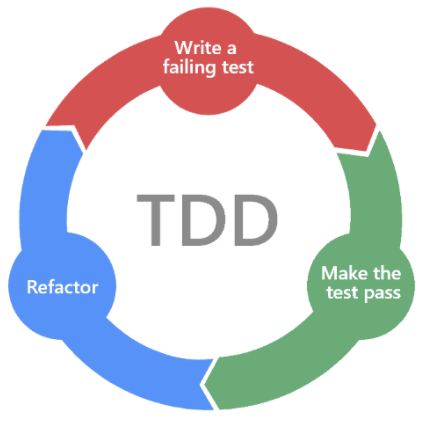
- [ ] Write failing test asserting expected STATE (Red)
- [ ] Write minimal code to pass the test (Green)
- [ ] Refactor while keeping tests green
- [ ] Define domain models in `Sources/Domain/` with behavior
- [ ] Test state changes and return values (not interactions)
- [ ] Define protocols with `@Mockable` for external dependencies
- [ ] Stub mocks to return data, assert on resulting state
- [ ] Implement infrastructure in `Sources/Infrastructure/`
- [ ] Create views consuming domain models directly
- [ ] Run `swift test` to verify all tests pass
Files in this skill
- SKILL.md
- references/architecture-diagrams.md
- references/domain-models.md
- references/swift-observable.md
- references/tdd-patterns.md
Attribution
Comments
Loading comments…
Newsletter
Get the weekly list of safe new skills, and the ones we pulled.