Installs into .claude/skills of the current project.
Are you the author of Iblai Vibe Profile?
Add the live security badge to your README. It updates with every re-scan.
[](https://www.skillsdirectory.com/skills/iblai-iblai-vibe-profile)
---
name: iblai-vibe-profile
description: Add profile dropdown and settings page to your Next.js app
globs:
alwaysApply: false
metadata:
core: true
kind: ui
---
# /iblai-vibe-profile
> **First time here?** If `iblai.env` has no `ARCHITECTURE=`, run `/iblai-vibe-start` first (four questions; two minutes) — it decides single-org / multi-org / headless and who signs in, and every skill reads the answer.
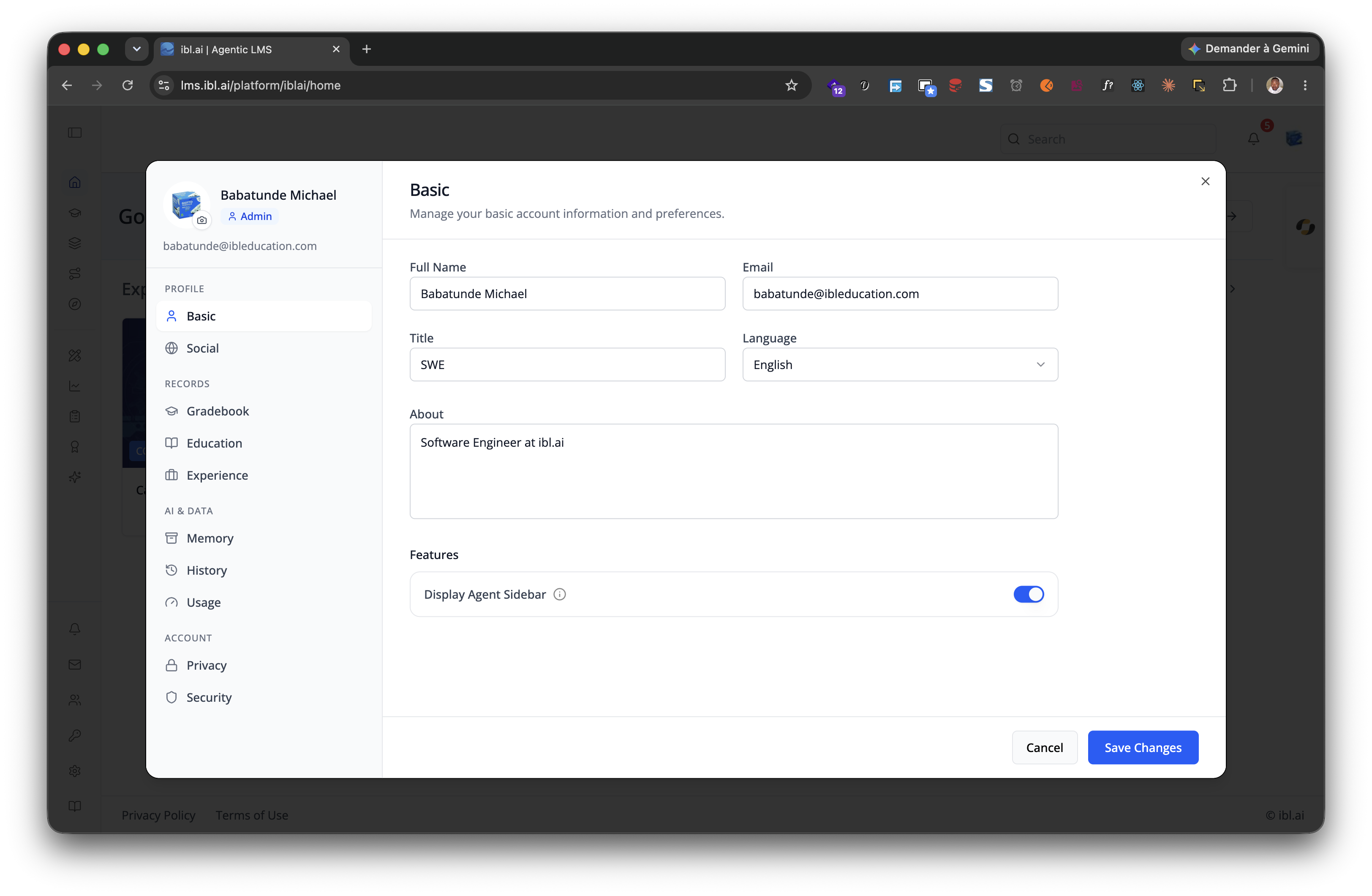
Add user profile features -- a compact avatar dropdown for your navbar and
a full settings page with sidebar tabs for Basic info, Social links,
Education (with Credentials and Skills sub-tabs), Experience (with a
Resume sub-tab), Purchases, Memory, Privacy, History, and Security —
several of them feature-gated per organization (see the tab table below).
> **Template:** the dropdown this skill creates is bundled as
> [`assets/profile-dropdown.tsx.j2`](assets/profile-dropdown.tsx.j2). See
> [`/iblai-vibe-scaffold`](../../start/iblai-vibe-scaffold/SKILL.md) for the `{{ }}` contract.
> **Navbar:** If the user wants a navbar with the profile dropdown, guide
> them to `/iblai-vibe-navbar` first. That skill creates the full navbar with
> logo, page links, notification bell, and profile dropdown.
> **Common setup (brand, conventions, env files, verification):** see [docs/skill-setup.md](https://raw.githubusercontent.com/iblai/vibe/refs/heads/main/docs/skill-setup.md).
## Step 0: Start from vibe-starter? (new projects)
Before running this skill, ask the user:
> Are you starting a new project from scratch? vibe-starter
> (https://github.com/iblai/vibe/tree/main/skills/start/iblai-vibe-ops-init/assets/vibe-starter) already ships the profile
> dropdown and /profile page wired up, alongside auth, navbar, and
> account/notifications. Want to use that instead?
If yes, copy the bundled starter template from the installed
`iblai-vibe-ops-init` skill's `assets/vibe-starter/` directory (it sits
alongside this skill in your skills directory; in the vibe repo it lives
under `skills/start/`), or fetch it from the vibe repo if those assets
are not installed -- tell the user which path you took -- then skip this
skill:
cp -a <skills-dir>/iblai-vibe-ops-init/assets/vibe-starter/. .
# or, without local assets:
git clone --depth 1 https://github.com/iblai/vibe.git vibe-tmp && cp -a vibe-tmp/skills/start/iblai-vibe-ops-init/assets/vibe-starter/. . && rm -rf vibe-tmp
pnpm install --ignore-scripts
> Run with `--ignore-scripts` to skip package lifecycle (postinstall) scripts.
If they prefer to add the profile features to an existing app, continue below.
## Prerequisites
- Auth must be set up first (`/iblai-vibe-auth`)
- MCP server + skills configured (`@iblai/mcp` in `.mcp.json`)
## Step 1: Check Environment
Before proceeding, check for a `iblai.env`
in the project root. Look for `PLATFORM`, `DOMAIN`, and `TOKEN` variables.
If the file does not exist or is missing these variables, tell the user:
"You need an `iblai.env` with your platform configuration. Download the
template and fill in your values:
`curl -o iblai.env https://raw.githubusercontent.com/iblai/vibe/refs/heads/main/iblai.env`"
## Step 2: Create the Dropdown
Render [`assets/profile-dropdown.tsx.j2`](assets/profile-dropdown.tsx.j2)
into `components/iblai/profile-dropdown.tsx` (substitute `{{ }}` placeholders).
## Files created
| File | Purpose |
|------|---------|
| `components/iblai/profile-dropdown.tsx` | Avatar dropdown for the navbar: profile, organization switcher (admins only), and logout |
The dropdown reads `userData`, `current_tenant`, and `tenants` from
localStorage. Admin status is derived from the `tenants` array by matching
the current organization key against `is_admin`. The avatar is fetched internally
by the SDK from the user metadata, keyed on `username` (use `user_nicename`)
— with a Gravatar fallback (`enableGravatarOnProfilePic`) and then initials.
The dropdown shows: **Profile** (opens the SDK profile modal), a
**Tenant Switcher** (admins only — see Step 4), and **Logout**. The
dedicated "Account" item is off (`showAccountTab={false}`); account settings
live on the separate `/account` page.
## Step 3: Add a Full Profile Page
Step 2 creates the dropdown only. You must create the profile **page**
manually using the `Profile` component (not `UserProfileModal`, which renders
as a dialog).
Import `Profile` from `@iblai/iblai-js/web-containers` (the framework-agnostic
bundle, NOT the `/next` bundle). This renders an inline, full-page profile
editor with sidebar navigation on desktop and tabbed navigation on mobile.
### Reference implementation
```tsx
// app/(app)/profile/page.tsx
"use client";
import { useEffect, useState } from "react";
import { Profile } from "@iblai/iblai-js/web-containers";
import { resolveAppTenant } from "@/lib/iblai/tenant";
export default function ProfilePage() {
const [tenantKey, setTenantKey] = useState("");
const [username, setUsername] = useState("");
const [isAdmin, setIsAdmin] = useState(false);
const [ready, setReady] = useState(false);
useEffect(() => {
try {
const raw = localStorage.getItem("userData");
if (raw) {
const parsed = JSON.parse(raw);
setUsername(parsed.user_nicename ?? parsed.username ?? "");
}
} catch {}
const resolved = resolveAppTenant();
setTenantKey(resolved);
try {
const tenantsRaw = localStorage.getItem("tenants");
if (tenantsRaw) {
const parsed = JSON.parse(tenantsRaw);
const match = parsed.find((t: any) => t.key === resolved);
if (match) setIsAdmin(!!match.is_admin);
}
} catch {}
setReady(true);
}, []);
if (!ready || !tenantKey) {
return (
<div className="flex flex-1 items-center justify-center">
<p className="text-sm text-gray-400">Loading profile...</p>
</div>
);
}
return (
<div className="mx-auto w-full flex-1 overflow-auto px-4 py-8 md:w-[75vw] md:px-0">
<div className="rounded-lg border border-[var(--border-color)] bg-white overflow-hidden">
<Profile
tenant={tenantKey}
tenants={tenants}
username={username}
isAdmin={isAdmin}
onClose={() => {}}
customization={{
showPlatformName: true,
useGravatarPicFallback: true,
}}
targetTab="basic"
/>
</div>
</div>
);
}
```
### Key patterns
- **White container wrapper**: The SDK Profile component has no outer background.
Wrap it in a `bg-white rounded-lg border` container so it renders as a card
against the gray page background (`--sidebar-bg: #fafbfc`).
- **`Profile` vs `UserProfileModal`**: `Profile` renders inline (full page).
`UserProfileModal` renders as a dialog overlay. Use `Profile` for a
dedicated `/profile` route.
- **Import path**: `@iblai/iblai-js/web-containers` (NOT `/next`).
## Step 4: Organization Switcher
The template already wires the organization switcher to match the reference app —
it's shown to **admins only** (`showTenantSwitcher={isAdmin}`) and fed by two
localStorage reads:
- **`userTenants`** (from the `tenants` localStorage key) — populates the switch list. Without it
the switcher never appears, even when `showTenantSwitcher` is `true`.
- **`currentTenant`** (from `current_tenant`) — the FULL active-tenant object.
The SDK uses it to label the current organization; without it the switcher falls
back to a generic label.
**Why admins only:** for a non-admin the SDK renders just the current organization
name with no working switch list — a dead row. The reference app hides it
for non-admins; the template does the same. To show it to everyone, set
`showTenantSwitcher` to a constant `true` (or `userTenants.length > 1`).
> **The `main` organization displays as "Community".** That's the SDK's built-in
> name for the `main` org — it is NOT read from `current_tenant.platform_name`,
> and passing `currentTenant` does not change it. It's not a bug; other
> organizations show their own name.
## Step 5: Use MCP Tools for Customization
```
get_component_info("UserProfileDropdown")
get_component_info("Profile")
get_component_info("MediaBox")
get_component_info("ResumeTab")
```
## Profile tabs
The sidebar tabs the `Profile` component renders, with the `targetTab`
id and when each appears:
| Tab | `targetTab` id | Shown when | Notes |
|---|---|---|---|
| Basic | `basic` | Always | Full name, email, title, about, language |
| Social | `social` | Always | Social links |
| Gradebook | `gradebook` | `customization.showGradebookTab` | Credentials + skills gradebook |
| Education | `education` | Always | Sub-tabs: Education / Credentials / Skills |
| Experience | `experience` | Always | Sub-tabs: Experience / Resume |
| Purchases | `purchases` | Organization has monetization enabled | Purchase history |
| Memory | `memory` | `enableMemoryTab` prop AND organization memsearch on | The user's own global memories + capture/personalization toggles (the admin view of the same data is `/iblai-vibe-memory`) |
| Privacy | `privacy` | Organization allows user chat-privacy control | "Private Mode" — see the Chat Privacy Settings API below |
| History | `chatHistory` | Own profile only (hidden on read-only previews) | Conversations + Exports — documented in `/iblai-vibe-history` |
| Security | `security` | Own profile only | Password reset, account deletion |
| Advanced | `advanced` | Tauri desktop with `localLLMProps.isAvailable` | Local LLM models — see `/iblai-vibe-local-llm` |
---
## Profile Content API, User Metadata, Memory, Privacy, MediaBox, Career tabs
Everything behind the tabs — the service layer, the RTK Query hooks, the career/resume backend contract, `MediaBox`, and the standalone `ResumeTab` / `EducationTab` / `ExperienceTab` — is in [`references/profile-api.md`](references/profile-api.md). Per-user custom data is `/iblai-vibe-user-metadata`; memory is `/iblai-vibe-memory-guide`; REST: [iblai-api-profile](https://raw.githubusercontent.com/iblai/vibe/refs/heads/main/skills/users/iblai-api-profile/SKILL.md).
## `<UserProfileDropdown>` Props
The generated dropdown component. Import from `@iblai/iblai-js/web-containers/next`.
| Prop | Type | Description |
|------|------|-------------|
| `email` | `string` | **Required.** User email (from `userData.user_email`); used for the Gravatar avatar fallback |
| `username` | `string` | Username — use `user_nicename` (the avatar metadata fetch keys on it) |
| `mainPlatformKey` | `string` | **Required.** Main/community org key (`config.mainTenantKey()`) |
| `tenantKey` | `string` | Active org key |
| `currentTenant` | `Tenant?` | Full active-tenant object (from `current_tenant`) — labels the organization switcher |
| `userTenants` | `Tenant[]` | **Required for the organization switcher** -- the full `tenants` list from localStorage |
| `userIsAdmin` | `boolean` | Shows admin badge + gates the organization switcher |
| `userIsStudent` | `boolean?` | Non-admin flag (`!isAdmin`) |
| `enableGravatarOnProfilePic` | `boolean?` | Gravatar fallback when the user has no uploaded image (default `true`) |
| `showProfileTab` | `boolean` | Show profile link |
| `showAccountTab` | `boolean` | Show the dedicated "Account" item (keep `false` — account lives on `/account`) |
| `showTenantSwitcher` | `boolean` | Show organization switcher (needs `userTenants` + `currentTenant`); gate on `userIsAdmin` |
| `showLogoutButton` | `boolean` | Show logout button |
| `showHelpLink` | `boolean` | Show help link |
| `showLearnerModeSwitch` | `boolean?` | Show learner/instructor mode toggle (admins) |
| `currentSPA` | `string?` | Current app id (e.g. `"mentor"`) — used for conditional SDK rendering |
| `currentPlatformBaseDomain` | `string?` | Base domain for custom-domain settings (`config.platformBaseDomain()`) |
| `authURL` | `string` | Auth service URL |
| `onLogout` | `() => void` | Logout callback |
| `onTenantChange` | `(tenant: string) => void` | Called when user switches organization -- must set `app_tenant` in localStorage |
| `onTenantUpdate` | `(tenant: Tenant) => void` | Called when organization data updates -- must set `app_tenant` in localStorage |
| `className` | `string?` | Additional CSS class |
| `dropdownClassName` | `string?` | CSS class for dropdown panel |
| `avatarSize` | `number?` | Avatar size in pixels |
| `metadata` | `{ help_center_url?: string; show_help?: boolean }` | Platform metadata for help link |
| `metadataLoaded` | `boolean?` | Whether metadata has finished loading |
| `enableMemoryTab` | `boolean?` | Show AI memory management tab |
| `enableCatalogInvite` | `boolean?` | Enable catalog invite feature |
| `enableRbac` | `boolean?` | Enable RBAC permission checks |
| `isModalOpen` | `boolean?` | Control profile modal open state externally |
| `onModalOpenChange` | `(open: boolean) => void` | Callback when modal open state changes |
| `defaultActiveTab` | `string?` | Default tab when profile modal opens |
| `onAccountDeleted` | `() => void` | Callback after account deletion |
## `<Profile>` Props (Full-Page Profile)
Import from `@iblai/iblai-js/web-containers`.
| Prop | Type | Description |
|------|------|-------------|
| `tenant` | `string` | Org key |
| `username` | `string` | Username |
| `isAdmin` | `boolean` | Admin flag |
| `onClose` | `() => void` | Close callback |
| `customization` | `object` | See below |
| `targetTab` | `string` | Initial tab id — see the **Profile tabs** table (`basic`, `social`, `gradebook`, `education`, `experience`, `purchases`, `memory`, `privacy`, `chatHistory`, `security`, `advanced`) |
| `enableMemoryTab` | `boolean?` | Show the Memory tab (still requires organization memsearch to be on) |
| `localLLMProps` | `object?` | Props for local LLM tab (Tauri desktop only) |
| `onAccountDeleted` | `() => void` | Callback after account deletion |
### Customization object
```typescript
{
showMentorAIDisplayCheckbox?: boolean; // Show "visible on MentorAI" toggle
showLeaderboardDisplayCheckbox?: boolean; // Show leaderboard opt-in
showUsernameField?: boolean; // Show username field (read-only)
showPlatformName?: boolean; // Show platform/tenant name badge
useGravatarPicFallback?: boolean; // Use Gravatar when no profile pic
}
```
## `<UserProfileModal>` Props (Profile + Account Modal)
For a profile editing modal (used by the MentorAI reference app), import
`UserProfileModal` from `@iblai/iblai-js/web-containers/next`. This is a
dialog that combines profile editing and account settings in one overlay.
The modal shows **Profile** tabs (basic, social, education, experience,
resume, security) and **Account** tabs (organization, management,
integrations, billing). Billing/purchases is on the Account side, not
the Profile side.
### Required
| Prop | Type | Description |
|------|------|-------------|
| `isOpen` | `boolean` | Whether the modal is visible |
| `onClose` | `() => void` | Close callback |
| `params` | `{ tenantKey: string; mentorId?: string; isAdmin?: boolean }` | Organization key, optional agent ID and admin flag |
| `authURL` | `string` | Auth service URL (from `config.authUrl()`) |
### Optional
| Prop | Type | Description |
|------|------|-------------|
| `tenants` | `Tenant[]` | The user's full `tenants` list from localStorage |
| `targetTab` | `string` | Initial tab: `basic`, `social`, `education`, `experience`, `resume`, `security`, `organization`, `management`, `integrations`, `billing` |
| `showPlatformName` | `boolean` | Show organization name badge |
| `useGravatarPicFallback` | `boolean` | Use Gravatar when no profile pic |
| `currentSPA` | `string` | Current app identifier (e.g., `"agent"`) |
| `currentPlatformBaseDomain` | `string` | Base domain for custom domain settings |
| `billingEnabled` | `boolean` | Enable billing tab (requires Stripe integration) |
| `billingURL` | `string` | Stripe billing portal URL |
| `topUpEnabled` | `boolean` | Enable credit top-up |
| `topUpURL` | `string` | Stripe top-up URL |
| `onTenantUpdate` | `(tenant: Tenant) => void` | Called when organization is updated |
| `onBillingTabRequest` | `() => Promise<void> \| void` | Called when billing tab is opened -- fetch billing data |
| `onUpgradeClick` | `() => void` | Called when upgrade button is clicked |
| `onAccountDeleted` | `() => void` | Called after account deletion |
## Step 6: Verify
Run `/iblai-vibe-ops-test` before telling the user the work is ready:
1. `pnpm build` -- must pass with zero errors
2. `pnpm test` -- vitest must pass
3. Start dev server and touch test:
```bash
pnpm dev &
npx playwright screenshot http://localhost:3000/profile /tmp/profile.png
```
## Important Notes
- **Redux store**: Must include `mentorReducer` and `mentorMiddleware`
- **`initializeDataLayer()`**: 5 args (v1.2+)
- **`@reduxjs/toolkit`**: Deduplicated via webpack aliases in `next.config.ts`
- **Admin detection**: Derived from `tenants` array in localStorage
- **SDK hardcoded styles**: The SDK Profile component uses `bg-white` and
`bg-gray-50` internally. Do NOT override these. Instead, wrap the component
in a white container so it renders correctly against the gray page background.
- **Billing vs Purchases**: Organization billing (plan, credits, spend limits)
lives on the Account page (`/iblai-vibe-account`, `/iblai-vibe-billing`).
The Profile page's own **Purchases** tab shows the user's purchase
history and only appears when the organization has monetization enabled.
- **Feature-gated tabs**: Memory, Privacy, Purchases, Gradebook, and
Advanced only render when their gate is on (see the Profile tabs
table) — `targetTab` pointing at a hidden tab falls back to nothing
useful, so check the gate before deep-linking.
- **Brand guidelines**: [BRAND.md](https://raw.githubusercontent.com/iblai/vibe/refs/heads/main/BRAND.md)



