Add the organization-wide Memory settings surface (manage every user's global memories and every agent's memories from one place — Global and Agent tabs with per-user memory toggles and the full per-agent memory manager) to your Next.js app
15 stars
0 votes
0 copies
0 views
Added September 2, 2026
developmentgoshellbashnextjsgitbackend
Works with
cli
mcp
Security analysis
C67/100
criticalExfiltrates credentials via HTTP — exact pattern from Snyk ToxicSkills study
mediumInstalls packages at runtime which could introduce malicious dependencies
Installs into .claude/skills of the current project.
Are you the author of Iblai Vibe Memory?
Add the live security badge to your README. It updates with every re-scan.
[](https://www.skillsdirectory.com/skills/iblai-iblai-vibe-memory)
---
name: iblai-vibe-memory
description: Add the organization-wide Memory settings surface (manage every user's global memories and every agent's memories from one place — Global and Agent tabs with per-user memory toggles and the full per-agent memory manager) to your Next.js app
globs:
alwaysApply: false
metadata:
core: true
kind: ui
---
# /iblai-vibe-memory
Add the organization-wide **Memory** settings surface -- "Manage user global
memories and agent memories" for the whole workspace, in two tabs:
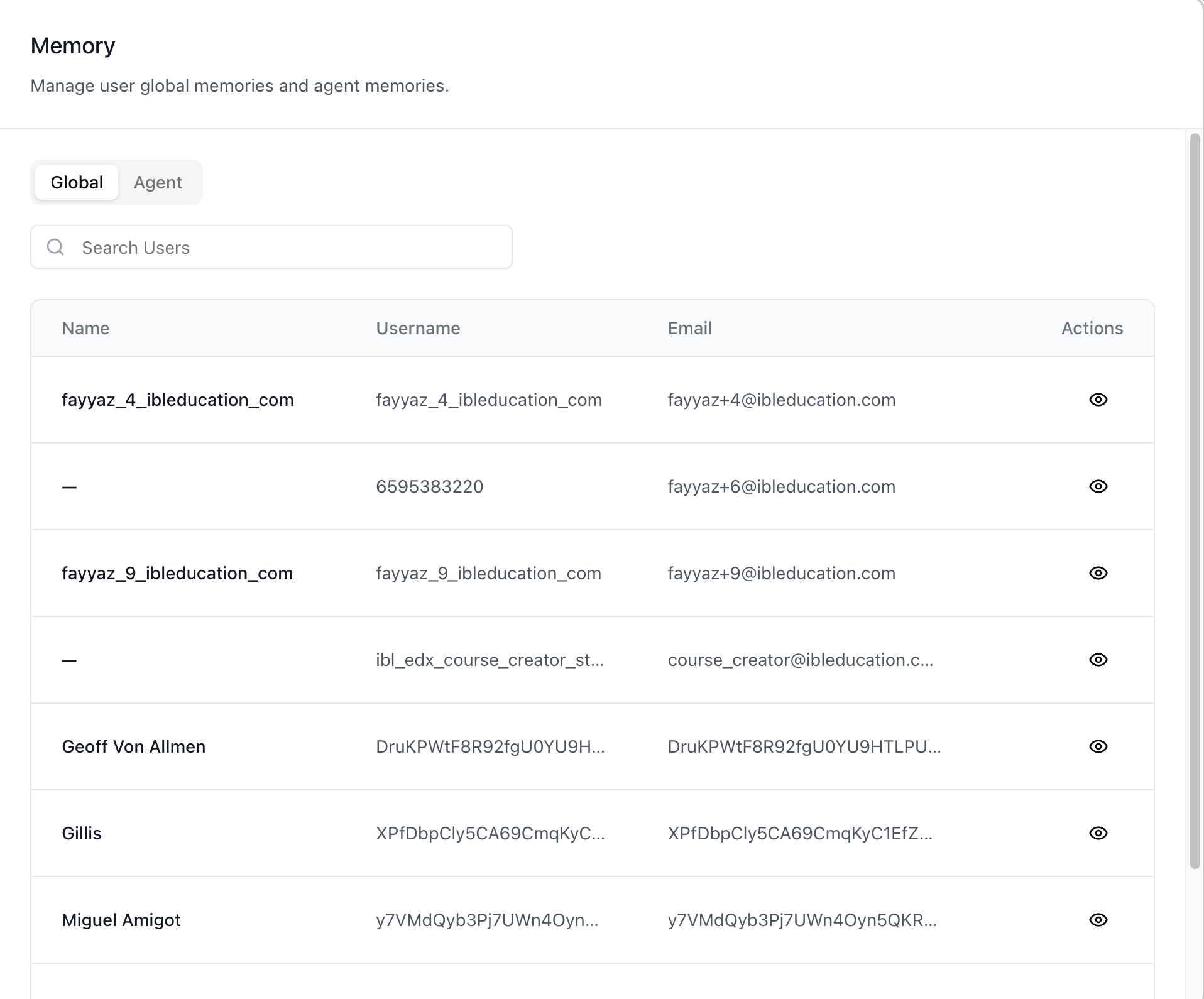
**Global** (a searchable org-users table; opening a row manages
that user's global memories, including their capture/personalization
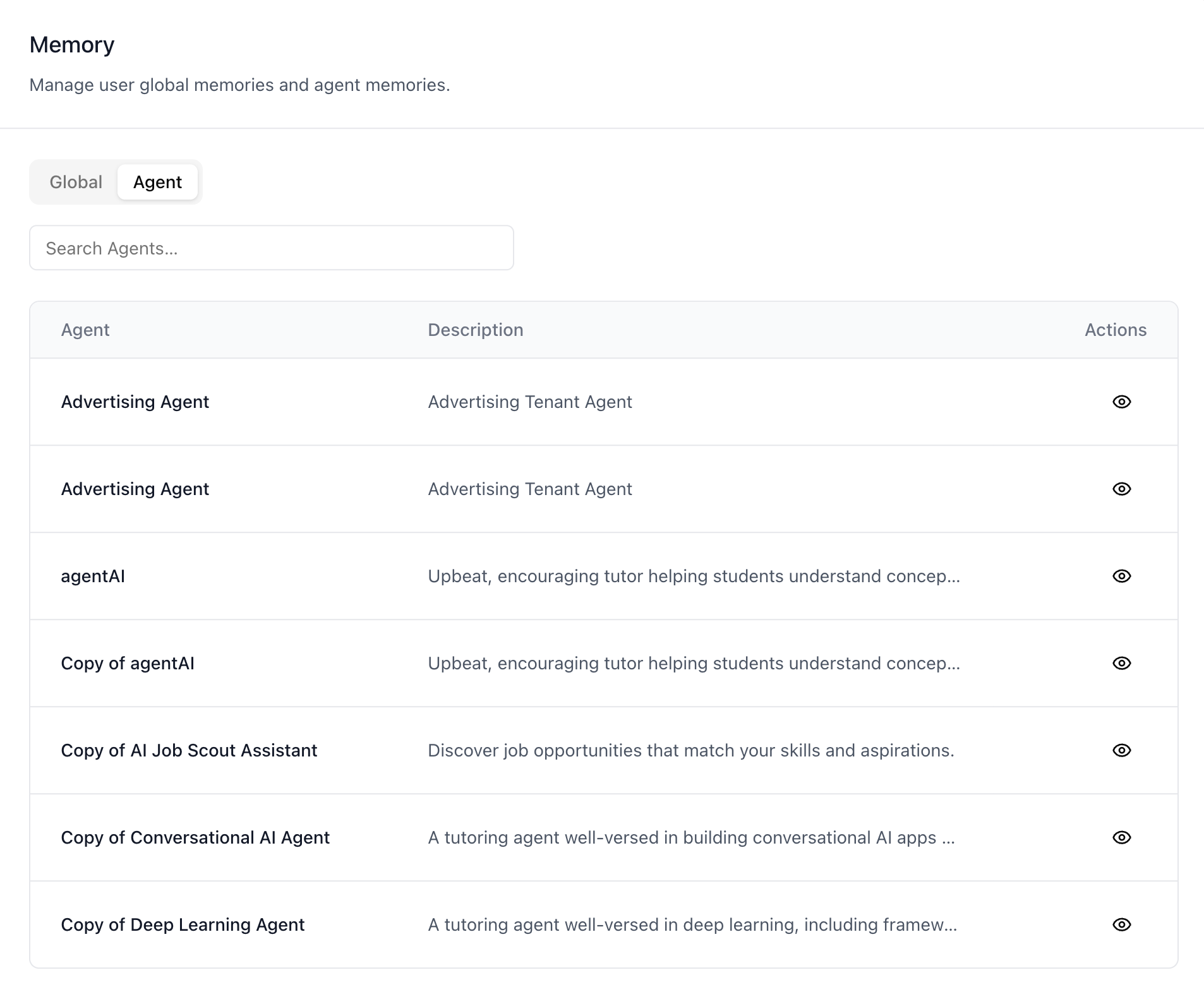
toggles) and **Agent** (a searchable agents table; opening a row
hosts the same full memory manager the agent settings Memory tab
uses — user, category, and date filters with full CRUD). Admins
and RBAC-granted users manage other people's memories directly from
organization settings.
This is the org-wide counterpart of two existing surfaces: the
per-agent Memory tab (`/iblai-vibe-agent-memory`) and the user's own
profile Memory tab. Same data, admin-scoped.
> **Common setup (brand, conventions, env files, verification):** see [docs/skill-setup.md](https://raw.githubusercontent.com/iblai/vibe/refs/heads/main/docs/skill-setup.md).
## Related Memory surfaces
- **`/iblai-vibe-agent-memory`** — the per-agent Memory tab in agent
settings (enable/disable memory + manage that one agent's memories).
The Agent tab here opens the **same manager** for any agent, without
leaving organization settings.
- **Profile Memory tab** — a user managing their *own* global memories
(part of the profile surface). The Global tab here is the admin view
of the same data for *any* user.
- **`/iblai-vibe-account`** — the Account settings page hosts this
surface as its **Memory** tab; that is also how it is mounted (see
Step 2).
## Prerequisites
- Auth must be set up first (`/iblai-vibe-auth`)
- MCP server + skills configured (`@iblai/mcp` in `.mcp.json`)
- **Memsearch must be enabled for the organization** — the tab checks the
platform's memsearch status and shows a "feature disabled" notice
when it is off.
- The user lists and memory endpoints are RBAC-gated admin endpoints —
a caller without access sees a friendly denied panel per section.
## Step 1: Check Environment
Before proceeding, check for an `iblai.env` in the project root. Look for
`PLATFORM`, `DOMAIN`, and `TOKEN` variables. If the file does not exist or
is missing these variables, tell the user:
"You need an `iblai.env` with your platform configuration. Download the
template and fill in your values:
`curl -o iblai.env https://raw.githubusercontent.com/iblai/vibe/refs/heads/main/iblai.env`"
## Step 2: Mount it (via the Account page's Memory tab)
The org-wide Memory surface (`MemoryAdminTab`) is **not exported as a
standalone component** — unlike `BillingTab`, it currently ships only
as the **Memory** tab inside `<Account>`. Mount the Account page and
deep-link to the tab:
```tsx
// app/(app)/settings/memory/page.tsx
"use client";
import { Account } from "@iblai/iblai-js/web-containers/next";
export default function TenantMemoryPage() {
return (
<div className="flex h-full flex-col bg-white">
<Account {...accountProps} targetTab="memory" /* accountProps = your usual Account wiring */ />
</div>
);
}
```
See `/iblai-vibe-account` Step 2 for the full `<Account>` prop wiring
(`tenant`, `username`, RBAC, etc.) — this skill only adds the
`targetTab="memory"` entry point. If you need the surface standalone
(without the Account shell), build it from the data-layer hooks listed
below; the SDK source paths in the next section are the reference
implementation.
## Step 3: Use MCP Tools for Customization
```
get_component_info("Account")
get_hook_info("useGetGlobalMemoriesQuery")
```
## Component map (web-containers source)
Everything lives under
`packages/web-containers/src/components/` in the SDK. These pieces are
internal to the tab (not exported individually) — listed with paths as
the reference for custom builds:
| Component | Path | Role |
|---|---|---|
| `MemoryAdminTab` | `profile/memory-admin/index.tsx` | The surface: memsearch gate + **Global** / **Agent** sub-tabs |
| `GlobalMemoriesSection` | `profile/memory-admin/global-memories-section.tsx` | Org users table (server-side search, 10/page) with an eye action per row |
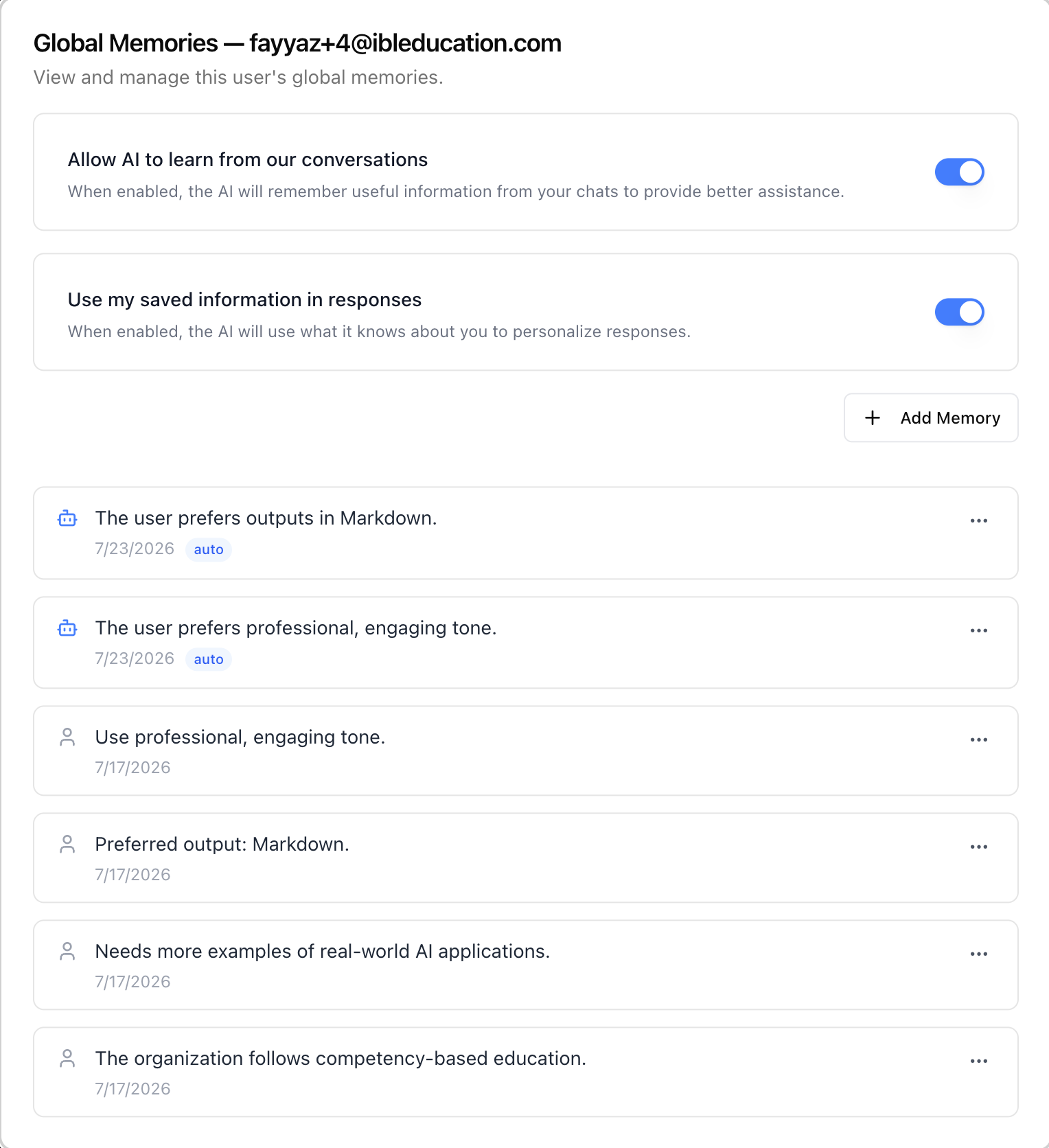
| `UserMemoriesModal` | `profile/memory-admin/user-memories-modal.tsx` | "Global Memories — {email}" popup: the user's two memory toggles, Add Memory, and the memories list (25/page) |
| `AgentMemoriesSection` | `profile/memory-admin/agent-memories-section.tsx` | Agents table (10/page) with an agent autocomplete filter (same `SearchSelect` as the Billing tab's Agent Limits) |
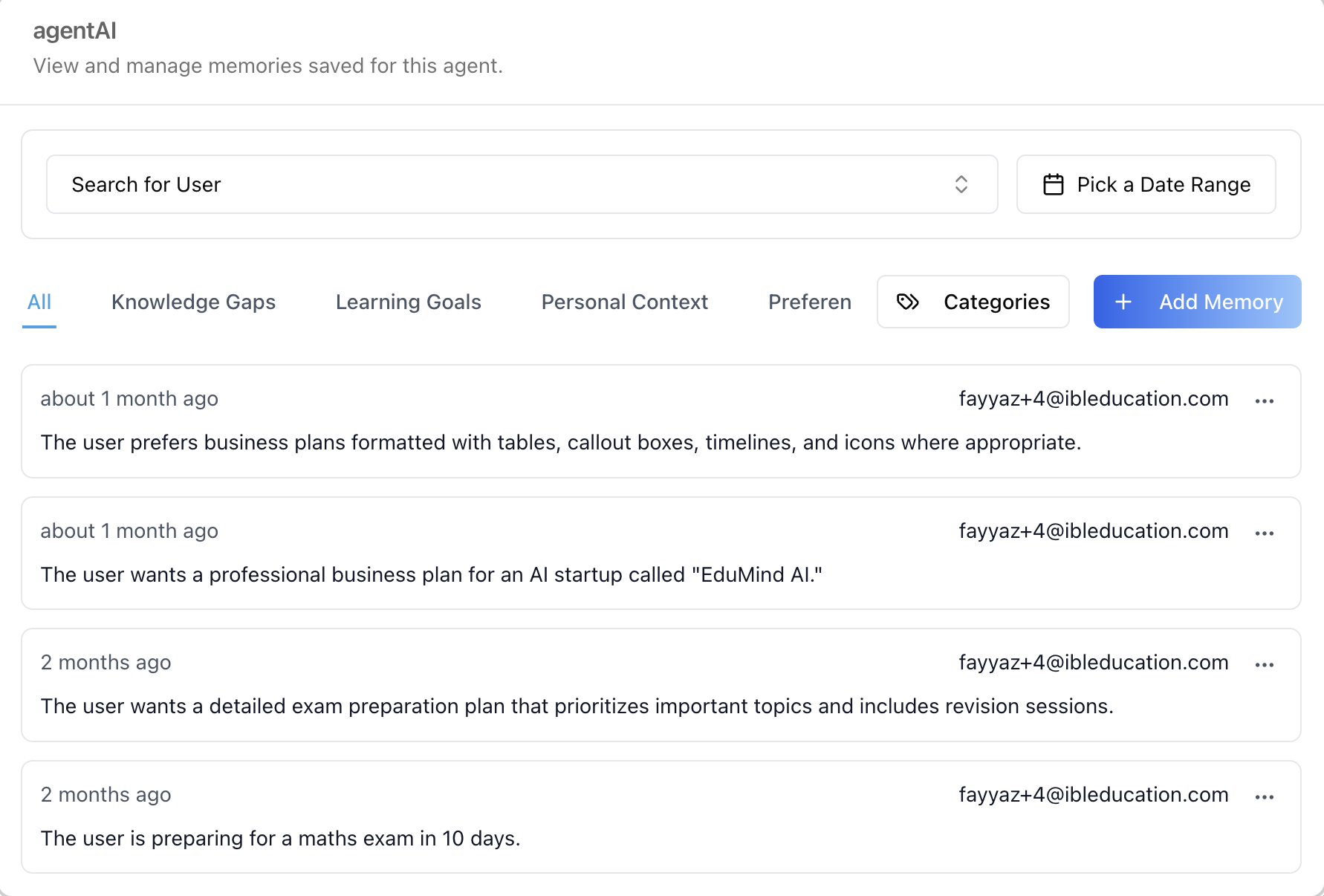
| `AgentMemoriesModal` | `profile/memory-admin/agent-memories-modal.tsx` | Popup titled with the agent's name, hosting `ManageMemories` |
| `ManageMemories` | `modals/edit-mentor-modal/tabs/memory-tab/manage-memories.tsx` | The full per-agent memory manager (also used by the agent settings Memory tab): user search, date range, category tabs, **Categories** manager, **Add Memory**, per-memory kebab |
| `MemoriesList` | `profile/memory/memories-list.tsx` | The global-memories list (also used by the profile Memory tab): per-memory rows with date, `auto` badge for AI-captured memories, edit/delete kebab |
| `AddMemoryDialog` / `EditMemoryDialog` | `profile/memory/add-memory-dialog.tsx` / `profile/memory/edit-memory-dialog.tsx` | Create / edit dialogs for a global memory |
| `SearchSelect` | `spend-caps/search-select.tsx` | Shared debounced autocomplete used by the Agent tab's filter |
## What each tab renders
### Global tab
- **Search Users** — debounced server-side search (terms under three
characters search as empty), 10 users per page.
- **Table** — Name / Username / Email with an **eye** action per row.
Users without a username are dropped (the memory endpoints can't
address them).
- **Global Memories popup** (eye) — for the picked user:
- **"Allow AI to learn from our conversations"** — the user's
memory-capture toggle.
- **"Use my saved information in responses"** — the user's
personalization toggle.
- **Add Memory**, plus the memories list — each row shows the text,
date, an `auto` badge (robot icon) when the memory was captured
automatically from chats vs. added manually, and an edit/delete
kebab. 25 memories per page.
### Agent tab
- **Agent filter** — debounced autocomplete (min 2 characters) over
the organization's agents; picking one narrows the table to it.
- **Table** — Agent / Description with an **eye** action per row,
10 per page.
- **Agent memories popup** (eye) — the same manager the agent
settings Memory tab renders, for that agent: "Search for User"
filter, **Pick a Date Range**, category tabs (All / Knowledge Gaps /
Learning Goals / Personal Context / Preferences / …), a
**Categories** manager (create/rename/delete categories), **Add
Memory**, and per-memory cards showing the time-ago, owning user's
email, and an actions kebab.
## Related Exports
From `@iblai/iblai-js/web-containers/next`:
- `Account` — the settings page hosting this surface as its Memory
tab (`targetTab="memory"`).
From `@iblai/iblai-js/data-layer` — the RTK Query hooks the surface
uses, for custom UI on the same endpoints:
- Gate: `useGetMemsearchStatusQuery` (organization memsearch on/off);
admins can flip it via `useGetMemsearchConfigQuery` /
`useUpdateMemsearchConfigMutation`
- Tables: `usePlatformUsersQuery` (organization users),
`useGetMentorsQuery` (agents)
- Global memories: `useGetGlobalMemoriesQuery`,
`useCreateGlobalMemoryMutation`, `useUpdateGlobalMemoryMutation`,
`useDeleteGlobalMemoryMutation`
- User toggles: `useGetUserMemorySettingsQuery`,
`useUpdateUserMemorySettingsMutation`
- Agent memories: `useGetAllMentorMemoriesQuery`,
`useGetMentorMemoriesListQuery`, `useCreateMentorMemoryMutation`,
`useUpdateMentorMemoryMutation`, `useDeleteMentorMemoryMutation`
- Categories: `useGetMemoryCategoriesAdminQuery`,
`useCreateMemoryCategoryMutation`,
`useUpdateMemoryCategoryMutation`, `useDeleteMemoryCategoryMutation`
## Step 4: Verify
Run `/iblai-vibe-ops-test` before telling the user the work is ready:
1. `pnpm build` -- must pass with zero errors
2. `pnpm test` -- vitest must pass
3. Start dev server and touch test:
```bash
pnpm dev &
npx playwright screenshot http://localhost:3000/settings/memory /tmp/tenant-memory.png
```
## Important Notes
- **Redux store**: Must include `mentorReducer` and `mentorMiddleware`
- **`initializeDataLayer()`**: 5 args (v1.2+)
- **`@reduxjs/toolkit`**: Deduplicated via webpack aliases in `next.config.ts`
- **Peer deps**: `sonner` and `@iblai/iblai-web-mentor` must be installed
(`pnpm add sonner @iblai/iblai-web-mentor`)
- **Not standalone (yet)**: `MemoryAdminTab` is internal to the SDK —
it is not in the package exports the way `BillingTab` is. Reach it
through `<Account targetTab="memory">`; for a bare-bones custom
page, rebuild from the data-layer hooks using the component map
above as the reference.
- **Memsearch gate**: with memsearch disabled for the organization, the tab
renders a "feature disabled" notice — same gate the profile Memory
tab applies. There is nothing to manage until it is on.
- **Admin call shape**: reads are made with the **admin as the caller**
path segment and the managed user passed as `user_id` (the endpoint
accepts the email, which this UI leads with; username is the
fallback). Writes address the managed user's own path — the backend
resolves admin/RBAC callers. Mirror this split in custom UI.
- **Per-section RBAC**: the users list, the agents list, and the
memory endpoints 403 independently; each section renders its own
denied panel.
- **`auto` badge**: global memories carry a flag distinguishing
AI-captured memories (robot icon + `auto` badge) from manually
added ones — both are editable and deletable by the admin.
- **Brand guidelines**: [BRAND.md](https://raw.githubusercontent.com/iblai/vibe/refs/heads/main/BRAND.md)



