Installs into .claude/skills of the current project.
Are you the author of Iblai Vibe Course Access?
Add the live security badge to your README. It updates with every re-scan.
[](https://www.skillsdirectory.com/skills/iblai-iblai-vibe-course-access)
---
name: iblai-vibe-course-access
description: Add course-content pages (the edX course-viewing UI) to your Next.js app
globs:
alwaysApply: false
metadata:
kind: ui
---
# /iblai-vibe-course-access
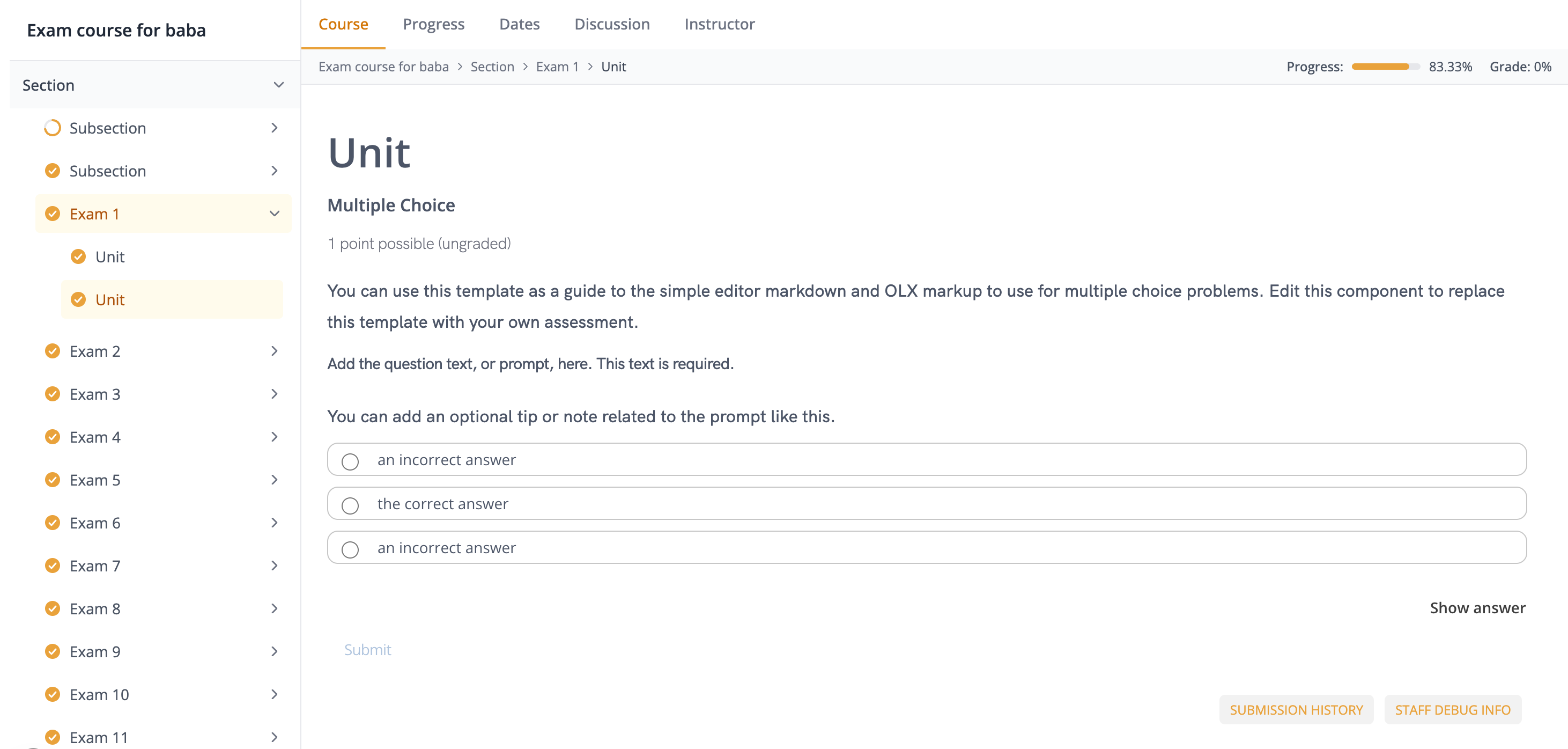
Add a full edX course-content experience -- hierarchical course outline
sidebar, collapsible modules/lessons/sublessons with progress indicators,
top tab strip (Course, Progress, Dates, Discussion, Instructor), breadcrumb
+ progress bar header, embedded learning MFE / LMS iframe with JWT
postMessage handshake, previous / next unit navigation, timed-exam guard,
and organization-based access control. Pulls course metadata, outline,
completion, and grading data via the data-layer RTK Query hooks.
> **Common setup (brand, conventions, env files, verification):** see [docs/skill-setup.md](https://raw.githubusercontent.com/iblai/vibe/refs/heads/main/docs/skill-setup.md).
## Prerequisites
- Auth must be set up first (`/iblai-vibe-auth`)
- MCP server + skills configured (`@iblai/mcp` in `.mcp.json`)
- A valid edX course id (e.g. `course-v1:org+course+run`). The user must
already have a course published in their organization. If not, direct them to
their LMS Studio to create one.
## Step 1: Check Environment
Before proceeding, check for a `iblai.env`
in the project root. Look for `PLATFORM`, `DOMAIN`, and `TOKEN` variables.
If the file does not exist or is missing these variables, tell the user:
"You need an `iblai.env` with your platform configuration. Copy the
bundled template and fill in your values:
`cp iblai.env.example iblai.env` (vibe-starter ships the example) — or,
when the project has no `iblai.env.example`:
`curl -o iblai.env https://raw.githubusercontent.com/iblai/vibe/refs/heads/main/iblai.env`"
No extra env vars are needed for the URLs: `lib/iblai/config.ts` derives the
edX LMS host (`config.legacyLmsUrl()` → `https://learn.iblai.app`), the
learner MFE (`config.mfeUrl()` → `https://apps.learn.iblai.app`), and the DM
base (`config.dmUrl()`) from the hosted defaults. Self-hosted deployments
override them in `.env.local`:
```bash
# Only for self-hosted deployments — hosted iblai.app needs none of these.
NEXT_PUBLIC_LEGACY_LMS_URL=https://learn.example.edu
NEXT_PUBLIC_MFE_URL=https://apps.learn.example.edu
```
## Architecture
Course-content ships as SDK components with no CLI generator -- you wire
the pages yourself, similar to `/iblai-vibe-workflow` and `/iblai-vibe-analytics`.
Four files cover a production-quality course player:
```
app/(app)/course-content/
└── [course_id]/
├── layout.tsx # Wraps pages in CourseContentLayout
├── course/page.tsx # Course body (default tab)
├── progress/page.tsx # Progress tab
├── dates/page.tsx # Dates tab
├── discussion/page.tsx # Forum (route segment differs from tab)
└── instructor/page.tsx # Instructor tab (admin only)
```
The layout mounts `CourseContentLayout`, which owns the outline sidebar,
breadcrumb header, tab strip, and the two contexts (`CourseOutlineContext`,
`EdxIframeContext`). Each per-tab `page.tsx` renders a `CourseContentTabPage`
that shares those contexts via the surrounding layout.
## Step 2: SDK Imports
Import course-content components directly. The framework-agnostic pieces
(outline, drawer, timed-exam, guard, loading, hooks, contexts, types) come
from `@iblai/iblai-js/web-containers`. The three Next-specific pieces
(`CourseContentLayout`, `CourseContentTabPage`, `EdxIframe`) come from
`@iblai/iblai-js/web-containers/next` because they import `next/navigation`
and `next/link`.
```typescript
// Framework-agnostic
import {
CourseOutline,
CourseOutlineDrawer,
CourseAccessGuard,
CourseContentLoading,
TimedExam,
CourseOutlineContext,
EdxIframeContext,
useCourseDetail,
useEdxIframe,
useCourseNavigator,
} from "@iblai/iblai-js/web-containers";
// Next-specific (layout + iframe + tab page)
import {
CourseContentLayout,
CourseContentTabPage,
EdxIframe,
} from "@iblai/iblai-js/web-containers/next";
// Data hooks (RTK Query)
import {
useGetDepartmentMemberCheckQuery,
useLazyGetExamInfoQuery,
useCreateCourseEnrollmentMutation,
useCreateStripeCheckoutSessionMutation,
useLazyGetCourseCompletionQuery,
useLazyGetCourseProgressQuery,
} from "@iblai/iblai-js/data-layer";
```
## Step 3: Create the Layout
`app/(app)/course-content/[course_id]/layout.tsx` — mounts
`CourseContentLayout`, which renders the outline sidebar, tab strip, and
breadcrumb, and provides both course-content contexts to children.
```tsx
"use client";
import type React from "react";
import { useCallback } from "react";
import { useParams, useRouter } from "next/navigation";
import { CourseContentLayout } from "@iblai/iblai-js/web-containers/next";
import { useGetDepartmentMemberCheckQuery } from "@iblai/iblai-js/data-layer";
import { toast } from "sonner";
import config from "@/lib/iblai/config";
import { resolveAppTenant } from "@/lib/iblai/tenant";
export default function CourseContentLayoutWrapper({
children,
}: { children: React.ReactNode }) {
const params = useParams<{ course_id: string }>();
const router = useRouter();
const courseId = decodeURIComponent(params.course_id);
const tenant = resolveAppTenant();
const { data: adminCheck } = useGetDepartmentMemberCheckQuery({
platform_key: tenant,
});
const isPlatformAdmin = Boolean(adminCheck?.is_admin);
const handleNavigate = useCallback(
(href: string, opts?: { external?: boolean }) => {
if (opts?.external) {
window.location.href = href;
} else {
router.push(href);
}
},
[router],
);
return (
<CourseContentLayout
courseId={courseId}
currentTenant={tenant}
isPlatformAdmin={isPlatformAdmin}
dmUrl={config.dmUrl()}
courseEligibilityEnabled
onUnauthorized={() => router.push("/error/403")}
onNotFound={() => router.push("/error/404")}
onNavigate={handleNavigate}
onError={(msg) => toast.error(msg)}
onSuccess={(msg) => toast.success(msg)}
onCourseMentorChange={(uuid) => {
// Optional: wire the course's attached mentor into your chat widget
}}
>
{children}
</CourseContentLayout>
);
}
```
### Key patterns
- **`isPlatformAdmin`** gates the `Instructor` tab. Derive it from
`useGetDepartmentMemberCheckQuery({ platform_key: tenant })` — the layout
does NOT read it itself.
- **`onUnauthorized` / `onNotFound`**: the layout never calls `router.push`
directly. Wire these to your error routes. Wrap them in `useCallback`
(or hoist to module scope) so `CourseAccessGuard` doesn't refire them.
- **`onNavigate`**: the layout calls this for lesson open, access course,
and Stripe checkout redirects. `opts.external === true` means full-page
navigation; otherwise use `router.push`.
- **`dmUrl`**: required for the Stripe `success_url` returned by
`useCourseDetail`. Use `config.dmUrl()` (add
`import config from "@/lib/iblai/config";` to the layout's imports).
- **`courseEligibilityEnabled`**: pass `true` to opt into the richer
enrollment / eligibility branch (Enroll Now / Buy Now / Request Access
labels). Pass `false` / omit for the simple "Access Course" branch.
## Step 4: Create the Per-Tab Pages
Each tab is its own Next.js route. They all render `CourseContentTabPage`,
which mounts `EdxIframe` and signals the active tab to
`EdxIframeContext` (wired by the layout).
Note the route segment / tab-value mismatch: the `forum` tab is served at
`/discussion`. The default `tabHrefTemplate` in the layout maps
`forum → discussion`. If you use a different base path, override
`tabHrefTemplate`.
### `app/(app)/course-content/[course_id]/course/page.tsx`
```tsx
"use client";
import { CourseContentTabPage } from "@iblai/iblai-js/web-containers/next";
import config from "@/lib/iblai/config";
// The iframe params want the edX host (learn.*), NOT the consolidated API
// base — `config.lmsUrl()` is `https://api.iblai.app/lms` on hosted defaults
// and edX page routes (xblock, bookmarks, instructor) do not live there.
const iframeProps = {
lmsUrl: config.legacyLmsUrl(),
mfeUrl: config.mfeUrl(),
legacyLmsUrl: config.legacyLmsUrl(),
};
export default function CoursePage() {
return <CourseContentTabPage tab="course" {...iframeProps} />;
}
```
### Remaining tabs
| Route | `tab` value |
|-------|-------------|
| `/course-content/[course_id]/course` | `"course"` |
| `/course-content/[course_id]/progress` | `"progress"` |
| `/course-content/[course_id]/dates` | `"dates"` |
| `/course-content/[course_id]/discussion` | `"forum"` |
| `/course-content/[course_id]/instructor` | `"instructor"` |
Each page is identical except for the `tab` prop. The instructor page does
NOT self-gate non-admin viewers — the layout hides the tab button when
`isPlatformAdmin` is false, but a direct URL visit will still render.
If you need a hard gate, wrap the page in your own admin guard.
## Step 5: Use MCP Tools for Customization
```
get_component_info("CourseContentLayout")
get_component_info("CourseContentTabPage")
get_component_info("EdxIframe")
get_component_info("CourseOutline")
get_hook_info("useCourseDetail")
get_hook_info("useEdxIframe")
get_hook_info("useCourseNavigator")
```
## Component props, hooks, contexts, custom routing
`<CourseContentLayout>`, `<CourseContentTabPage>`, `<EdxIframe>`, `<CourseOutline>`, `<CourseOutlineDrawer>`, `<CourseAccessGuard>`, `<TimedExam>`, `<CourseContentLoading>`, the `useCourseDetail` / `useEdxIframe` / `useCourseNavigator` hooks, the two contexts, and custom routing are documented in [`references/props.md`](references/props.md) (or ask MCP: `get_component_info("CourseContentLayout")`).
## Step 6: Redux Store
`@iblai/iblai-js/data-layer` ships `coreApiSlice`, `mentorReducer`, and
`mentorMiddleware` — you already have them if you ran `/iblai-vibe-auth`.
No additional slices are required for course-content. The hooks used
internally (`useGetExamInfoQuery`, `useGetCourseCompletionQuery`,
`useGetCourseProgressQuery`, `useCreateCourseEnrollmentMutation`,
`useCreateStripeCheckoutSessionMutation`) all live on `coreApiSlice`.
Verify your `store/iblai-store.ts` includes:
```typescript
import {
coreApiSlice,
mentorReducer,
mentorMiddleware,
} from "@iblai/iblai-js/data-layer";
export const store = configureStore({
reducer: {
[coreApiSlice.reducerPath]: coreApiSlice.reducer,
mentor: mentorReducer,
},
middleware: (getDefaultMiddleware) =>
getDefaultMiddleware()
.concat(coreApiSlice.middleware)
.concat(mentorMiddleware),
});
```
Without `mentorReducer` / `mentorMiddleware`, the course-content hooks
silently return `undefined`.
## Step 7: Verify
Run `/iblai-vibe-ops-test` before telling the user the work is ready:
1. `pnpm build` — must pass with zero errors
2. `pnpm test` — vitest must pass
3. Start dev server and touch test:
```bash
pnpm dev &
npx playwright screenshot "http://localhost:3000/course-content/<course-id>/course" /tmp/course.png
```
Replace `<course-id>` with a URL-encoded course id the user has access
to (e.g. `course-v1%3Aibl%2BDEMO%2B2024`).
## Common Pitfalls
1. **`forum` tab at `/discussion`**: The route segment is `discussion`,
the tab value is `"forum"`. The default `tabHrefTemplate` handles this
mapping. If you override `tabHrefTemplate`, preserve the mapping.
2. **Instructor page not gated by default**: `CourseContentLayout` hides
the instructor **tab button** when `isPlatformAdmin` is false, but the
route itself is not self-guarded. A non-admin visiting the URL directly
will still render the iframe. Wrap the page in your own guard if you
need a hard gate.
3. **`onUnauthorized` / `onNotFound` re-fires**: Stabilize these with
`useCallback` — otherwise `CourseAccessGuard`'s effect will re-run on
every render and push twice.
4. **`dmUrl` missing**: Required for Stripe checkout's `success_url`.
Without it, the paid-enrollment branch of `useCourseDetail` throws.
`config.dmUrl()` always resolves (hosted default in code), so only a
hand-rolled empty string can hit this.
5. **`platform_key: "main"` exception**: `CourseAccessGuard` always allows
courses whose `platform_key === "main"`. This is intentional — global
catalog courses bypass the organization check.
6. **iframe JWT postMessage**: `EdxIframe` listens for `auth.jwt.ready` from
the MFE and replies with the JWT stored at `edxTokenKey`
(`"edx_jwt_token"` by default). If you use a custom localStorage key,
pass it via `edxTokenKey` on every `CourseContentTabPage`.
7. **`mentor_hidden` suppresses `onCourseMentorChange`**: If a course has
`mentor_hidden: true`, the callback is never fired — do not wire
fallback agents from the caller side.
8. **`useCourseDetail` is internal**: Don't call it from pages — the
layout already calls it and exposes state via `CourseOutlineContext`.
Calling it again creates duplicate fetches and stale state.
## Important Notes
- **Import paths**: framework-agnostic from `@iblai/iblai-js/web-containers`,
Next-specific (`CourseContentLayout`, `CourseContentTabPage`, `EdxIframe`)
from `@iblai/iblai-js/web-containers/next`.
- **Redux store**: must include `mentorReducer` and `mentorMiddleware`
- **`initializeDataLayer()`**: 5 args (v1.2+)
- **`@reduxjs/toolkit`**: deduplicated via webpack aliases in `next.config.ts`
- **URLs**: all from `lib/iblai/config.ts` — `config.legacyLmsUrl()` and
`config.mfeUrl()` for the iframes, `config.dmUrl()` for Stripe. Hosted
defaults are in code; self-hosted overrides via `NEXT_PUBLIC_LEGACY_LMS_URL`
/ `NEXT_PUBLIC_MFE_URL` in `.env.local`.
- **Brand guidelines**: [BRAND.md](https://raw.githubusercontent.com/iblai/vibe/refs/heads/main/BRAND.md)



