Add the organization-wide Billing settings surface (Plan & Credits with Stripe upgrade, add-credits, and auto-recharge; the workspace-wide Spend Limit; and the Agent Limits table managing every agent's spend cap in one place) to your Next.js app
15 stars
0 votes
0 copies
1 view
Added September 2, 2026
developmentbashreactnextjsgitapibackend
Works with
cli
api
mcp
Security analysis
C67/100
criticalExfiltrates credentials via HTTP — exact pattern from Snyk ToxicSkills study
mediumInstalls packages at runtime which could introduce malicious dependencies
Installs into .claude/skills of the current project.
Are you the author of Iblai Vibe Billing?
Add the live security badge to your README. It updates with every re-scan.
[](https://www.skillsdirectory.com/skills/iblai-iblai-vibe-billing)
---
name: iblai-vibe-billing
description: Add the organization-wide Billing settings surface (Plan & Credits with Stripe upgrade, add-credits, and auto-recharge; the workspace-wide Spend Limit; and the Agent Limits table managing every agent's spend cap in one place) to your Next.js app
globs:
alwaysApply: false
metadata:
kind: ui
---
# /iblai-vibe-billing
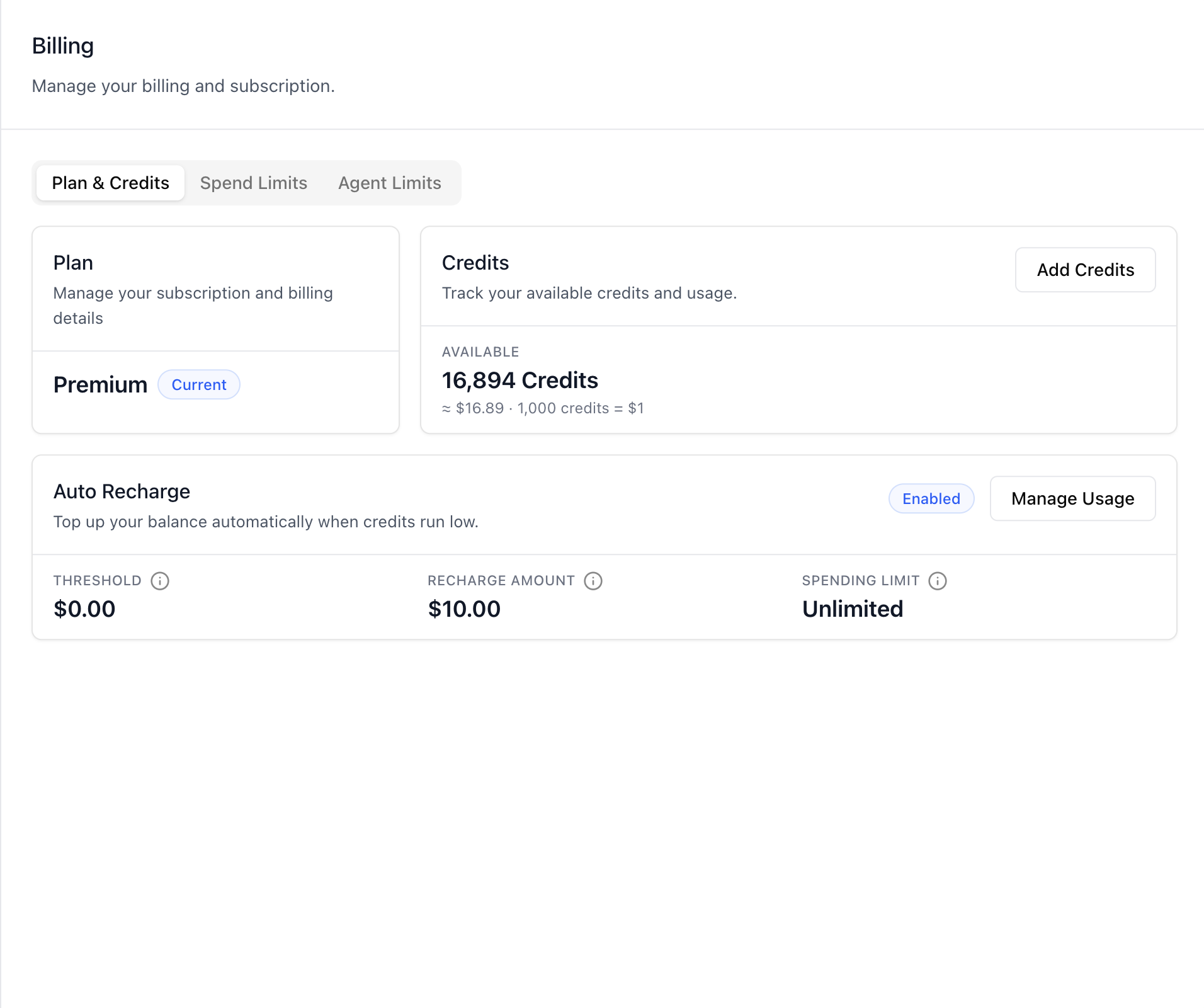
Add the organization-wide **Billing** surface -- "Manage your billing and
subscription" for the whole workspace, in three tabs: **Plan &
Credits** (current plan with Stripe upgrade, credit balance with its
USD equivalent, Add Credits, and Auto Recharge with threshold /
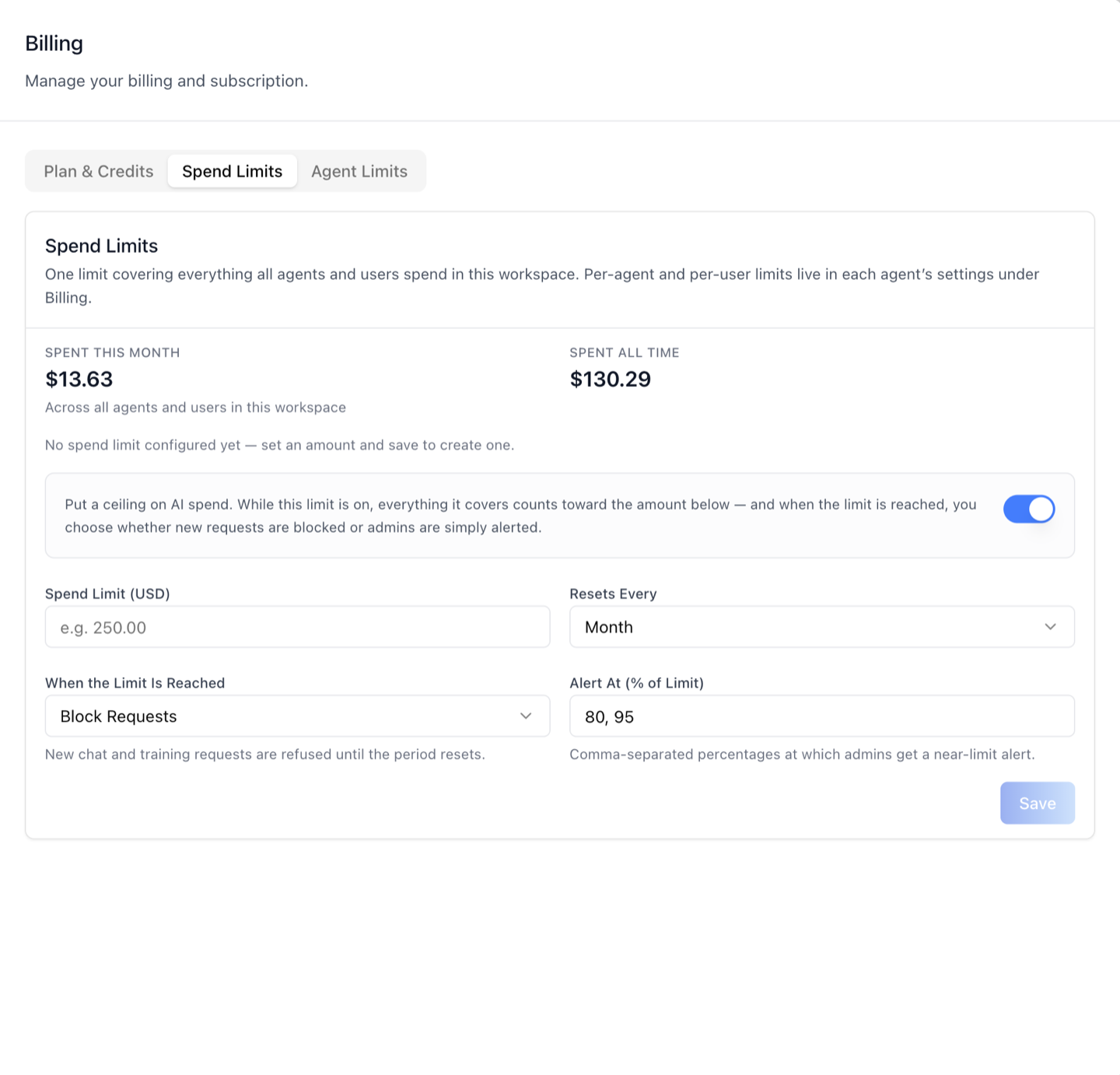
recharge amount / spending limit), **Spend Limits** (the single
workspace-wide LLM spend limit covering everything all agents and
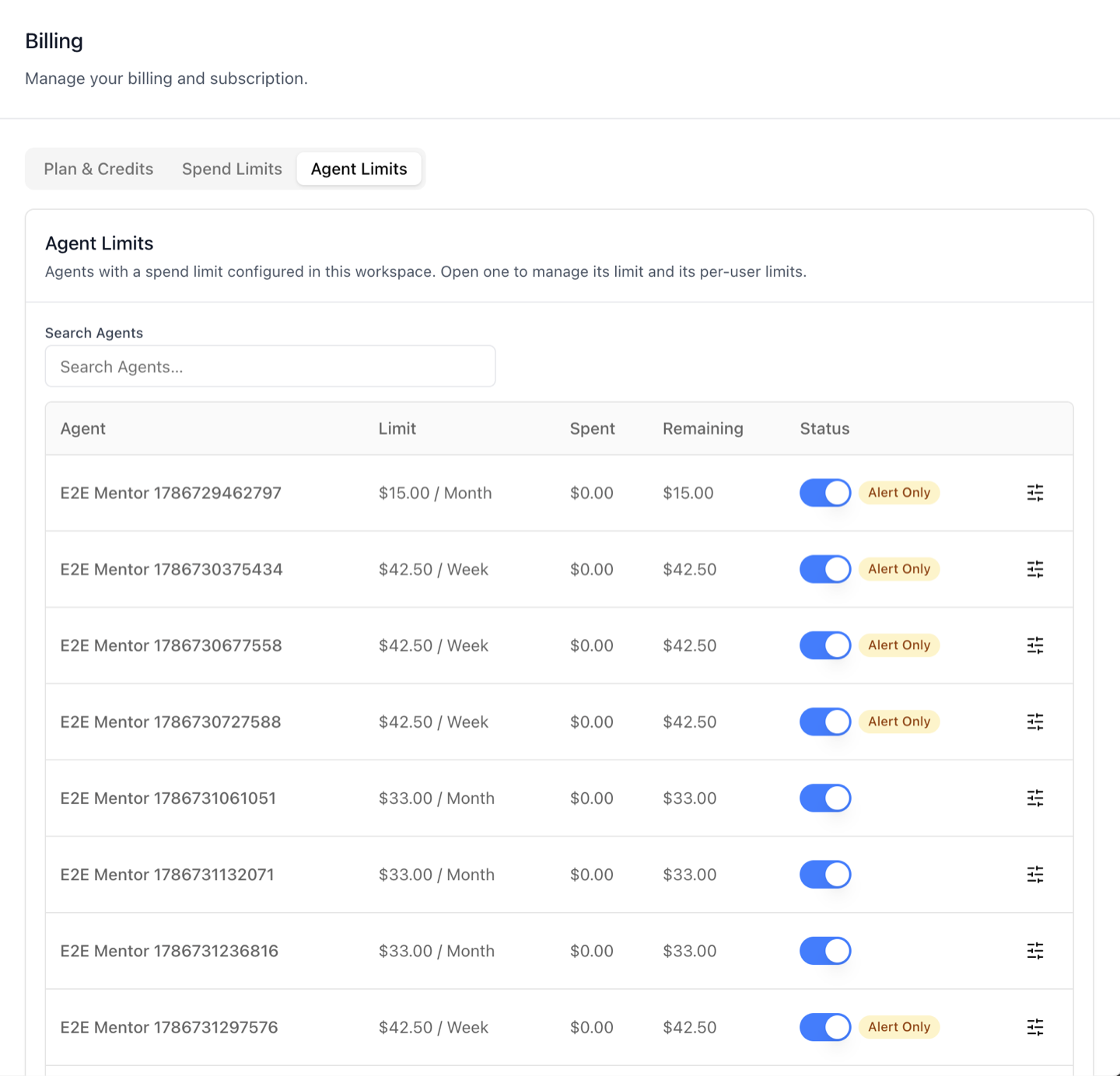
users spend), and **Agent Limits** (every agent spend cap in the
workspace in one searchable table — each row opens the same per-agent
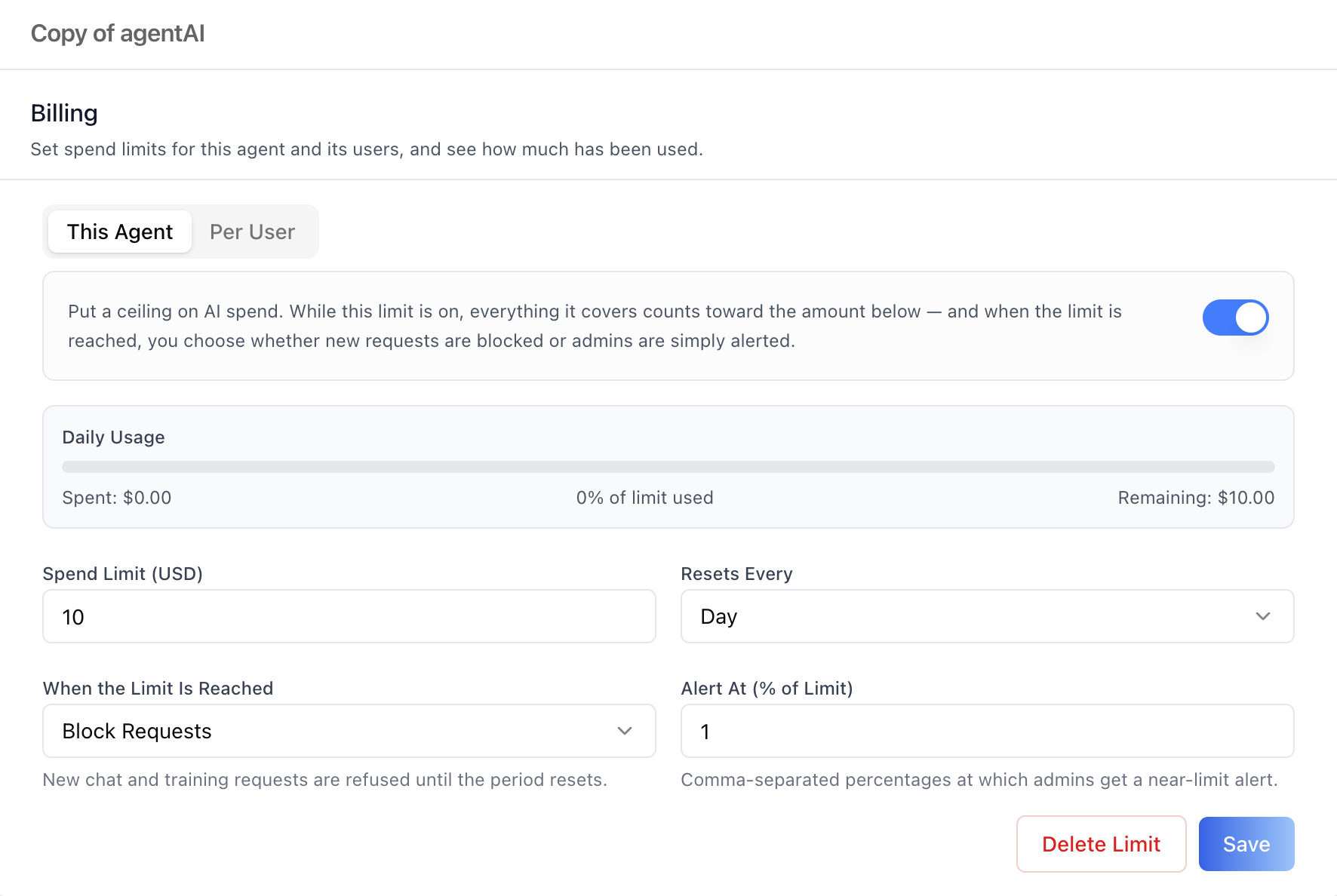
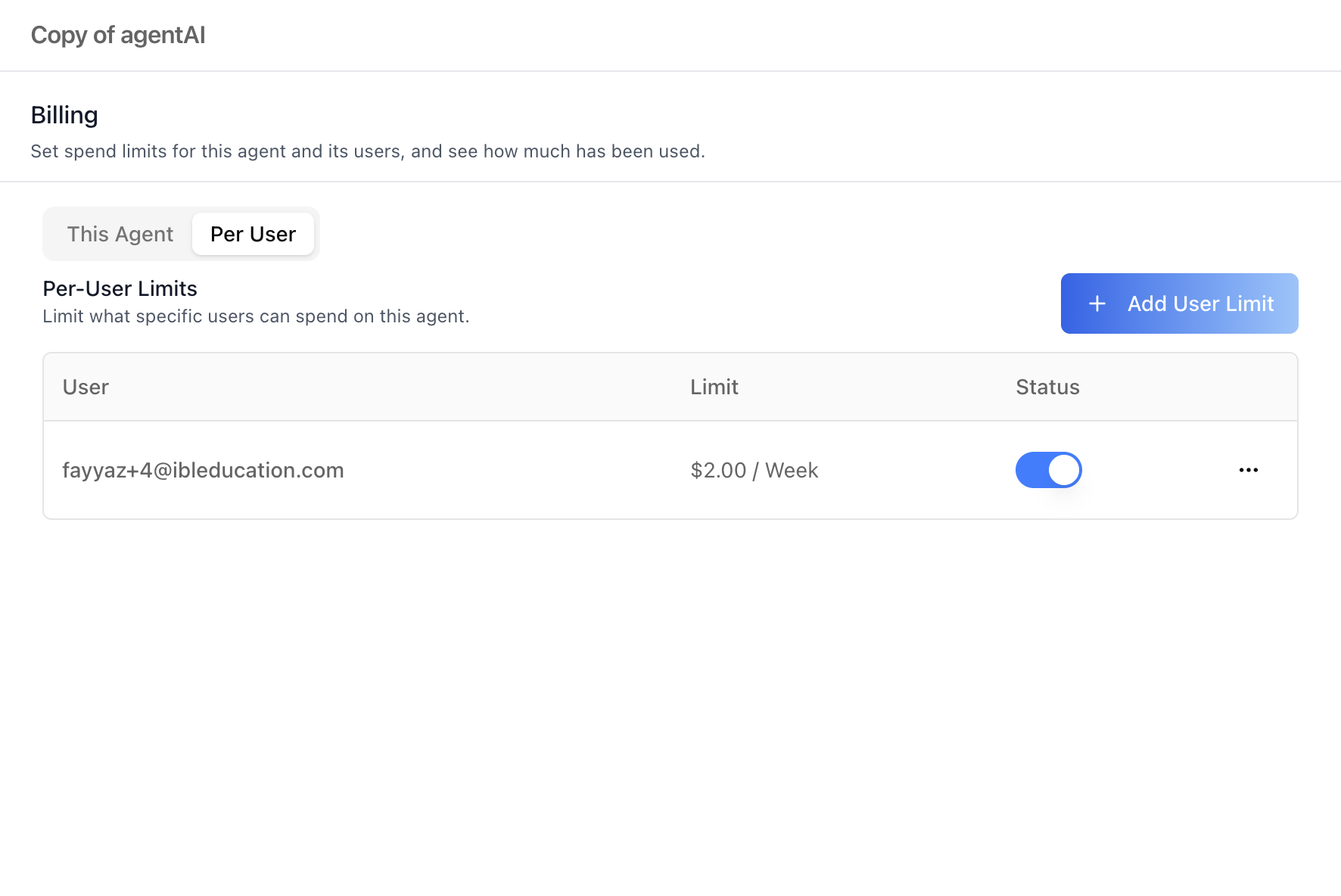
Billing editor documented in `/iblai-vibe-agent-billing`).
This is the org-wide counterpart of the per-agent Billing tab:
per-agent and per-user limits live in each agent's settings
(`/iblai-vibe-agent-billing`); this surface holds the plan/credits
management, the workspace-wide cap, and the cross-agent overview.
> **Common setup (brand, conventions, env files, verification):** see [docs/skill-setup.md](https://raw.githubusercontent.com/iblai/vibe/refs/heads/main/docs/skill-setup.md).
## Already have Billing?
Two sibling surfaces overlap with this one — check before mounting:
- **`/iblai-vibe-account`** — the `<Account>` settings page already
hosts this exact component as its **Billing** tab (shown when
`billingURL` or `topUpURL` is set). If your app uses the Account
page, you likely don't need a standalone mount — deep-link with
`targetTab: "billing"` instead.
- **`/iblai-vibe-credit`** — the compact `<CreditBalance>` navbar
widget (plan badge, credits, add-credits/upgrade dropdown). It is a
top-nav companion to this page, not a replacement.
## Prerequisites
- Auth must be set up first (`/iblai-vibe-auth`)
- MCP server + skills configured (`@iblai/mcp` in `.mcp.json`)
- Plan upgrades, Add Credits, and Auto Recharge run through **Stripe**
on the ibl.ai backend — nothing to configure client-side, but the
flows redirect to Stripe-hosted pages and return to your app.
- The Spend Limits / Agent Limits tabs hit RBAC-gated admin endpoints
— a user without access sees a friendly denied panel per section.
## Step 1: Check Environment
Before proceeding, check for an `iblai.env` in the project root. Look for
`PLATFORM`, `DOMAIN`, and `TOKEN` variables. If the file does not exist or
is missing these variables, tell the user:
"You need an `iblai.env` with your platform configuration. Download the
template and fill in your values:
`curl -o iblai.env https://raw.githubusercontent.com/iblai/vibe/refs/heads/main/iblai.env`"
## Step 2: Mount `BillingTab`
`BillingTab` imports from `@iblai/iblai-js/web-containers` (the base
bundle, not `/next`). It takes the org key plus the acting user's
identity — the agent search and the Stripe flows need them.
```tsx
// app/(app)/settings/billing/page.tsx
"use client";
import { useEffect, useState } from "react";
import { BillingTab } from "@iblai/iblai-js/web-containers";
export default function BillingPage() {
const [tenant, setTenant] = useState("");
const [username, setUsername] = useState("");
const [email, setEmail] = useState("");
useEffect(() => {
try {
const raw = localStorage.getItem("userData");
if (raw) {
const parsed = JSON.parse(raw);
setUsername(parsed.user_nicename ?? parsed.username ?? "");
setEmail(parsed.user_email ?? "");
}
setTenant(
localStorage.getItem("app_tenant") ??
localStorage.getItem("tenant") ??
"",
);
} catch {}
}, []);
if (!tenant || !username) return null;
return (
<div className="flex h-full flex-col bg-white p-6">
<BillingTab
tenant={tenant}
username={username}
currentUserEmail={email}
mainPlatformKey={process.env.NEXT_PUBLIC_MAIN_TENANT_KEY ?? ""}
/>
</div>
);
}
```
## Step 3: Use MCP Tools for Customization
```
get_component_info("BillingTab")
get_component_info("AgentSpendCapsTab")
```
## `<BillingTab>` Props
Import from `@iblai/iblai-js/web-containers`.
| Prop | Type | Required | Description |
|------|------|----------|-------------|
| `tenant` | `string` | Yes | Org key this Billing page manages |
| `username` | `string` | Yes | Acting admin's username (Stripe portal + agent search) |
| `mainPlatformKey` | `string` | Yes | The main org key (`NEXT_PUBLIC_MAIN_TENANT_KEY`) — used to classify Free/Trial/Premium |
| `currentUserEmail` | `string` | Yes | Acting user's email, passed to the Stripe upgrade flow |
| `userActiveApp` | `UserApp \| null` | No | Active subscription record (from `@iblai/iblai-api`) — enables renewal-date / trial-days copy on the Plan card |
| `redirectUrl` | `string` | No | Stripe checkout return URL; defaults to the current page |
## What each tab renders
### Plan & Credits
- **Plan card** — Free / Trial / Premium label with a "Current"
badge; trial end date or renewal date when `userActiveApp` carries a
subscription. Free and Trial plans get a gradient **Upgrade** button
(Stripe checkout via `useStripeUpgrade`).
- **Credits card** — Available credits with the USD equivalent and
the environment's conversion rate (e.g. "≈ $16.89 · 1,000 credits =
$1" — resolved from account fields, falling back to the newest
top-up transaction; never hardcoded), plus Consumed and Resets-on
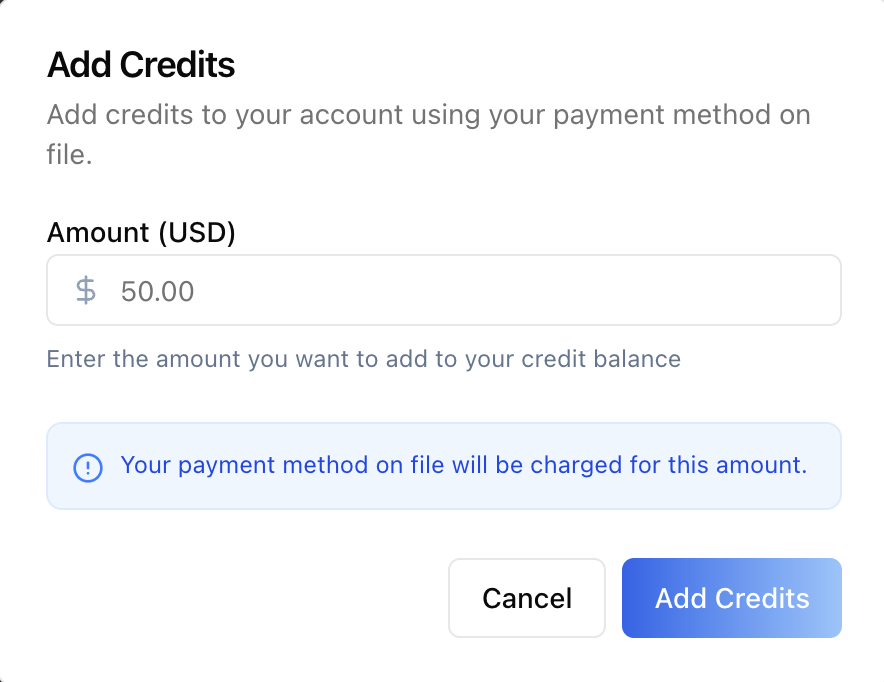
stats when the API provides them. **Add Credits** opens a modal that
charges the payment method on file for a dollar amount; with no
payment method, the button becomes **Manage Billing** and opens the
Stripe customer portal to add one.
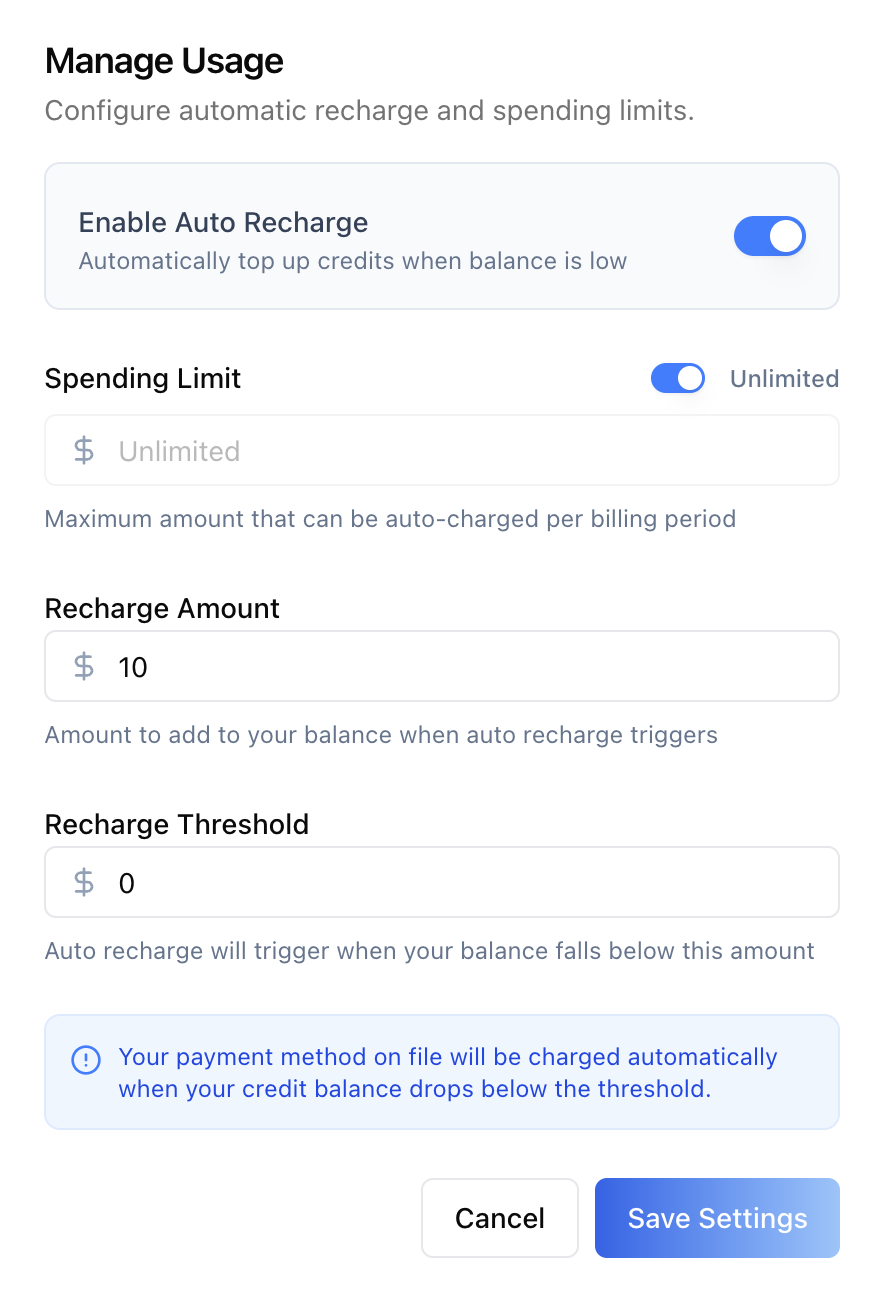
- **Auto Recharge section** (paid plans with a payment method) —
Enabled/Disabled badge, Threshold / Recharge Amount / Spending
Limit stats, and a **Manage Usage** modal: enable toggle, spending
limit (with an Unlimited toggle — the max auto-charged per billing
period), recharge amount, and recharge threshold (top up when the
balance falls below it).
### Spend Limits (workspace-wide)
One limit covering everything all agents and users spend in this
workspace — the org-wide scope of the same spend-cap editor documented
in `/iblai-vibe-agent-billing` (enable toggle, usage bar, Spend Limit,
Resets Every, Block Requests / Alert Only, Alert At thresholds,
Delete Limit / Save). Before a cap exists, the section shows the
workspace's **actual** spend (this month + all time, from the
financial analytics endpoint) so an admin can pick a sensible number.
### Agent Limits
Every configured agent spend cap in the org, from the org-wide
list endpoint (no per-agent fan-out):
- **Search Agents** — debounced autocomplete filter (min 2 chars);
filtering by an agent with no cap yet shows a **Set a limit**
button for it.
- **Table** — Agent, Limit (`$10.00 / Day`), Spent, Remaining, Status
(direct toggle that saves immediately, with Exceeded / Alert-only
badges).
- **Manage** (slider icon) — opens that agent's full Billing editor
(`AgentSpendCapsTab`: **This Agent** + **Per User** sub-tabs) in a
popup titled with the agent's name, exactly as in
`/iblai-vibe-agent-billing`.
## Related Exports
From `@iblai/iblai-js/web-containers`:
- `BillingTab` — this surface. (The Spend Limits / Agent Limits
sections and the credits modals are internal to it.)
From `@iblai/iblai-js/web-containers/next` (see
`/iblai-vibe-agent-billing`):
- `AgentSpendCapsTab` — the per-agent editor the Agent Limits popup
hosts.
From `@iblai/iblai-js/data-layer`:
- Billing/credits: `useGetAccountBillingInfoQuery`,
`useGetCreditTransactionsQuery`, `useUpdateAutoRechargeInfoMutation`,
`useTriggerAutoRechargeMutation`,
`useCreateStripeCustomerPortalMutation`,
`useRenewSubscriptionMutation`
- Workspace cap: `useGetTenantSpendCapQuery`,
`useUpsertTenantSpendCapMutation`, `useDeleteTenantSpendCapMutation`
- Agent-caps list: `useListAgentSpendCapsQuery` (optional `mentor`
filter)
- Actual-spend stats: `useGetFinancialStatsQuery`
From `@iblai/iblai-js/web-utils`:
- `useStripeUpgrade` — the plan-upgrade checkout flow.
- `openExternalUrl` — opens Stripe-hosted pages (portal/checkout).
## Step 4: Verify
Run `/iblai-vibe-ops-test` before telling the user the work is ready:
1. `pnpm build` -- must pass with zero errors
2. `pnpm test` -- vitest must pass
3. Start dev server and touch test:
```bash
pnpm dev &
npx playwright screenshot http://localhost:3000/settings/billing /tmp/billing.png
```
## Important Notes
- **Redux store**: Must include `mentorReducer` and `mentorMiddleware`
- **`initializeDataLayer()`**: 5 args (v1.2+)
- **`@reduxjs/toolkit`**: Deduplicated via webpack aliases in `next.config.ts`
- **Peer deps**: `sonner` and `@iblai/iblai-web-mentor` must be installed
(`pnpm add sonner @iblai/iblai-web-mentor`)
- **Import path**: `BillingTab` comes from
`@iblai/iblai-js/web-containers` (base bundle) — unlike the agent
settings tabs, which come from `/next`.
- **Plan gating**: Free/Trial plans see the Upgrade button and no
Add Credits / Auto Recharge; a paid plan without a payment method
sees Manage Billing (Stripe portal) instead of Add Credits, and the
Auto Recharge section stays hidden until a payment method exists.
- **Conversion rate is per-environment**: the credits↔USD rate is
resolved from the account fields or the latest top-up transaction —
custom UI must not hardcode it.
- **Workspace cap semantics**: same contract as the agent scope —
first-run GET 404s until a cap is saved, the PUT is an upsert,
counters are read-only, and a hard-block cap refuses requests with
the `spend_cap_exceeded` 429. Full spend-caps REST tables live in
`/iblai-vibe-agent-billing`; the org-scoped endpoints are
`spend-caps/tenant/` (GET/PUT/DELETE) and `spend-caps/agents/`
(org-wide list, `?mentor=<uuid>` filter).
- **Per-scope RBAC**: each section 403s independently — Spend Limits
and Agent Limits render their own denied panels without hiding the
Plan & Credits tab.
- **Brand guidelines**: [BRAND.md](https://raw.githubusercontent.com/iblai/vibe/refs/heads/main/BRAND.md)



