Add the agent Support tab (human support ticket inbox with availability toggle, filters, ticket detail, status updates, and replies) to your Next.js app
15 stars
0 votes
0 copies
0 views
Added September 2, 2026
developmentgobashreactnextjsgit
Works with
cli
mcp
Security analysis
C67/100
criticalExfiltrates credentials via HTTP — exact pattern from Snyk ToxicSkills study
mediumInstalls packages at runtime which could introduce malicious dependencies
Installs into .claude/skills of the current project.
Are you the author of Iblai Vibe Agent Support?
Add the live security badge to your README. It updates with every re-scan.
[](https://www.skillsdirectory.com/skills/iblai-iblai-vibe-agent-support)
---
name: iblai-vibe-agent-support
description: Add the agent Support tab (human support ticket inbox with availability toggle, filters, ticket detail, status updates, and replies) to your Next.js app
globs:
alwaysApply: false
metadata:
kind: ui
---
# /iblai-vibe-agent-support
Add the agent **Support tab** -- human support ticket management for the
agent. Support lets people chatting with the agent hand the conversation
over to a human; each request shows up as a ticket that admins can
review, reply to, and resolve. The tab has an availability toggle, user
and status filters, a paginated ticket inbox, and a ticket detail pane
with status control and a reply thread. This is one tab in the wider
agent-settings family. All tabs share the same `AgentSettingsProvider`
wrapper.
> **Common setup (brand, conventions, env files, verification):** see [docs/skill-setup.md](https://raw.githubusercontent.com/iblai/vibe/refs/heads/main/docs/skill-setup.md).
## Prerequisites
- Auth must be set up first (`/iblai-vibe-auth`)
- MCP server + skills configured (`@iblai/mcp` in `.mcp.json`)
- `AgentSettingsProvider` must wrap the route (see `/iblai-vibe-agent-setting`
Step 2 if not already set up). This tab reads its identity from the
provider only — there are no identity prop overrides.
- Ask the user for a real `mentorId` (agent UUID). Do NOT invent one.
## Step 1: Check Environment
Before proceeding, check for an `iblai.env` in the project root. Look for
`PLATFORM`, `DOMAIN`, and `TOKEN` variables. If the file does not exist or
is missing these variables, tell the user:
"You need an `iblai.env` with your platform configuration. Download the
template and fill in your values:
`curl -o iblai.env https://raw.githubusercontent.com/iblai/vibe/refs/heads/main/iblai.env`"
## Step 2: Mount `AgentHumanSupportTab`
```tsx
// app/(app)/agents/[mentorId]/support/page.tsx
"use client";
import { AgentHumanSupportTab } from "@iblai/iblai-js/web-containers/next";
export default function AgentSupportPage() {
return (
<div className="flex h-full flex-col bg-white">
<AgentHumanSupportTab />
</div>
);
}
```
`AgentHumanSupportTab` reads `tenantKey`, `mentorId`, and `username` from
`AgentSettingsProvider`. Pagination renders out of the box via the
built-in `IblPagination` — no host wiring needed.
## Step 3: Customize Labels (Optional)
```tsx
import { AgentHumanSupportTab } from "@iblai/iblai-js/web-containers/next";
<AgentHumanSupportTab
labels={{
header: { title: "Help Desk" },
detail: { sendReply: "Reply" },
}}
/>;
```
## Step 4: Use MCP Tools for Customization
```
get_component_info("AgentHumanSupportTab")
get_component_info("AgentSettingsProvider")
```
## `<AgentHumanSupportTab>` Props
Import from `@iblai/iblai-js/web-containers/next`.
| Prop | Type | Required | Description |
|------|------|----------|-------------|
| `labels` | `DeepPartial<HumanSupportTabLabels>` | No | Override user-visible strings |
| `PaginationComponent` | `React.ComponentType<{ currentPage, totalPages, onPageChange, disabled, disableNumberedButtons }>` | No | Replace the built-in `IblPagination` used under the ticket list |
## What the tab renders
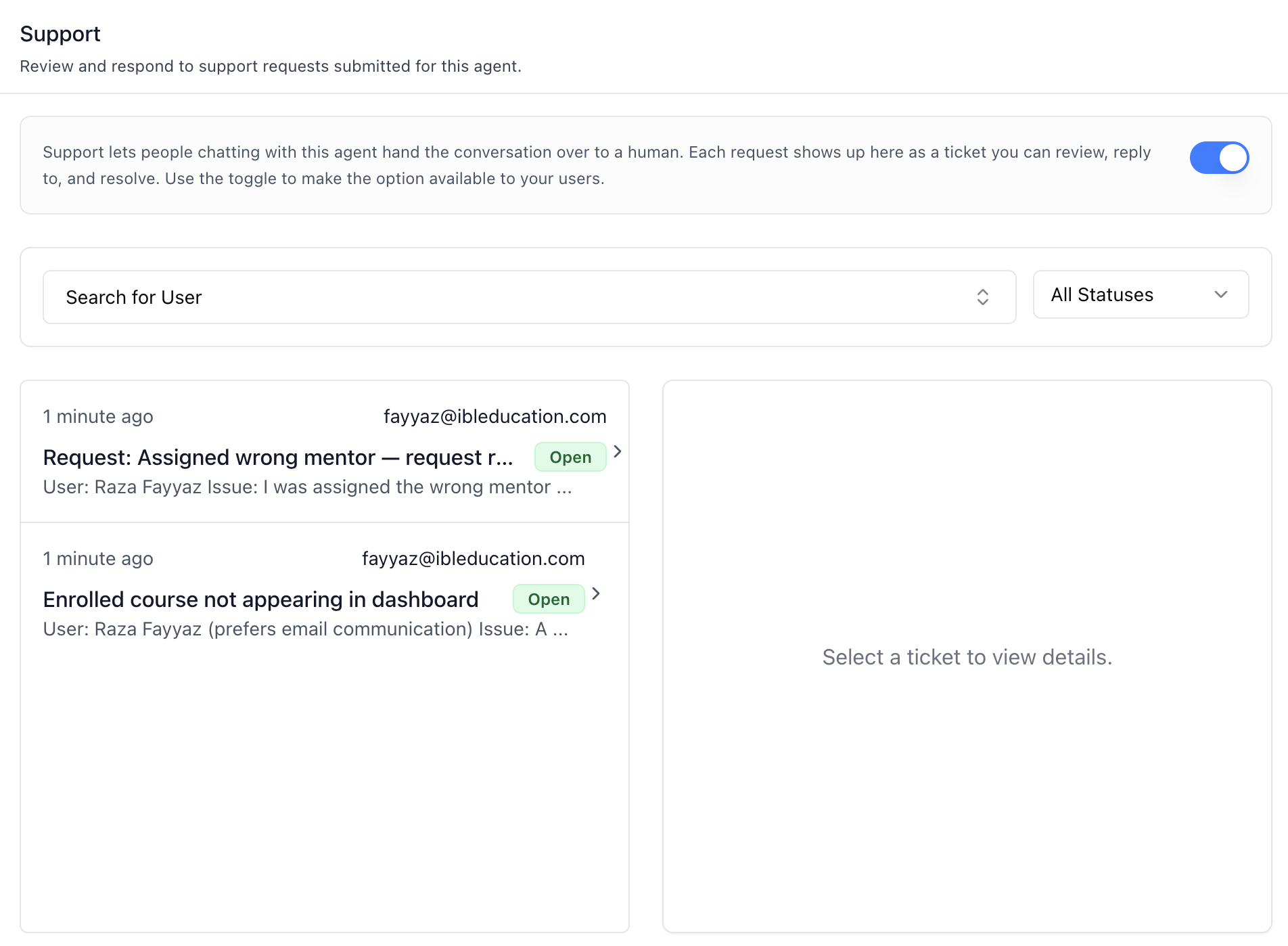
- **Header** — "Support" title and description.
- **Info box + availability toggle** — explains the hand-over-to-a-human
flow. The switch is the agent's **human support tool** (the same
toggle shown in the Tools tab, surfaced here where the feature
lives). Existing tickets stay fully actionable even while the option
is switched off for users.
- **Filters** — a searchable user combobox (type to search the organization's
users, debounced; shows emails and filters tickets by that requester,
with an "All Users" reset) and a status select (All Statuses / Open /
In Progress / Closed).
- **Ticket inbox (left column)** — 10 tickets per page, each row showing
time-ago, requester email, subject, a status badge (Open = green,
In Progress = amber, Closed = gray), and a one-line body preview.
Pagination appears when there is more than one page.
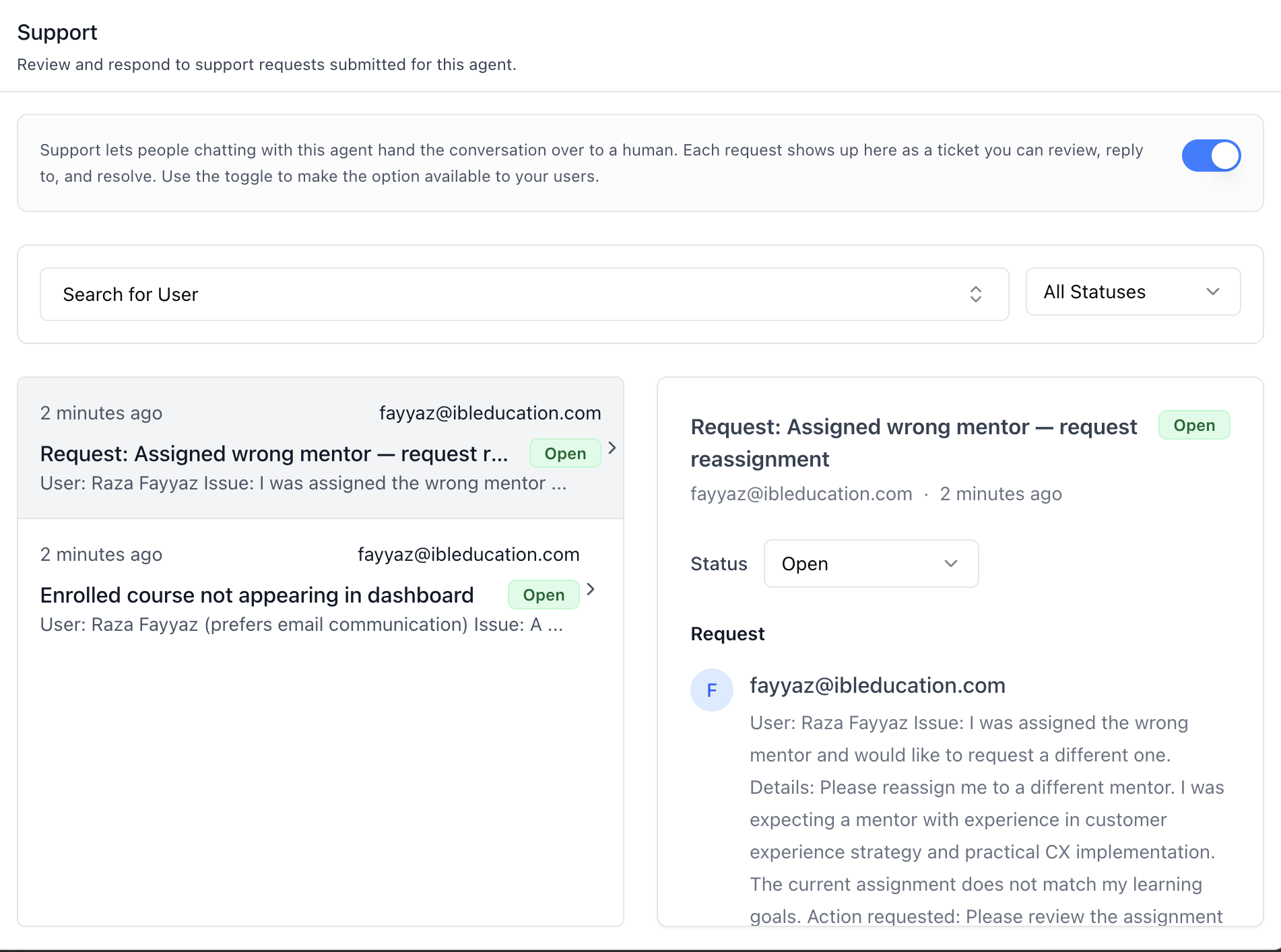
- **Ticket detail (right column)** — on desktop; below the `md`
breakpoint clicking a ticket opens the detail in a dialog instead.
Shows the subject, requester, time, and:
- **Status dropdown** — Open / In Progress / Closed. Setting Closed
calls the dedicated close endpoint; the others patch the ticket.
- **Request** — the original ticket body. Agent-authored bodies may be
HTML or Markdown; both render sanitized, and plain text renders
as-is.
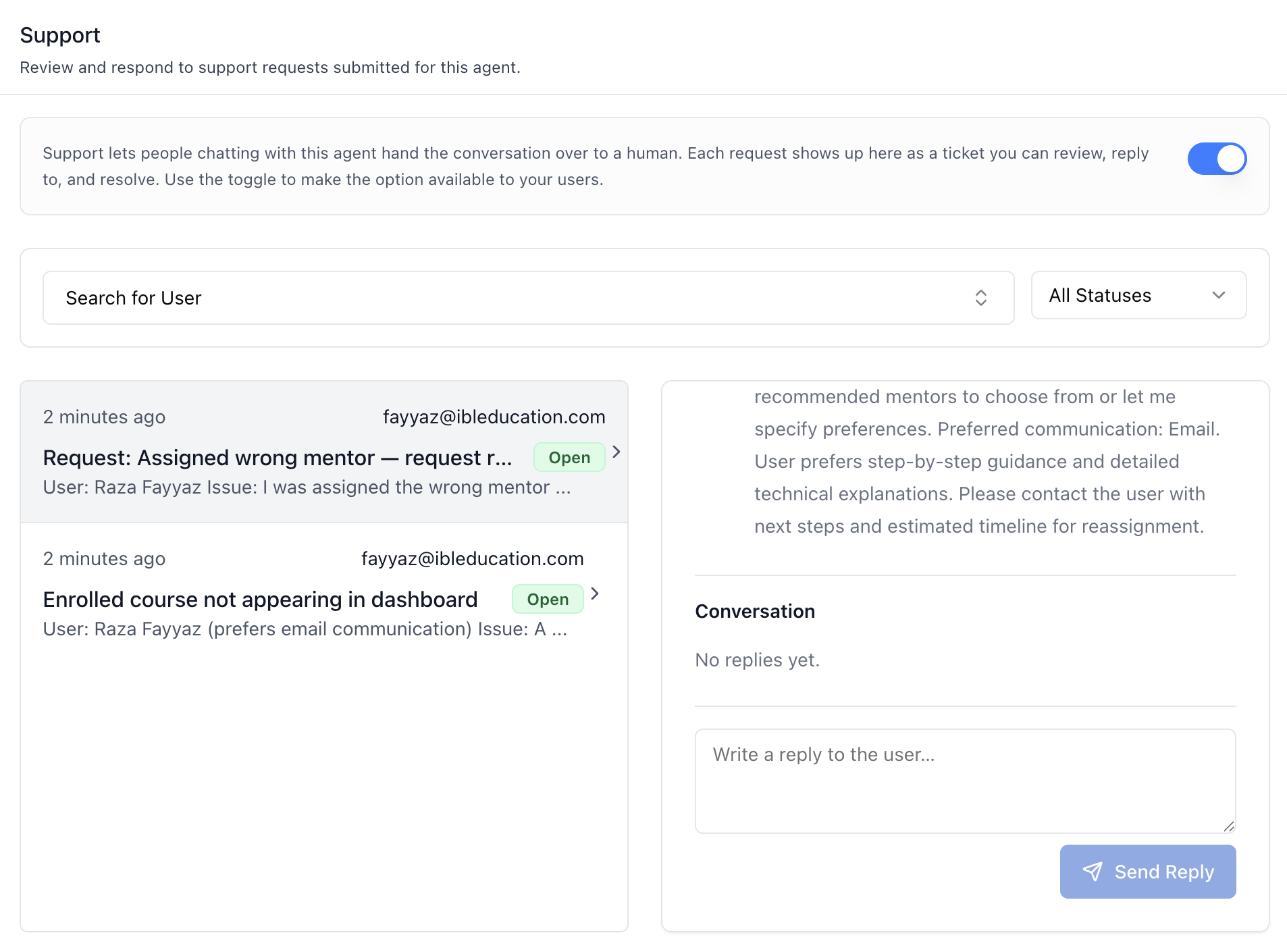
- **Conversation** — the reply thread, oldest first, distinguishing
the requester from the Support Team.
- **Reply box** — textarea + **Send Reply**. Closed tickets show a
notice instead ("Set it back to Open or In Progress to reply.").
## Related Exports
From `@iblai/iblai-js/web-containers/next`:
- `AGENT_HUMAN_SUPPORT_TAB_LABELS` -- the default agent-facing label bundle.
- `HumanSupportTabLabels` -- type for the full label bundle.
- `AgentHumanSupportTabProps` -- props type for the tab.
- `SupportTicketsFilter` -- type of the status/username filter state.
From `@iblai/iblai-js/data-layer` -- the RTK Query hooks and types the tab uses,
for custom UI built on the same endpoints:
- `useGetSupportTicketsQuery`, `useGetSupportTicketMessagesQuery`,
`useCreateSupportTicketMessageMutation`,
`usePatchSupportTicketMutation`, `useCloseSupportTicketMutation`,
`usePlatformUsersQuery`
- `SupportTicket`, `SupportTicketMessage`, `SupportTicketStatus`
## Step 5: Verify
Run `/iblai-vibe-ops-test` before telling the user the work is ready:
1. `pnpm build` -- must pass with zero errors
2. `pnpm test` -- vitest must pass
3. Start dev server and touch test:
```bash
pnpm dev &
npx playwright screenshot http://localhost:3000/agents/<id>/support /tmp/agent-support.png
```
## Important Notes
- **Redux store**: Must include `mentorReducer` and `mentorMiddleware`
- **`initializeDataLayer()`**: 5 args (v1.2+)
- **`@reduxjs/toolkit`**: Deduplicated via webpack aliases in `next.config.ts`
- **Peer deps**: `sonner` and `@iblai/iblai-web-mentor` must be installed
(`pnpm add sonner @iblai/iblai-web-mentor`)
- **Shared provider**: `AgentSettingsProvider` must wrap the route at a
layout level — this tab throws without it (it uses the required
context, not the optional one). See `/iblai-vibe-agent-setting` Step 2
for the full snippet.
- **Availability is a tool toggle**: Turning support on/off toggles the
agent's `human support` tool slug — the same state as the Tools tab
(`/iblai-vibe-agent-tool`). If the tool is not available on the
platform, the switch is hidden but the inbox still works.
- **Ticket scoping**: Tickets are scoped to this agent via its
`mentor_unique_id` (resolved from the agent's public settings).
- **Brand guidelines**: [BRAND.md](https://raw.githubusercontent.com/iblai/vibe/refs/heads/main/BRAND.md)



