Add the agent Skills tab (reusable Agent Skills catalog with per-agent assignment, private skills, file resources, and the chat `/` skill picker) to your Next.js app
15 stars
0 votes
0 copies
1 view
Added September 2, 2026
developmentgobashreactnextjsgitapi
Works with
cli
api
mcp
Security analysis
C67/100
criticalExfiltrates credentials via HTTP — exact pattern from Snyk ToxicSkills study
mediumInstalls packages at runtime which could introduce malicious dependencies
Installs into .claude/skills of the current project.
Are you the author of Iblai Vibe Agent Skills?
Add the live security badge to your README. It updates with every re-scan.
[](https://www.skillsdirectory.com/skills/iblai-iblai-vibe-agent-skills)
---
name: iblai-vibe-agent-skills
description: Add the agent Skills tab (reusable Agent Skills catalog with per-agent assignment, private skills, file resources, and the chat `/` skill picker) to your Next.js app
globs:
alwaysApply: false
metadata:
kind: ui
---
# /iblai-vibe-agent-skills
Add the agent **Skills tab** -- reusable playbooks a Base Agent can
discover and follow. An Agent Skill is a written instruction bundle
(plus optional reference files) for one job, like researching a topic
on the web or reviewing code. The agent reads a skill only when it's
relevant, so an agent can carry many capabilities without bloating
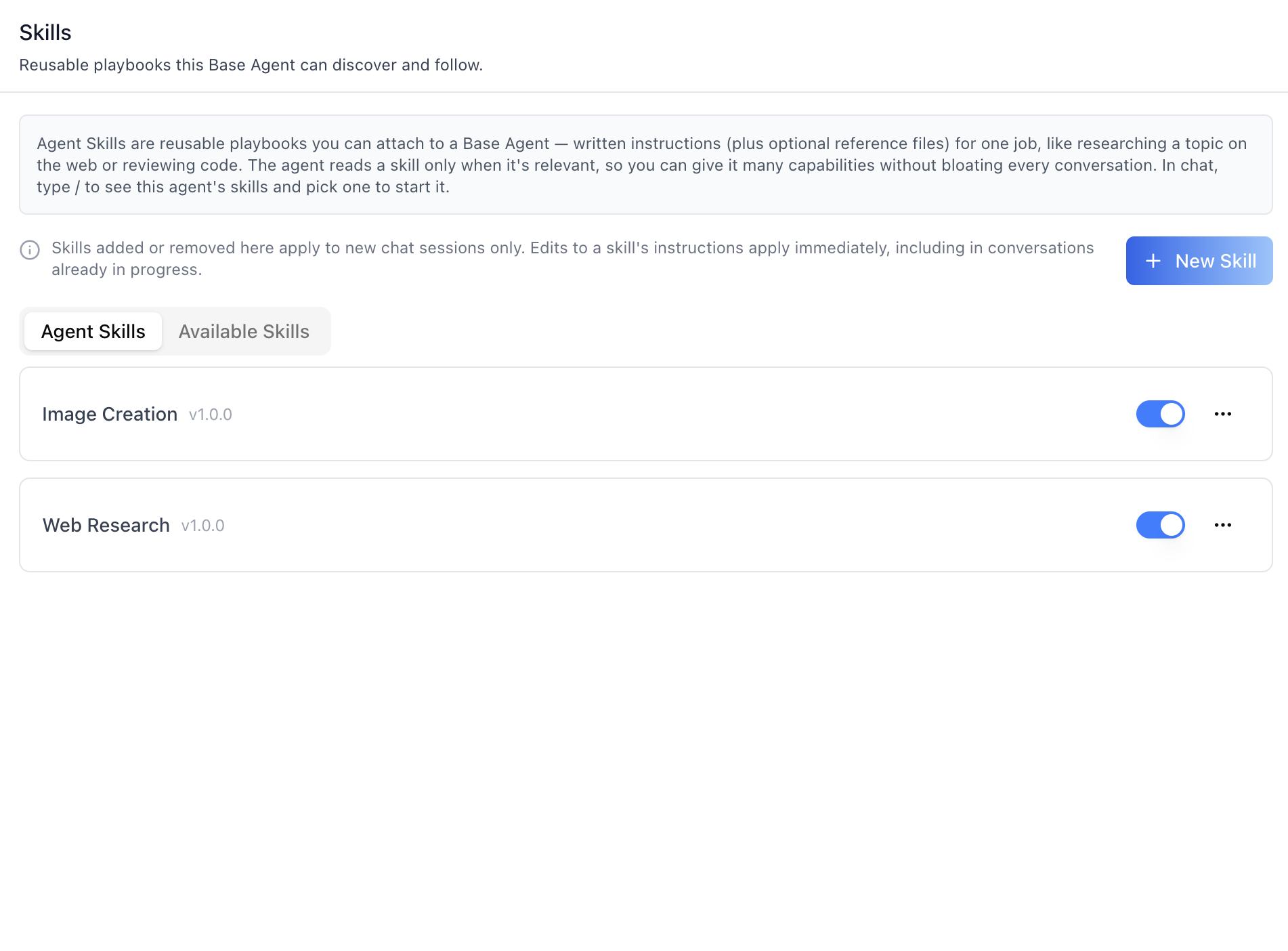
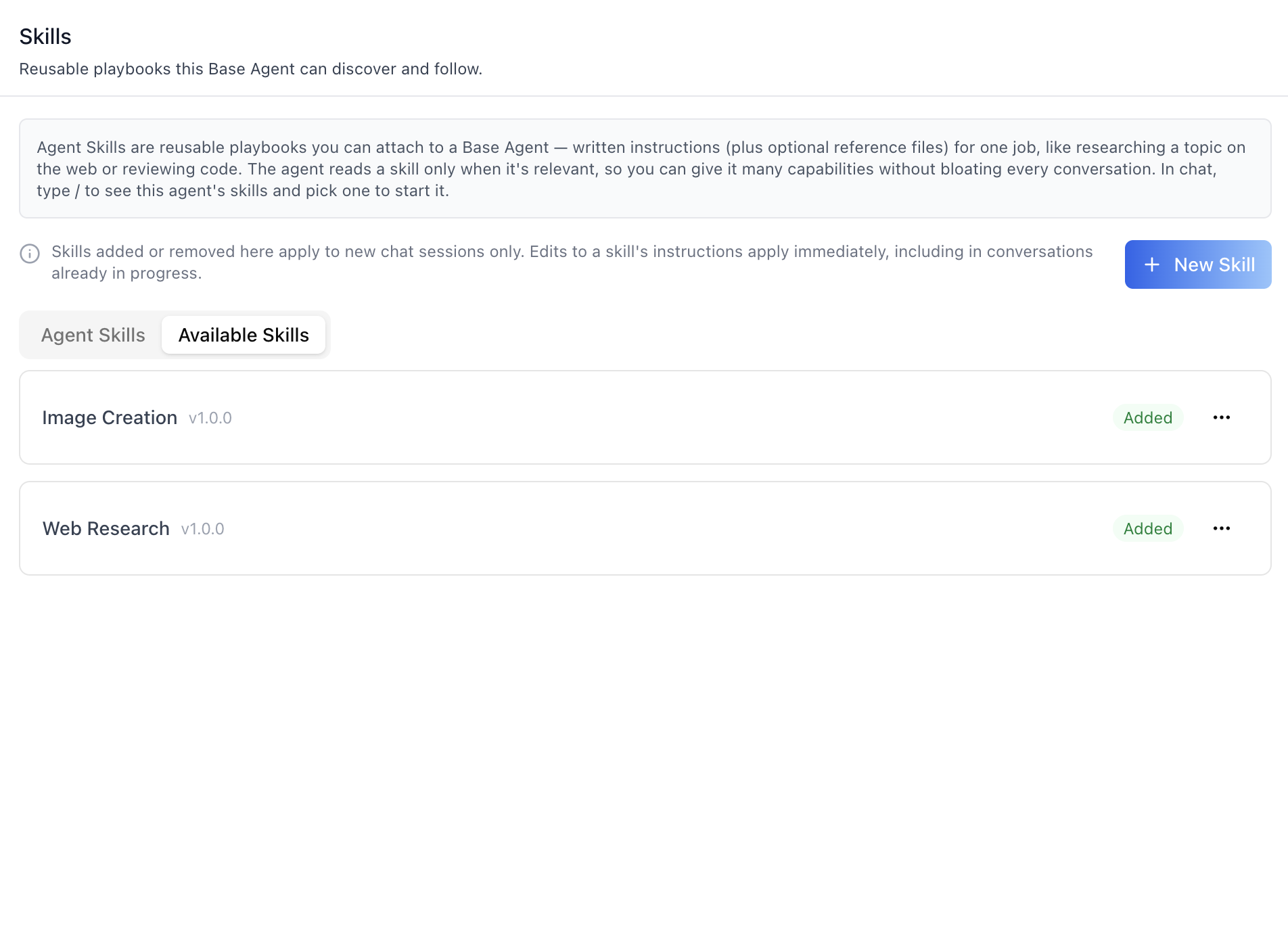
every conversation. The surface has two tabs — **Agent Skills** (the
agent's own set, with enable/disable toggles) and **Available Skills**
(the organization catalog, with one-click "Add to Agent") — plus New/Edit
skill dialogs (with a **Resources** file manager) and the chat **`/`
skill picker** that lets users invoke a skill from the composer.
Skills are managed independently of the Claw sandbox — no sandbox
instance is required. (They were previously documented as a section of
`/iblai-vibe-agent-sandbox`.)
> **Common setup (brand, conventions, env files, verification):** see [docs/skill-setup.md](https://raw.githubusercontent.com/iblai/vibe/refs/heads/main/docs/skill-setup.md).
## Prerequisites
- Auth must be set up first (`/iblai-vibe-auth`)
- MCP server + skills configured (`@iblai/mcp` in `.mcp.json`)
- Ask the user for a real `mentorId` (agent UUID). Do NOT invent one.
- Agent Skills only apply to **Base Agent** agents (template slug
`base-agent`, or its legacy aliases `ai-mentor` / `ai-agent`). Use
`isBaseAgentMentor()` from `@iblai/iblai-js/data-layer` if you need
to gate the tab per agent type.
## Step 1: Check Environment
Before proceeding, check for an `iblai.env` in the project root. Look for
`PLATFORM`, `DOMAIN`, and `TOKEN` variables. If the file does not exist or
is missing these variables, tell the user:
"You need an `iblai.env` with your platform configuration. Download the
template and fill in your values:
`curl -o iblai.env https://raw.githubusercontent.com/iblai/vibe/refs/heads/main/iblai.env`"
## Step 2: Mount `AgentSkills`
`AgentSkills` is an independent component — it does not read from
`AgentSettingsProvider`. It takes `platformKey` and `mentorUniqueId`
as required props and manages everything else (fetching, dialogs,
pagination, toasts) internally.
```tsx
// app/(app)/agents/[mentorId]/skills/page.tsx
"use client";
import { useEffect, useState } from "react";
import { useParams } from "next/navigation";
import { AgentSkills } from "@iblai/iblai-js/web-containers";
export default function AgentSkillsPage() {
const { mentorId } = useParams<{ mentorId: string }>();
const [platformKey, setPlatformKey] = useState("");
useEffect(() => {
try {
const resolvedTenant =
localStorage.getItem("app_tenant") ??
(() => {
try {
return JSON.parse(localStorage.getItem("current_tenant") ?? "{}").key;
} catch { return undefined; }
})() ??
localStorage.getItem("tenant") ??
"";
setPlatformKey(resolvedTenant);
} catch {}
}, []);
if (!platformKey) return null;
return (
<div className="flex h-full flex-col bg-white p-6">
<AgentSkills platformKey={platformKey} mentorUniqueId={mentorId} />
</div>
);
}
```
Skills work without any sandbox connection — org-level skills and the
agent's assignments both resolve on their own, so the component always
renders its full UI.
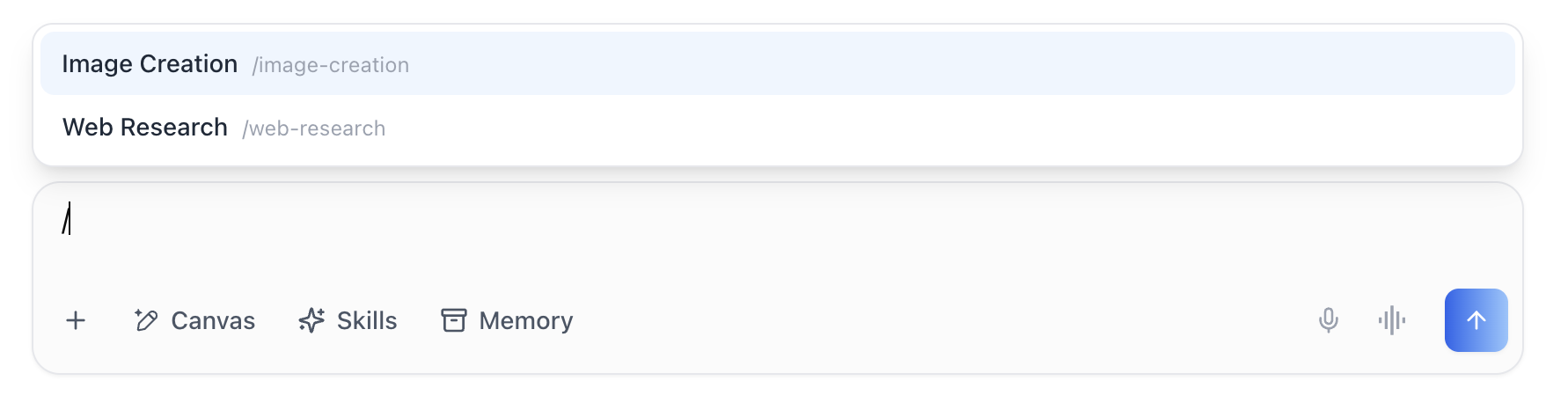
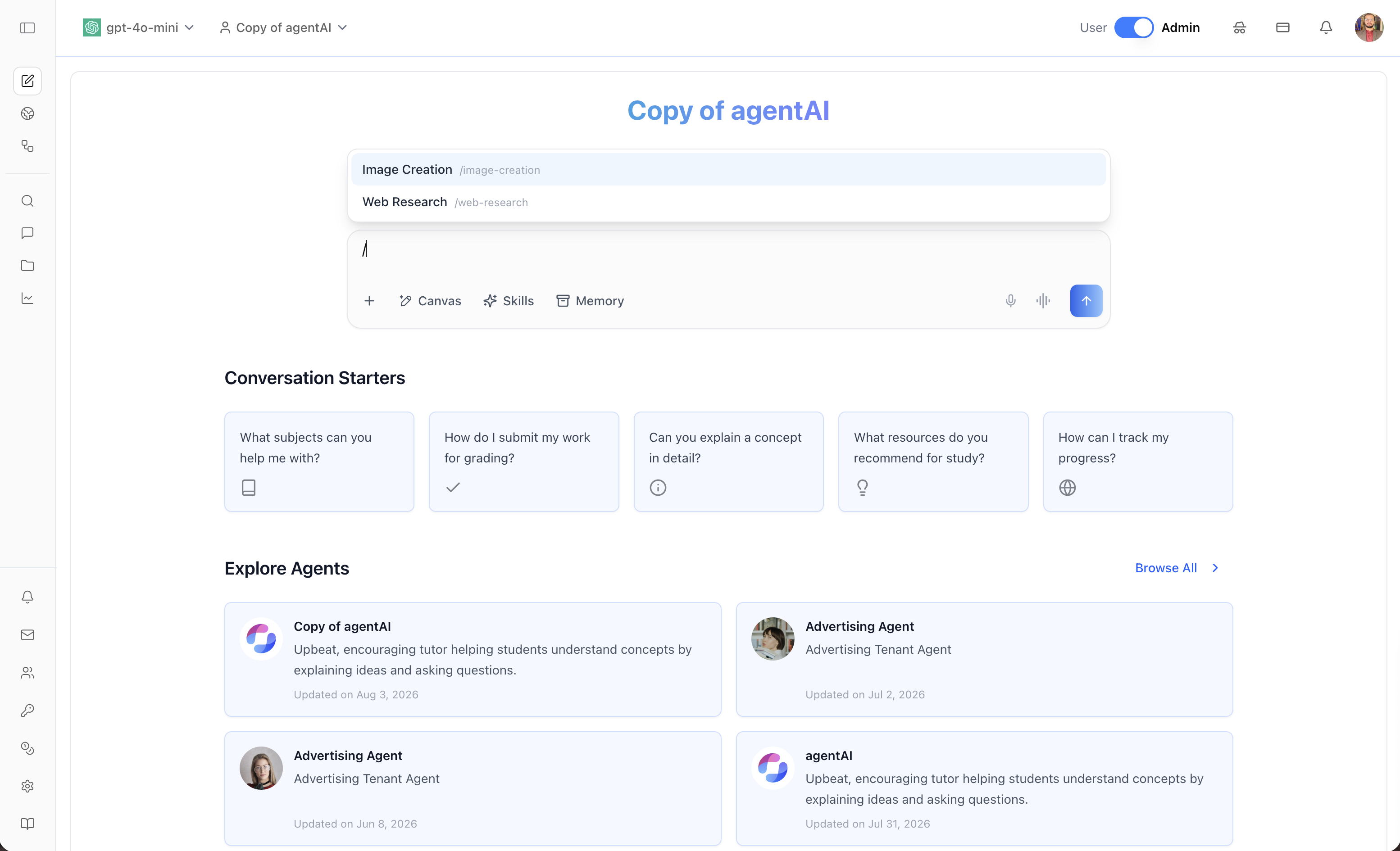
## Step 3: Enable the chat `/` skill picker
The chat composer ships a `/` skill combobox (see the last screenshot):
typing `/` as the first word opens a popup listing the agent's skills
(name + `/slug`, arrow keys + Enter/Tab to select, Esc to dismiss).
Selecting inserts `/slug ` into the composer. It is **off by default**
— opt in with one prop on `<Chat>` (from `/iblai-vibe-agent-chat`):
```tsx
import { Chat } from "@iblai/iblai-js/web-containers/next";
<Chat
// ...existing chat config...
slashSkillsEnabled
/>;
```
With `slashSkillsEnabled`, the composer lazily fetches the agent's
skills from the per-agent skills endpoint on the first `/` keystroke
(20 per page, loading more as the list scrolls; errors degrade to an
inactive picker). To supply the list yourself instead, pass
`slashSkills` (an `EffectiveAgentSkill[]`) and `slashSkillsLoading`
while resolving it — a host-supplied list bypasses fetching entirely.
The same three props exist on `ChatInputForm` for custom chat
surfaces.
For a fully custom composer, the pieces are exported individually:
`useSlashSkills` (lazy paged fetch), `useSlashSkillPicker` (open/close
+ keyboard state machine), `SlashSkillPicker` (the listbox popup), and
`isSlashCommandToken` (is the composer text a `/` token).
## Step 4: Use MCP Tools for Customization
```
get_component_info("AgentSkills")
get_component_info("Chat")
```
## Component Props
### `<AgentSkills>` (from `@iblai/iblai-js/web-containers`)
| Prop | Type | Required | Description |
|------|------|----------|-------------|
| `platformKey` | `string` | Yes | Organization key (org slug) |
| `mentorUniqueId` | `string` | Yes | Agent UUID |
### `<Chat>` / `<ChatInputForm>` slash-picker props
| Prop | Type | Required | Description |
|------|------|----------|-------------|
| `slashSkillsEnabled` | `boolean` | No | Turns the `/` picker on (default `false`). Fetches the agent's skills lazily |
| `slashSkills` | `EffectiveAgentSkill[]` | No | Host-supplied list — overrides the internal fetch |
| `slashSkillsLoading` | `boolean` | No | True while the host is still resolving `slashSkills` — the popup shows a loading row |
## What the component renders
- **Header note + New Skill** — "Skills added or removed here apply to
new chat sessions only. Edits to a skill's instructions apply
immediately, including in conversations already in progress." plus
the gradient **New Skill** button.
### Agent Skills tab
The agent's *effective* set: its skill assignments plus its own
private skills, deduped by slug and paged 10 per row-page.
- **Rows** — name, version, badges (category, Native, Featured,
Private), description, enable/disable **Switch**, kebab menu.
- **Toggle** — for an assigned skill, PATCHes the assignment's
`enabled`; for a private skill, PATCHes the skill itself.
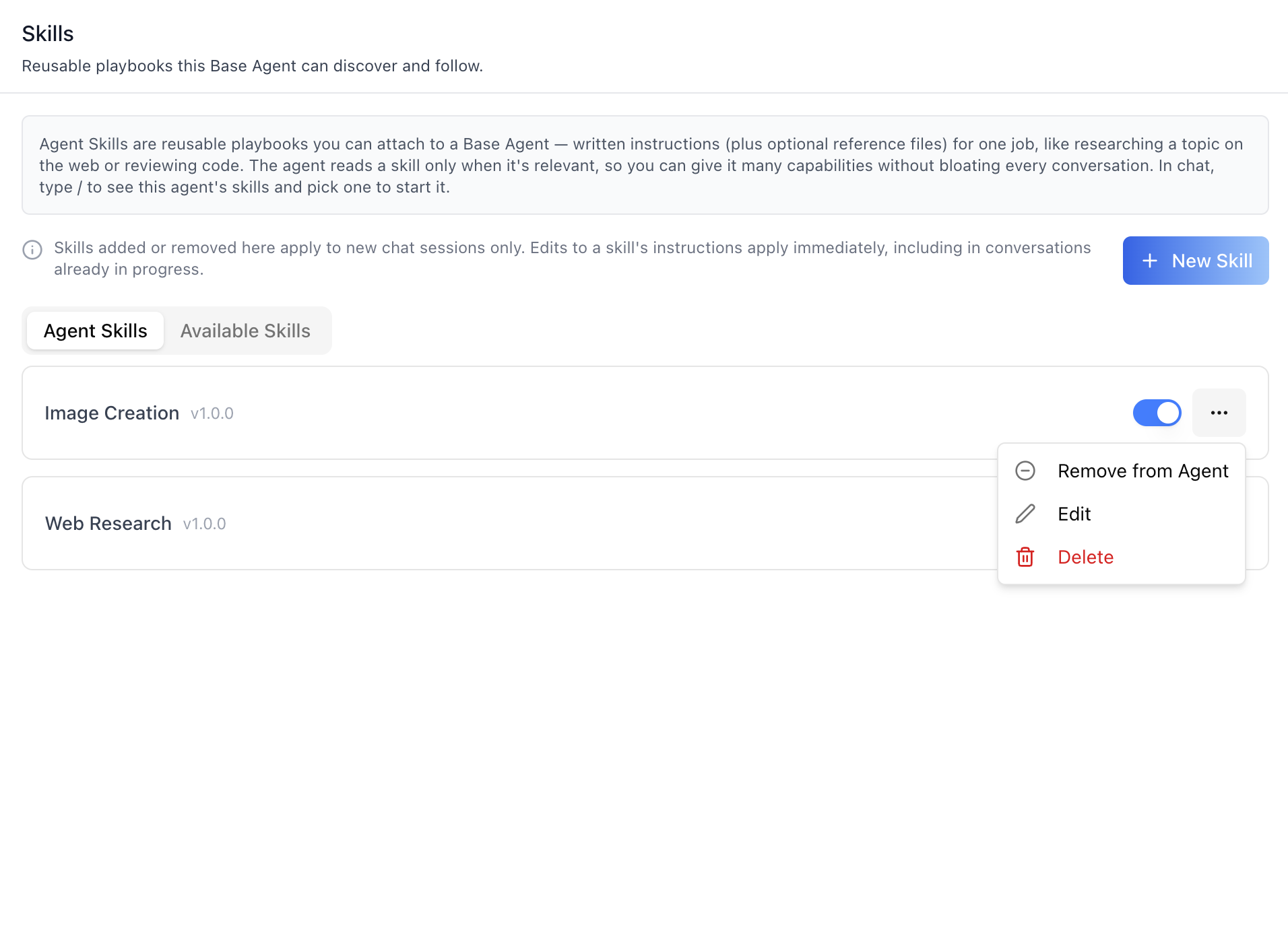
- **Kebab menu** — **Remove from Agent** (deletes the assignment;
only for assigned skills), **Edit**, **Delete** (edit/delete only
for skills the organization owns — featured skills from the `main`
platform are read-only).
### Available Skills tab
The organization's full skill catalog, paged server-side 10 at a time.
- **Rows** — same name/version/badges/description block.
- **Add to Agent** — creates a `MentorSkillAssignment` (enabled) for
the agent. Rows already covered by the agent's set — attached, or
shadowed by a same-slug private skill — show a green **Added** chip
instead. Another agent's private skills are not attachable.
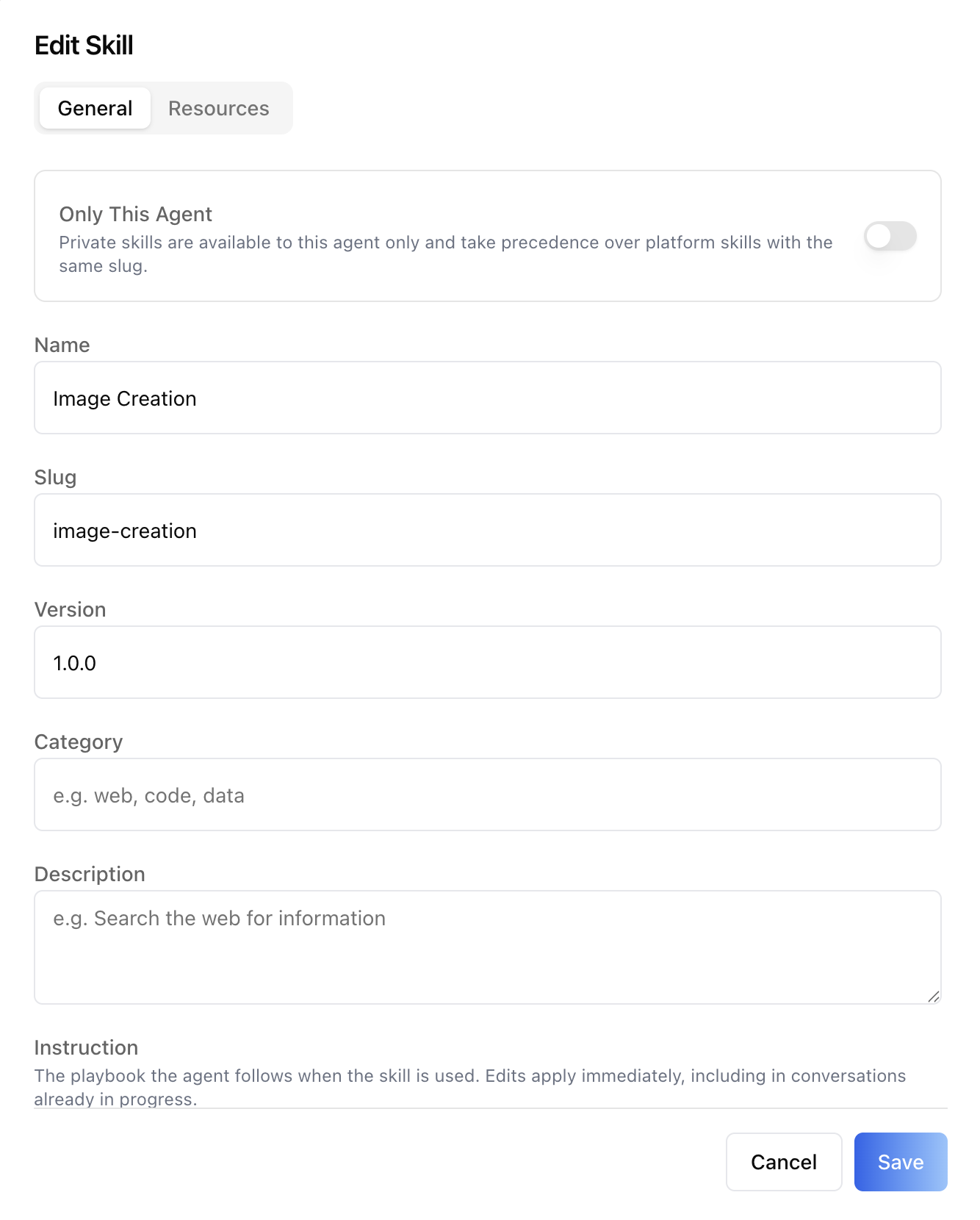
### New / Edit Skill dialog
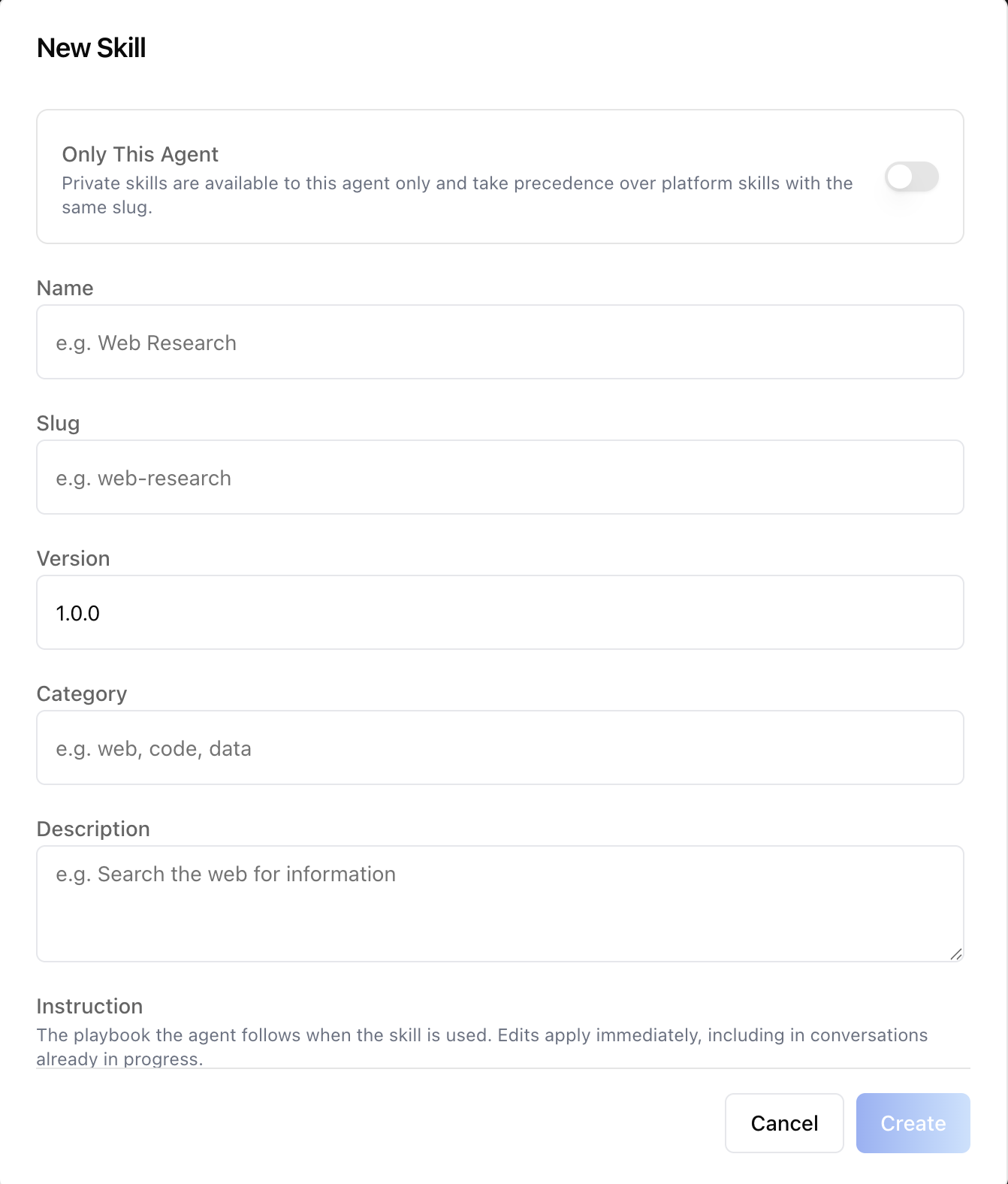
- **Only This Agent** toggle — "Private skills are available to this
agent only and take precedence over platform skills with the same
slug." Sets `mentor` to the agent's UUID (null = platform-wide).
- **Fields** — Name, Slug (both required), Version (default `1.0.0`),
Category (e.g. web, code, data), Description, and Instruction (a
`RichTextEditor` — the playbook the agent follows).
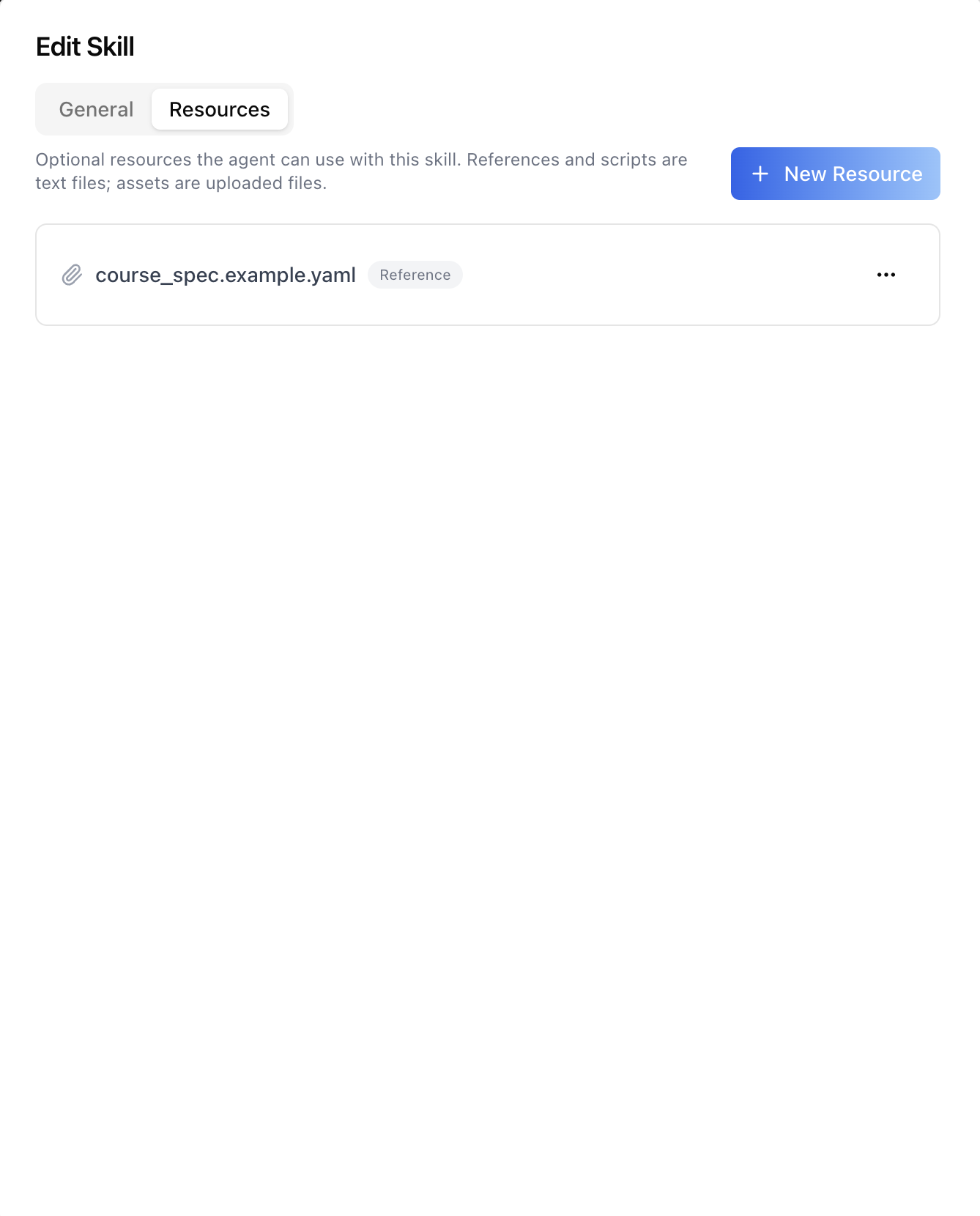
- The Edit dialog has **General** and **Resources** sub-tabs; files
can be attached after the skill is created.
### Resources sub-tab (skill files)
Optional files the agent can use with the skill:
- **Types** — `reference` and `script` are text files (filename +
content in a textarea); `asset` is a binary upload (multipart).
- **Rows** — filename + type chip + kebab (**Download** for assets,
**Edit** for text files, **Delete** with confirmation). Paged 20
per page.
### Chat `/` skill picker
- Opens while the composer holds a single `/`-prefixed word and at
least one **enabled** skill matches (name or slug, case-insensitive).
- ArrowUp/ArrowDown browse, Enter/Tab select (inserts `/slug `), Esc
dismisses until the token is cleared — plain text starting with `/`
is never blocked.
- Skills load lazily on the first `/` keystroke and page in as the
list scrolls; the popup shows spinner rows while loading.
## Related Exports
From `@iblai/iblai-js/web-containers`:
- `AgentSkills` — the Skills surface.
- `SlashSkillPicker`, `SlashSkillPickerProps` — the `/` popup listbox.
- `useSlashSkillPicker`, `isSlashCommandToken` — composer keyboard /
open-state machine.
- `useSlashSkills` — lazy paged fetch of the agent's skills for the
picker.
From `@iblai/iblai-js/data-layer`:
- `useGetAgentSkillsQuery`, `useGetAgentSkillQuery`,
`useCreateAgentSkillMutation`, `useUpdateAgentSkillMutation`,
`useDeleteAgentSkillMutation` — skill catalog CRUD.
- `useGetAgentSkillResourcesQuery`,
`useCreateAgentSkillResourceMutation`,
`useUpdateAgentSkillResourceMutation`,
`useUploadAgentSkillResourceAssetMutation`,
`useDeleteAgentSkillResourceMutation` — skill file resources.
- `useGetMentorSkillAssignmentsQuery`,
`useGetMentorSkillAssignmentsInfiniteQuery` (one growing cache entry
per agent — powers the `/` picker's lazy list),
`useCreateMentorSkillAssignmentMutation`,
`useUpdateMentorSkillAssignmentMutation`,
`useDeleteMentorSkillAssignmentMutation` — per-agent assignments.
- `resolveEffectiveAgentSkills` — client-side join of catalog +
assignments into the agent's effective set (private >
organization > global/featured, deduped by slug).
- `filterSlashSkills` — enabled-only name/slug filter used by the
picker.
- `isBaseAgentMentor`, `BASE_AGENT_TEMPLATE_SLUGS` — Base Agent gate.
- `MENTOR_SKILL_ASSIGNMENTS_PAGE_SIZE` — the picker's page size (20).
- `AgentSkill`, `AgentSkillResource`, `MentorSkillAssignment`,
`EffectiveAgentSkill` — payload types.
## Step 5: Verify
Run `/iblai-vibe-ops-test` before telling the user the work is ready:
1. `pnpm build` -- must pass with zero errors
2. `pnpm test` -- vitest must pass
3. Start dev server and touch test:
```bash
pnpm dev &
npx playwright screenshot http://localhost:3000/agents/<id>/skills /tmp/agent-skills.png
```
## Important Notes
- **Redux store**: Must include `mentorReducer` and `mentorMiddleware`
- **`initializeDataLayer()`**: 5 args (v1.2+)
- **`@reduxjs/toolkit`**: Deduplicated via webpack aliases in `next.config.ts`
- **Peer deps**: `sonner` and `@iblai/iblai-web-mentor` must be installed
(`pnpm add sonner @iblai/iblai-web-mentor`)
- **Base Agent only**: Agent Skills apply to Base Agent agents only.
Gate the tab with `isBaseAgentMentor({ mentorSlug, templateMentorSlug })`
when your app hosts other agent types.
- **Session behaviour**: adding/removing a skill applies to **new chat
sessions only**; editing a skill's instructions applies immediately,
including to conversations already in progress. The component
surfaces this note in its header — keep it visible in custom UI.
- **Skill UUID, not pk**: `MentorSkillAssignment.skill` is the skill's
`unique_id`, not the integer id. Custom UI joining skills to
assignments must key on `skill.unique_id`. (Skill *resources* key on
the integer `skill.id` instead.)
- **Private-skill precedence**: a skill created with **Only This
Agent** shadows platform skills with the same slug for that agent
(`resolveEffectiveAgentSkills` ranks private > organization > featured).
- **Featured skills are read-only**: featured skills come from the
`main` platform; the API 404s organization writes against them, so the
component hides their Edit/Delete actions. Mirror that in custom UI.
- **Enabled is an AND**: an effective skill is enabled only when the
catalog skill AND its assignment are both enabled; the `/` picker
offers enabled skills only.
- **Brand guidelines**: [BRAND.md](https://raw.githubusercontent.com/iblai/vibe/refs/heads/main/BRAND.md)
## Agent Skills REST API
For custom UI beyond the component. All endpoints are prefixed with
`${dmUrl}/api/ai-mentor/orgs/{org}/` where `dmUrl` is
`NEXT_PUBLIC_API_BASE_URL`. Auth: `Authorization: Token <token>`.
### Skill catalog (platform-level)
| Method | Path | Purpose |
|---|---|---|
| GET | `agent-skills/` | List skills — filters: `enabled`, `search` (name/slug), `limit`, `offset` |
| POST | `agent-skills/` | Create — `{ name, slug, version, category, description, instruction, mentor, enabled }` |
| GET | `agent-skills/{id}/` | Retrieve |
| PATCH | `agent-skills/{id}/` | Update |
| DELETE | `agent-skills/{id}/` | Delete |
`mentor` (agent UUID) makes the skill private to that agent; `null`
makes it platform-wide. Featured skills (`is_featured`) are served
read-only to organizations.
### Skill resources (files)
| Method | Path | Purpose |
|---|---|---|
| GET | `agent-skill-resources/` | List — filters: `skill` (integer pk), `file_type`, `limit`, `offset` |
| POST | `agent-skill-resources/` | Create — `{ skill, file_type, filename, content }` for text; multipart with `file` for `asset` |
| PATCH | `agent-skill-resources/{id}/` | Update filename/content |
| DELETE | `agent-skill-resources/{id}/` | Delete |
`file_type` is `reference`, `script` (text — send `content`), or
`asset` (binary — send multipart `file`; the response carries a
download URL in `file`).
### Per-agent assignments
| Method | Path | Purpose |
|---|---|---|
| GET | `agents/{mentor_unique_id}/skills/` | Skills bound to this agent |
| POST | `agents/{mentor_unique_id}/skills/` | Bind — `{ "skill": "<skill-uuid>", "enabled": true }` |
| PATCH | `agents/{mentor_unique_id}/skills/{id}/` | Toggle `enabled` |
| DELETE | `agents/{mentor_unique_id}/skills/{id}/` | Unbind |
Uses the canonical `agents/` spelling — the `mentors/` route is a
deprecated alias slated for removal. The `skill` field is the **UUID**
(`unique_id`), not the integer primary key — keying assignments by
`unique_id` keeps the binding stable across skill edits.



