Installs into .claude/skills of the current project.
Are you the author of Iblai Vibe Agent Memory?
Add the live security badge to your README. It updates with every re-scan.
[](https://www.skillsdirectory.com/skills/iblai-iblai-vibe-agent-memory)
---
name: iblai-vibe-agent-memory
description: Add the agent Memory tab (enable/disable memory and manage memories) to your Next.js app
globs:
alwaysApply: false
metadata:
core: true
kind: ui
---
# /iblai-vibe-agent-memory
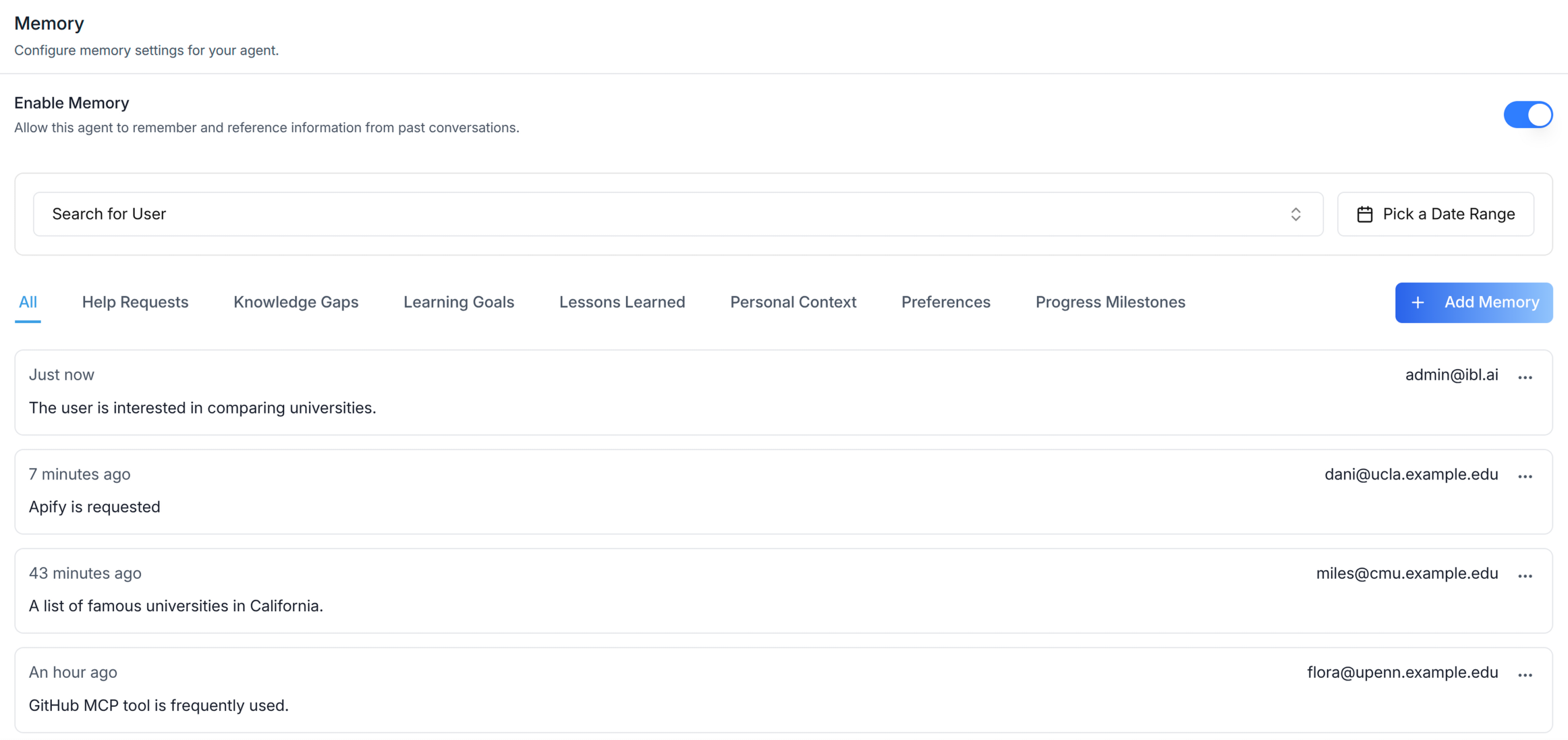
Add the agent **Memory tab** -- a toggle switch to enable/disable agent
memory and a managed memories section with add, edit, bulk delete, and
individual delete actions. This is one tab in the wider agent-settings
family. All tabs share the same `AgentSettingsProvider` wrapper.
> **Common setup (brand, conventions, env files, verification):** see [docs/skill-setup.md](https://raw.githubusercontent.com/iblai/vibe/refs/heads/main/docs/skill-setup.md).
## Prerequisites
- Auth must be set up first (`/iblai-vibe-auth`)
- MCP server + skills configured (`@iblai/mcp` in `.mcp.json`)
- `AgentSettingsProvider` must wrap the route (see `/iblai-vibe-agent-setting`
Step 2 if not already set up)
- Ask the user for a real `mentorId` (agent UUID). Do NOT invent one.
## Step 1: Check Environment
Before proceeding, check for an `iblai.env` in the project root. Look for
`PLATFORM`, `DOMAIN`, and `TOKEN` variables. If the file does not exist or
is missing these variables, tell the user:
"You need an `iblai.env` with your platform configuration. Download the
template and fill in your values:
`curl -o iblai.env https://raw.githubusercontent.com/iblai/vibe/refs/heads/main/iblai.env`"
## Step 2: Mount `AgentMemoryTab`
```tsx
// app/(app)/agents/[mentorId]/memory/page.tsx
"use client";
import { AgentMemoryTab } from "@iblai/iblai-js/web-containers/next";
export default function AgentMemoryPage() {
return (
<div className="flex h-full flex-col bg-white">
<AgentMemoryTab />
</div>
);
}
```
## Step 3: Customize Labels (Optional)
```tsx
import { AgentMemoryTab } from "@iblai/iblai-js/web-containers/next";
<AgentMemoryTab
labels={{
header: { title: "Mentor memory" },
}}
/>;
```
## Step 4: Use MCP Tools for Customization
```
get_component_info("AgentMemoryTab")
get_component_info("AgentSettingsProvider")
```
## `<AgentMemoryTab>` Props
Import from `@iblai/iblai-js/web-containers/next`.
| Prop | Type | Required | Description |
|------|------|----------|-------------|
| `labels` | `DeepPartial<MemoryTabLabels>` | No | Override user-visible strings |
## Related Exports
From `@iblai/iblai-js/web-containers/next`:
- `AGENT_MEMORY_TAB_LABELS` -- the default agent-facing label bundle.
- `MemoryTabLabels` -- type for the full label bundle.
## Step 5: Verify
Run `/iblai-vibe-ops-test` before telling the user the work is ready:
1. `pnpm build` -- must pass with zero errors
2. `pnpm test` -- vitest must pass
3. Start dev server and touch test:
```bash
pnpm dev &
npx playwright screenshot http://localhost:3000/agents/<id>/memory /tmp/agent-memory.png
```
## Important Notes
- **Redux store**: Must include `mentorReducer` and `mentorMiddleware`
- **`initializeDataLayer()`**: 5 args (v1.2+)
- **`@reduxjs/toolkit`**: Deduplicated via webpack aliases in `next.config.ts`
- **Peer deps**: `sonner` and `@iblai/iblai-web-mentor` must be installed
(`pnpm add sonner @iblai/iblai-web-mentor`)
- **Shared provider**: `AgentSettingsProvider` must wrap the route at a
layout level. See `/iblai-vibe-agent-setting` Step 2 for the full snippet.
- **Brand guidelines**: [BRAND.md](https://raw.githubusercontent.com/iblai/vibe/refs/heads/main/BRAND.md)
## Memory REST API
Full REST reference: [`/iblai-api-agent-memory`](https://raw.githubusercontent.com/iblai/vibe/refs/heads/main/skills/agents/iblai-api-agent-memory/SKILL.md)
(headless twin, installed with the rest of this repo's skills).
The tables below are the frontend-relevant summary.
For custom UI beyond `<AgentMemoryTab>`. All endpoints are prefixed with
`${dmUrl}/api/ai-mentor/orgs/{org}/` where `dmUrl` is `NEXT_PUBLIC_API_BASE_URL`
and `{org}` is the org key (`platform_key`).
The system has three control levels: **Platform** (admin enables for organization),
**Agent** (admin/owner enables per agent), **User** (user opts in/out of
capture and use).
### User memory settings (per user opt-in)
| Method | Path | Purpose |
|---|---|---|
| GET | `users/{user_id}/memsearch-settings/` | Read `auto_capture_enabled`, `use_memory_in_responses` |
| PUT | `users/{user_id}/memsearch-settings/` | Update one or both flags |
Defaults are `false` if no settings row exists.
### Platform config (organization admin)
| Method | Path | Purpose |
|---|---|---|
| GET | `users/{user_id}/memsearch-config/` | Read `enable_memsearch` |
| POST | `users/{user_id}/memsearch-config/` | Set `enable_memsearch` |
| GET | `users/{user_id}/memsearch-status/` | Read-only enabled status for the organization |
### Agent toggle
| Method | Path | Purpose |
|---|---|---|
| PUT | `users/{user_id}/mentors/{mentor}/settings/` | Body includes `enable_memory_component: bool` |
Every memory row identifies its owner with `username`, `email` and
`user_full_name`, so a list renders the person without a second request; an
agent-knowledge row names its curator with `created_by`, `created_by_email` and
`created_by_full_name` instead.
### Global memories (apply across all agents)
| Method | Path | Purpose |
|---|---|---|
| GET | `users/{user_id}/global-memories/` | List. Params: `page`, `page_size` (≤25), `user_id`, `start_date`, `end_date`, `search` |
| POST | `users/{user_id}/global-memories/` | Create. Body `{ content }` (≥10 chars). 409 if duplicate |
| DELETE | `users/{user_id}/global-memories/{memory_id}/` | Delete |
### Agent-specific memories (grouped by category)
| Method | Path | Purpose |
|---|---|---|
| GET | `users/{user_id}/mentors/{mentor_id}/mentor-memories/` | List grouped by category. Params: `user_id`, `start_date`, `end_date`, `my_memory` |
| POST | `users/{user_id}/mentors/{mentor_id}/mentor-memories/` | Create. Body `{ category_slug, content }` (≥10 chars) |
| PATCH | `users/{user_id}/mentors/{mentor_id}/mentor-memories/{memory_id}/` | Partial update of `content` and/or `category_slug` |
| DELETE | `users/{user_id}/mentors/{mentor_id}/mentor-memories/{memory_id}/` | Delete |
### Memory categories (admin/owner)
| Method | Path | Purpose |
|---|---|---|
| GET | `mentors/{mentor_id}/memory-categories/` | List active categories |
| POST | `mentors/{mentor_id}/memory-categories/` | Create. 409 if slug exists |
| PATCH | `mentors/{mentor_id}/memory-categories/{category_id}/` | Update name/description/extraction prompt |
| DELETE | `mentors/{mentor_id}/memory-categories/{category_id}/` | Soft-delete (sets `is_active=false`) |
Default categories auto-created per agent: `knowledge_gaps`, `learning_goals`,
`preferences`, `progress_milestones`, `personal_context`.
### Common errors
`400` validation (`content` <10 chars), `403` viewing another user's memories,
`404` not found, `409` duplicate.
### Visibility rule
Hide memory UI unless platform `memsearch-status` is enabled AND the agent's
`enable_memory_component` is true. Always show the user-level toggles so users
can opt in/out.



