Installs into .claude/skills of the current project.
Are you the author of Firecrawl Research Patterns?
Add the live security badge to your README. It updates with every re-scan.
[](https://www.skillsdirectory.com/skills/terrylica-firecrawl-research-patterns)
---
name: firecrawl-research-patterns
description: Programmatic Firecrawl usage via the public API, academic paper routing, recursive deep research, and raw corpus persistence.
allowed-tools: Read, Write, Edit, Bash, Grep, Glob
---
# Firecrawl Research Patterns
Programmatic patterns for using Firecrawl in research workflows — search, scrape, route academic papers, run recursive deep research, and persist raw results for future re-analysis.
**Use the public Firecrawl API. There is no self-hosted instance.** `POST https://api.firecrawl.dev/v2/scrape` answers without an API key, which covers the low-volume, occasional conversions this repo actually does. Rate limits and queueing are acceptable — do not stand up a private deployment to avoid them.
For archiving AI chat conversations (ChatGPT/Gemini shares), see `Skill(gh-tools:research-archival)`.
---
> **Self-Evolving Skill**: This skill improves through use. If instructions are wrong, parameters drifted, or a workaround was needed — fix this file immediately, don't defer. Only update for real, reproducible issues.
## FIRST — TodoWrite Task Templates
**MANDATORY**: Select and load the appropriate template before any research work.
### Intent routing — AI chat share URLs (chatgpt / gemini / claude)
AI chat share URLs (`chatgpt.com/share/*`, `chat.openai.com/share/*`, `gemini.google.com/share/*`, `g.co/gemini/share/*`, `claude.ai/share/*`, `claude.ai/chat/*`) can be processed by **either** this skill or `Skill(gh-tools:research-archival)`. Pick by **intent**, not URL pattern:
| Your intent | Skill | Output |
| ---------------------------------------------------------------------------------- | ------------------------------------ | ------------------------------------------------------------------------------ |
| One-off read / extract conversation text for analysis | **This skill** — public API (Sec. 1) | Markdown file on Caddy; no frontmatter, no Issue, no provenance. |
| Long-term archive with identity verification, frontmatter, GitHub Issue cross-link | `Skill(gh-tools:research-archival)` | `docs/research/YYYY-MM-DD-{slug}-{type}.md` + issue with Discovery Provenance. |
| Already have the file, just need to scrape extra content into the same corpus file | **This skill** | Append-mode workflow under your control. |
> **Both paths share the same Firecrawl backend.** `research-archival` calls Firecrawl too — it adds an archival layer on top. There is no scraping capability gap between the two; the difference is what happens to the bytes after they come back.
**WebFetch limitation, regardless of intent**: Claude Code hard-blocks `WebFetch` against `chatgpt.com`. Use Firecrawl.
**Prefer Firecrawl over Jina Reader for chat shares — Jina silently truncates.** Measured 2026-08-13 on two `chatgpt.com/share/*` URLs, same moment, both returning HTTP 200 with no error:
| Link | Firecrawl `v2/scrape` | Jina `r.jina.ai` | Jina coverage |
| ---- | ------------------------------------------- | ----------------------------------------- | ------------- |
| 1 | 57,616 chars · 76 headings · 128 table rows | 9,397 chars · 12 headings · 22 table rows | **17%** |
| 2 | 136,590 chars · 85 headings · 69 table rows | 15,960 chars · 13 headings · 9 table rows | **12%** |
Firecrawl reached the true end of both pages (the `Sources` / `ChatGPT is AI and can make mistakes.` footer). Jina stopped mid-sentence — link 1 ended at `"I would spend money on **Synol"`. Neither hit the login wall and Firecrawl's extra bulk was not nav boilerplate (its most-repeated line is blank). **A truncated Jina result looks like a successful short page**, which is the dangerous failure: there is no error to catch.
Jina also needs `-H "x-timeout: 30"` at all — the default returns ~321 bytes of login chrome (`"Log in to get answers"`) with only a soft `Warning:` line. Keep Jina as a fallback for simple static pages; do not use it for chat shares or anything JS-rendered.
### Template A — Single Firecrawl Search + Persist
```
1. No health check needed — the public API has no self-hosted liveness concern. Handle per-request failures instead (Section 1).
2. Execute search — POST /v2/search with query, limit, scrapeOptions
3. Persist raw results — save each result page to docs/research/corpus/ with frontmatter
4. Update corpus index — append entries to docs/research/corpus-index.jsonl
5. Extract findings — summarize key learnings from raw corpus files
```
### Template B — Academic Paper Retrieval + Persist
```
1. Identify source — classify URL/DOI per academic-paper-routing.md decision tree
2. Route to scraper — arxiv direct HTML, Semantic Scholar API, Firecrawl, or Jina Reader
3. Scrape content — execute fetch with appropriate method and timeout
4. Persist raw result — save to docs/research/corpus/ with academic-specific frontmatter
5. Update corpus index — append entry to corpus-index.jsonl
6. Summarize paper — extract key claims, methods, results from raw corpus file
```
### Template C — Full Recursive Deep Research with Corpus
```
1. No health check needed — the public API has no self-hosted liveness concern. Handle per-request failures instead (Section 1).
2. Initialize parameters — set breadth (default 4), depth (default 2), concurrency (default 2)
3. Generate search queries — LLM generates N queries from topic + prior learnings
4. Execute searches — Firecrawl /v2/search for each query via p-limit(concurrency)
5. Persist raw results — save ALL scraped pages to docs/research/corpus/ with provenance
6. Extract learnings — LLM extracts key findings + follow-up questions per result set
7. Recurse — for each follow-up, recurse with breadth=ceil(breadth/2), depth=depth-1
8. Base case — depth=0, return accumulated learnings
9. Synthesize report — LLM generates final markdown from all learnings
10. Write session report — save to docs/research/sessions/ with corpus file references
11. Update corpus index — append all new entries to corpus-index.jsonl
```
### Template D — Corpus Review / Re-Analysis
```
1. Inventory corpus — read docs/research/corpus-index.jsonl, filter by session/topic/date
2. Read raw files — load matching corpus files from docs/research/corpus/
3. Re-analyze — extract new insights with current context/questions
4. Update session report — amend or create new session report in docs/research/sessions/
```
### Template E — Image-Rich Paper with Inline Figures
Use when paper contains architecture diagrams, result plots, attention maps, or any critical visual content.
```
1. Scrape text — use the public API (`/v2/scrape`, preserves absolute image URLs) or Jina fallback
2. Detect figures — scan scraped markdown for  patterns with .png/.jpg/.svg
3. Extract figure URLs — for arXiv: probe https://arxiv.org/html/{id}v{n}/x{N}.png until 404
4. Keep URLs inline — DO NOT rewrite to local relative paths (breaks GitHub rendering)
5. Ensure inline embedding — markdown body must have  for each figure
6. Catalog in frontmatter — add figure_count and figure_urls list (all absolute URLs)
7. Save corpus file — GFM markdown with inline absolute URLs renders on GitHub without hosting
8. Update corpus-index.jsonl — include has_figures: true, figure_count, figure_urls
```
---
## Section 1 — Programmatic Firecrawl Usage
**Endpoint**: the public API at `https://api.firecrawl.dev`. No API key, no host, no tunnel — it answers unauthenticated.
```bash
curl -sS -X POST https://api.firecrawl.dev/v2/scrape \
-H 'Content-Type: application/json' \
-d '{"url":"<URL>","formats":["markdown"],"waitFor":8000,"timeout":60000}'
# -> {"success":true,"data":{"markdown":"..."}}
```
**Always send `waitFor`** for JS-rendered pages (SPAs, chat shares, dashboards). Without it the scrape can return the pre-hydration shell — which for a login-walled SPA is the login chrome, not the content, and it returns HTTP 200 while doing so. A 200 is not proof of extraction; check for content you expect.
**Do not resurrect a self-hosted deployment.** One ran on gpu-host-2:3002 (5 containers: api, playwright-service, nuq-postgres, rabbitmq, redis) and was retired 2026-08-13, reclaiming ~18 GB. The public API covers this repo's volume. Standing one up again trades ~18 GB and five long-running containers for rate limits nobody was hitting.
### Why `fetch()` Instead of `@mendable/firecrawl-js` SDK
The official SDK uses `jiti` for dynamic imports, which is incompatible with Bun's module resolution. Direct `fetch()` calls are simpler, more reliable, and have zero dependencies.
### Two Endpoints
| Endpoint | Purpose | When to Use |
| ----------------- | --------------------- | ------------------------------------------------- |
| `POST /v2/search` | Search + scrape combo | Research queries — returns multiple scraped pages |
| `POST /v2/scrape` | Single URL scrape | Known URL — extract markdown from one page |
See [api-endpoint-reference.md](./references/api-endpoint-reference.md) for full request/response contracts.
### Quick Examples
Use the public API base. Pull from `$FIRECRAWL_BASE` env var if your project sets one, otherwise hard-code the FQDN:
```typescript
const FIRECRAWL_BASE =
process.env.FIRECRAWL_BASE ?? "https://api.firecrawl.dev";
```
**Search** (returns multiple results with markdown):
```typescript
const res = await fetch(`${FIRECRAWL_BASE}/v2/search`, {
method: "POST",
headers: { "Content-Type": "application/json" },
body: JSON.stringify({
query: "mixture of experts scaling laws",
limit: 5,
scrapeOptions: { formats: ["markdown"] },
}),
});
const { data } = await res.json(); // data: [{ url, markdown, metadata }]
```
**Scrape** (single URL):
```typescript
const res = await fetch(`${FIRECRAWL_BASE}/v2/scrape`, {
method: "POST",
headers: { "Content-Type": "application/json" },
body: JSON.stringify({
url: "https://arxiv.org/abs/2401.12345",
formats: ["markdown"],
waitFor: 3000, // ms — for JS-heavy pages
}),
});
const { data } = await res.json(); // data: { markdown, metadata }
```
### Error Handling
```typescript
// Always set a timeout
const controller = new AbortController();
const timeoutId = setTimeout(() => controller.abort(), 15_000);
try {
const res = await fetch(url, { ...opts, signal: controller.signal });
if (!res.ok) throw new Error(`Firecrawl: ${res.status} ${res.statusText}`);
const json = await res.json();
if (!json.data || (Array.isArray(json.data) && json.data.length === 0)) {
// Empty results — not an error, but no content to process
}
} finally {
clearTimeout(timeoutId);
}
```
---
## Section 2 — Academic Paper Routing
Route paper retrieval to the most effective method based on source. Full decision tree in [academic-paper-routing.md](./references/academic-paper-routing.md).
### Quick Reference
| Source | Best Method | Fallback |
| ----------------- | ------------------------------------- | ------------------------- |
| arxiv.org | Direct HTML (`/html/ID`) | Firecrawl `/v2/scrape` |
| Semantic Scholar | API (`api.semanticscholar.org`) | Firecrawl search by title |
| ACL Anthology | Firecrawl `/v2/scrape` | Direct PDF download |
| NeurIPS/ICML/ICLR | Firecrawl `/v2/scrape` with `waitFor` | Search by title |
| IEEE Xplore | Firecrawl with `waitFor: 3000` | Author's website |
| ACM DL | Firecrawl with `waitFor: 3000` | Author's website |
| Author blogs | Jina Reader (`r.jina.ai`) | Firecrawl `/v2/scrape` |
| Google Scholar | Firecrawl `/v2/search` | Direct search query |
### DOI Resolution
```typescript
// DOI → publisher URL → route to appropriate scraper
const res = await fetch(`https://doi.org/${doi}`, { redirect: "follow" });
const publisherUrl = res.url; // e.g., https://dl.acm.org/doi/10.1145/...
// Then route publisherUrl through the decision tree above
```
---
## Section 3 — Recursive Research Protocol
The iterative search → extract → recurse → synthesize pattern. Full step-by-step protocol in [recursive-research-protocol.md](./references/recursive-research-protocol.md).
### Algorithm Overview
```
deepResearch(topic, breadth=4, depth=2, concurrency=2):
1. Generate N search queries (N = breadth) from topic + prior learnings
2. For each query (via p-limit concurrency):
a. Firecrawl /v2/search → get results
b. PERSIST each raw result to docs/research/corpus/
c. Extract learnings + follow-up questions
3. For each follow-up question:
→ Recurse with breadth=ceil(breadth/2), depth=depth-1
4. Base case: depth=0 → return accumulated learnings
5. Synthesize final report from all learnings
6. Write session report to docs/research/sessions/
```
### Default Parameters (from working implementation)
| Parameter | Default | Max | Rationale |
| ------------- | ------- | --- | ------------------------------------------------------- |
| `breadth` | 4 | — | Number of parallel search queries per level |
| `depth` | 2 | 5 | Recursion levels (depth > 5 yields diminishing returns) |
| `concurrency` | 2 | — | Parallel Firecrawl requests (public API — be gentle) |
| `limit` | 5 | — | Results per search query |
| `timeout` | 15000ms | — | Per-search timeout |
### Token Budget
Each search returns up to 5 pages. Trim each page to ~25,000 tokens before LLM processing:
```typescript
function trimToTokenLimit(text: string, maxTokens: number): string {
if (!text) return "";
const estimatedTokens = Math.ceil(text.length / 3.5);
if (estimatedTokens <= maxTokens) return text;
const maxChars = Math.floor(maxTokens * 3.5 * 0.8);
return text.slice(0, maxChars);
}
```
### Partial Failure Principle
**Partial results are better than total failure.** If a query fails, log it and continue with remaining queries. Never abort the entire research session because one query timed out.
---
## Section 4 — Raw Corpus Persistence
**Critical principle**: Every Firecrawl-scraped page must be persisted in its **original raw markdown** with provenance metadata. Synthesized reports reference these originals but never replace them.
Full format specification in [corpus-persistence-format.md](./references/corpus-persistence-format.md).
### Directory Layout
```
{project-root}/
├── docs/research/
│ ├── corpus/ # Raw scraped pages (committed)
│ │ └── YYYY-MM-DD-{slug}.md # One file per scraped URL
│ ├── sessions/ # Research session reports (committed)
│ │ └── YYYY-MM-DD-{topic-slug}.md # Synthesized report with corpus refs
│ └── corpus-index.jsonl # Append-only registry (committed)
```
### Corpus File Frontmatter
```yaml
---
source_url: https://arxiv.org/html/2401.12345
scraped_at: "2026-02-25T14:30:00Z"
scraper: firecrawl
firecrawl_endpoint: /v2/search
search_query: "mixture of experts scaling"
result_index: 2
research_session: "2026-02-25-moe-scaling"
depth_level: 1
claude_code_uuid: SESSION_UUID
content_tokens_approx: 4200
---
[RAW MARKDOWN FROM FIRECRAWL — NEVER MODIFIED]
```
### Key Rules
1. Content below `---` is the **exact markdown Firecrawl returned** — no summarization, trimming, or reformatting
2. One file per URL per scrape — if the same URL is scraped in multiple sessions, each gets its own timestamped file
3. File naming: `YYYY-MM-DD-{slug}.md` where slug is kebab-case from page title or URL path (max 60 chars)
4. Session reports in `docs/research/sessions/` reference corpus files by relative path
### Corpus Index (JSONL)
```json
{
"url": "https://arxiv.org/html/2401.12345",
"file": "corpus/2026-02-25-moe-scaling-arxiv-2401-12345.md",
"scraped_at": "2026-02-25T14:30:00Z",
"session": "2026-02-25-moe-scaling",
"tokens": 4200,
"scraper": "firecrawl"
}
```
### Why This Matters
- **LLM re-analysis**: Future sessions can re-read raw corpus files and extract different insights with better prompts or newer models
- **No information loss**: Synthesis drops details; raw files preserve everything Firecrawl captured
- **Deduplication awareness**: The JSONL index lets agents skip URLs already in the corpus
- **Git-friendly**: Markdown files diff cleanly, JSONL is append-only
---
## Section 5 — Retired: self-hosted operations
The self-hosted deployment (gpu-host-2:3002, plus ports 3003/3004 behind Caddy) was **retired
2026-08-13**. Its containers, images and build cache are gone and ~18 GB was reclaimed. Use the
public API in Section 1. Do not reintroduce a private deployment for this repo's volume.
## Section 6 — Image and Figure Capture
Text-only scrapers (Jina, direct Firecrawl) capture prose but lose architecture diagrams, result plots, and attention maps. For image-rich papers, always capture figures.
### When to Capture Images
Capture figures when the paper contains any of:
- Architecture diagrams (model structure, attention patterns)
- Benchmark/result comparison plots
- Qualitative examples (generated outputs, visualizations)
- Algorithm flowcharts or pseudocode figures
### arXiv HTML Figure URL Discovery
arXiv HTML papers store figures at sequential absolute URLs (`x1.png`, `x2.png`, ...). Probe to discover all figure URLs — do NOT download them locally:
```bash
ARXIV_ID="2312.00752"
ARXIV_VER="v2"
BASE_URL="https://arxiv.org/html/${ARXIV_ID}${ARXIV_VER}"
FIGURE_URLS=()
# Probe sequential URLs until 404 — collect absolute URLs only
for i in $(seq 1 50); do
url="${BASE_URL}/x${i}.png"
status=$(curl -s -o /dev/null -w "%{http_code}" "$url")
if [ "$status" != "200" ]; then
echo "Stopped at x${i}.png (${status}) — found ${#FIGURE_URLS[@]} figures"
break
fi
FIGURE_URLS+=("$url")
echo "Found: $url"
done
```
The collected absolute URLs go directly into the markdown body and frontmatter — no local copies needed.
### Inline Figure Embedding (GFM)
Each figure must appear inline in the corpus markdown as an absolute URL so GitHub renders it in-place:
```markdown
## Key Figures
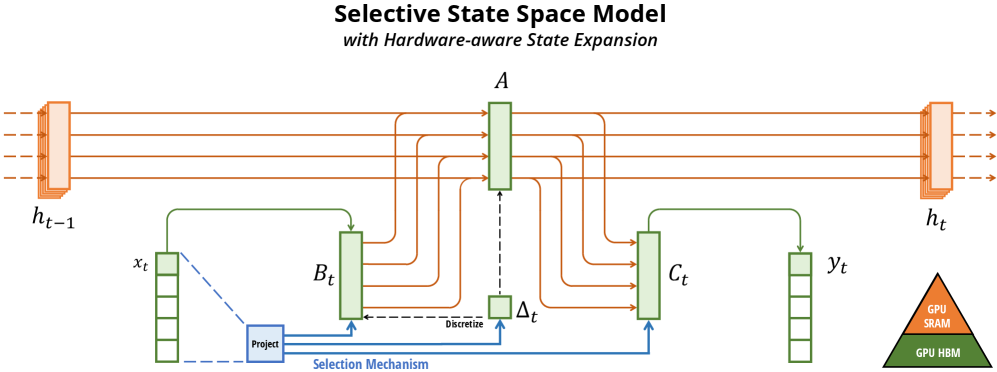


```
> **Never rewrite to relative paths** like `./figures/x1.png` — relative paths break on GitHub unless images are committed to the same repo.
### Extracting Existing Inline URLs from Scraped Markdown
Firecrawl embeds absolute image URLs in the scraped markdown. Extract them for the frontmatter catalog:
```bash
CORPUS_FILE="docs/research/corpus/2026-03-13-mamba-ssm.md"
# Extract all absolute image URLs already in the markdown
grep -oE 'https://[^)]+\.(png|jpg|svg|gif|webp)' "$CORPUS_FILE" | sort -u
```
These URLs are already inline — just copy them into the frontmatter `figure_urls` list.
### Frontmatter for Image-Rich Papers
The YAML frontmatter catalogs all figure source URLs for provenance. The markdown body embeds them inline:
```yaml
---
source_url: https://arxiv.org/html/2312.00752v2
scraped_at: "2026-03-13T00:00:00Z"
scraper: firecrawl
tags: [ssm, state-space-model, mamba, sequence-modeling]
content_tokens_approx: 4200
has_figures: true
figure_count: 12
figure_urls:
- https://arxiv.org/html/2312.00752v2/x1.png
- https://arxiv.org/html/2312.00752v2/x2.png
- https://arxiv.org/html/2312.00752v2/x3.png
- https://arxiv.org/html/2312.00752v2/x4.png
- https://arxiv.org/html/2312.00752v2/x5.png
---
```
### Corpus Index Entry with Figures
```json
{
"url": "https://arxiv.org/html/2312.00752v2",
"file": "corpus/2026-03-13-mamba-ssm.md",
"scraped_at": "2026-03-13T00:00:00Z",
"session": "2026-03-13-mamba-ssm",
"scraper": "firecrawl",
"has_figures": true,
"figure_count": 12,
"figure_urls": [
"https://arxiv.org/html/2312.00752v2/x1.png",
"https://arxiv.org/html/2312.00752v2/x2.png"
]
}
```
### Firecrawl vs Jina Reader: Empirical Comparison (arXiv)
**Validated on arXiv:2312.00752v2 (Mamba paper) — both scrapers running, same URL:**
| Scraper | Bytes | Lines | Words | Figures (absolute inline) | Math on GitHub |
| ------------------------ | ------ | ----- | ------ | ------------------------- | -------------------------------------- |
| Firecrawl `/v2/scrape` | 99,104 | 1,267 | 13,182 | 13 ✅ | ❌ doubled Unicode+LaTeX, no `$...$` |
| Jina Reader | 84,832 | 596 | 10,761 | 12 ✅ | ❌ doubled Unicode+LaTeX, no `$...$` |
| Pandoc from LaTeX source | — | — | — | via `\includegraphics` | ✅ `$inline$` + ` ```math ``` ` blocks |
**Verdict**: Firecrawl gets **17% more bytes, 2.1× more lines, 22% more words, 1 extra figure** than Jina on this paper — consistent with the far larger gap measured on chat shares. **Both emit absolute inline figure URLs**, so no URL reconstruction is needed from either scraper.
**Recommended arXiv workflow**:
1. Firecrawl `POST /v2/scrape` (preferred) — more complete content, figures inline
2. Jina Reader (fallback, static pages only) — 17% less content but still gets absolute figure URLs
3. Probe loop to build `figure_urls` frontmatter catalog regardless of scraper used
4. For human-readable math on GitHub: Pandoc from arXiv LaTeX source (see below)
### Math Rendering: Empirically Validated Approaches
**Validated on arXiv:2312.00752v2 (Mamba paper), March 2026.**
#### Firecrawl/Jina Math Output: Unreadable on GitHub
Both Firecrawl and Jina Reader extract math by doubling content — each equation appears as a Unicode render followed immediately by raw LaTeX source, packed into markdown table cells with `\displaystyle` prefixes and `\\bm{}` escaping. Example from the empirical test:
```
| | h′(t)\\displaystyle h^{\\prime}(t) | \=𝑨h(t)+𝑩x(t)\\displaystyle=\\bm{A}h(t)+\\bm{B}x(t) | | (1a) |
```
No `$...$` delimiters — **GitHub cannot render this as math**. The raw LaTeX portion is parseable by an LLM (equations are present), but the output is completely unreadable to humans on GitHub.
**For LLM consumption**: Firecrawl's doubled content is sufficient — the LaTeX source is embedded and an LLM can extract it.
**For human-readable GitHub rendering**: Use Pandoc from the arXiv LaTeX source tarball (see below).
#### Pandoc from arXiv LaTeX Source (Human-Readable Math)
Produces proper `$inline$` and ` ```math ``` ` display blocks that GitHub's MathJax/KaTeX renders natively:
```bash
ARXIV_ID="2312.00752"
# Download arXiv LaTeX source tarball
curl -L "https://arxiv.org/src/${ARXIV_ID}" -o "${ARXIV_ID}-src.tar.gz"
mkdir -p "${ARXIV_ID}-src"
tar xzf "${ARXIV_ID}-src.tar.gz" -C "${ARXIV_ID}-src/"
# Find main .tex entry point and section files
ls "${ARXIV_ID}-src/"*.tex
ls "${ARXIV_ID}-src/src/"*.tex 2>/dev/null # some papers put sections in src/
# Option A: Convert individual section files (safer — avoids macro parse errors)
pandoc "${ARXIV_ID}-src/src/background.tex" \
--to gfm+tex_math_dollars \
--wrap=none \
-o "${ARXIV_ID}-background.md"
# Option B: Convert full main.tex (may fail on custom macros like \iftoggle)
pandoc "${ARXIV_ID}-src/main.tex" \
--to gfm+tex_math_dollars \
--wrap=none \
-o "${ARXIV_ID}-pandoc.md"
```
Install: `brew install pandoc`. Works on any arXiv paper that publishes LaTeX source (most do).
**Pandoc output quality** (empirically validated):
- Inline math: `$x(t) \in \R \mapsto y(t) \in \R$` ✅ GitHub renders
- Display math: ` ```math\n\begin{align}\nh'(t) &= \A h(t) + \B x(t)\n\end{align}\n``` ` ✅ GitHub renders
- Custom macros (`\A`, `\B`, `\R`, `\dt`, `\dA`, `\dB`): ⚠️ **undefined in KaTeX** — macros pass through as-is and may partially fail on GitHub without the preamble's `\newcommand` definitions
**Handling custom macros**: Prepend the `\newcommand` block from `main.tex` preamble to the output:
````bash
# Extract custom macro definitions from preamble
grep '\\newcommand\|\\renewcommand\|\\def ' "${ARXIV_ID}-src/main.tex" > macros.tex
# Pandoc does not read preamble macros — include them explicitly in a math block at the top:
echo '```math' > preamble-block.md
cat macros.tex >> preamble-block.md
echo '```' >> preamble-block.md
cat preamble-block.md "${ARXIV_ID}-pandoc.md" > "${ARXIV_ID}-with-macros.md"
````
**Known Pandoc parse errors on arXiv LaTeX**:
| Error trigger | Cause | Workaround |
| -------------------- | ---------------------------------------------- | ----------------------------------------- |
| `\iftoggle{arxiv}` | Undefined toggle macro (etoolbox package) | Convert section files instead of main.tex |
| `\begin{figure*}` | Two-column figure environment breaks structure | Use `head -N` to avoid broken `\end` tags |
| `\bm{}`, `\mathbf{}` | Passes through — may not render in KaTeX | Check paper's macro file for mappings |
---
## Anti-Patterns
| # | Anti-Pattern | Why It Fails | Correct Approach |
| --- | --------------------------------------------- | ---------------------------------------------------------------------------- | ---------------------------------------------------------------------------------------------------------------------------------------------------- |
| 1 | Using `@mendable/firecrawl-js` SDK | `jiti` dynamic imports break in Bun | Direct `fetch()` calls |
| 2 | Searching paywalled sites without `waitFor` | JS SPAs return empty shell | Use `waitFor: 3000` for IEEE, ACM DL |
| 3 | Setting depth > 5 | Exponential query explosion, diminishing returns | Cap at depth 5 (`clampDepth()`) |
| 4 | No timeout on `fetch()` | Hangs indefinitely on unreachable pages | Always use `AbortController` with 15s timeout |
| 5 | Not trimming long page content | Exceeds LLM context window | `trimToTokenLimit(text, 25_000)` per page |
| 6 | Aborting on partial failure | Loses all completed work | Log failures, continue with remaining queries |
| 7 | Gating a run on a liveness check | The public API has no health endpoint and no host to be down | Handle per-request failures: retry once, then fall back. See Section 1. |
| 8 | Saving only synthesis without raw originals | Loses source material, prevents re-analysis | Always persist raw Firecrawl markdown to corpus |
| 9 | Rewriting figure URLs to local relative paths | Relative paths like `./figures/x1.png` break on GitHub — images don't render | Keep absolute URLs inline in markdown body (``); catalog in frontmatter `figure_urls` list — see Section 6 |
---
## References
- [API Endpoint Reference](./references/api-endpoint-reference.md) — `/v2/search` and `/v2/scrape` contracts
- [Academic Paper Routing](./references/academic-paper-routing.md) — Decision tree for paper sources
- [Recursive Research Protocol](./references/recursive-research-protocol.md) — Step-by-step recursive pattern
- [Corpus Persistence Format](./references/corpus-persistence-format.md) — Raw content archival format + directory layout
- [Evolution Log](./references/evolution-log.md) — Dated change history for this skill
## Post-Execution Reflection
After this skill completes, check before closing:
1. **Did the command succeed?** — If not, fix the instruction or error table that caused the failure.
2. **Did parameters or output change?** — If the underlying tool's interface drifted, update Usage examples and Parameters table to match.
3. **Was a workaround needed?** — If you had to improvise (different flags, extra steps), update this SKILL.md so the next invocation doesn't need the same workaround.
Only update if the issue is real and reproducible — not speculative.

