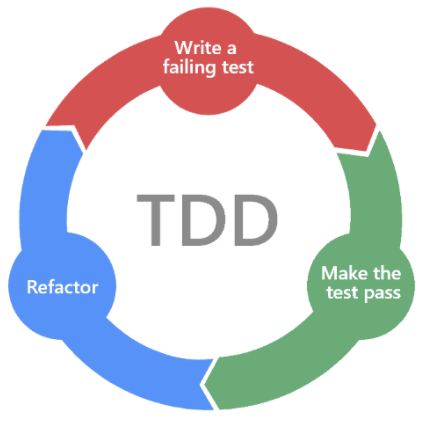
Guide for implementing features in ClaudeBar following architecture-first design, TDD, rich domain models, and Swift 6.2 patterns. Use this skill when:
(1) Adding new functionality to the app
(2) Creating domain models that follow user's mental model
(3) Building SwiftUI views that consume domain models directly
(4) User asks "how do I implement X" or "add feature Y"
(5) Implementing any feature that spans modules (DataSources, Providers, Quotas) and the App
Installs into .claude/skills of the current project.
Are you the author of Implement Feature?
Add the live security badge to your README. It updates with every re-scan.
[](https://www.skillsdirectory.com/skills/tddworks-implement-feature-claudebar)
---
name: implement-feature
description: |
  Guide for implementing features in ClaudeBar following architecture-first design, TDD, rich domain models, and Swift 6.2 patterns. Use this skill when:
  (1) Adding new functionality to the app
  (2) Creating domain models that follow user's mental model
  (3) Building SwiftUI views that consume domain models directly
  (4) User asks "how do I implement X" or "add feature Y"
  (5) Implementing any feature that spans modules (DataSources, Providers, Quotas) and the App
---

# Implement Feature in ClaudeBar

Implement features using architecture-first design, TDD, rich domain models, and Swift 6.2 patterns.

## Workflow Overview

```
┌─────────────────────────────────────────────────────────────┐
│  1. ARCHITECTURE DESIGN (Required - User Approval Needed)  │
├─────────────────────────────────────────────────────────────┤
│  • Read the design docs — they are the source of truth     │
│  • Place the feature: owner, capability, extension point    │
│  • Write the design change into the docs first              │
│  • Analyze requirements                                     │
│  • Create component diagram                                 │
│  • Show data flow and interactions                          │
│  • Present to user for review                               │
│  • Wait for approval before proceeding                      │
└─────────────────────────────────────────────────────────────┘
                            │
                            ▼ (User Approves)
┌─────────────────────────────────────────────────────────────┐
│  2. TDD IMPLEMENTATION                                      │
├─────────────────────────────────────────────────────────────┤
│  • Model tests → models (Quotas / Providers / Domain)       │
│  • Module tests → generic rules and workers (DataSources)   │
│  • Views, reading the domain directly                       │
└─────────────────────────────────────────────────────────────┘
```

## Phase 0: Architecture Design (MANDATORY)

Before writing any code, design it **in the docs** and get user approval.
The design docs are the source of truth ([AGENTS.md → Design docs are the
source of truth](../../../AGENTS.md#design-docs-are-the-source-of-truth)).

### Step 0: Read the design docs, and place the feature in them

Read the design in order ([ARCHITECTURE.md](../../../docs/architecture/ARCHITECTURE.md) maps it):
[USER_JOURNEYS.md](../../../docs/architecture/USER_JOURNEYS.md) (the person and the moment),
[CANONICAL_MODEL.md](../../../docs/architecture/CANONICAL_MODEL.md) (the tree, the words, each law
and its owner, *owned* vs *offered*), [TARGET_ARCHITECTURE.md](../../../docs/architecture/TARGET_ARCHITECTURE.md) (the
pieces and their one job, the flows), then any `docs/features/<x>/design.md` it touches. Then answer:

| Question | If yes |
|---|---|
| Does it answer *another question* than the product's lifecycle? | it is a **capability** (CANONICAL §2.1): declared in the definition, its own types, reached through a handle that is `nil` when not declared — never a flag on `Provider`, never chosen by a provider's name. A runner outside the modules is supplied by the `Engine` (TARGET_ARCHITECTURE §10) |
| Does a provider need something the definition can't say? | a **generic rule or worker** in `DataSources` (ENGINE_DESIGN), then a line of JSON — never a Swift line that names the provider |
| Does it react to a refresh, a selection, a setting? | it observes an **extension point** (e.g. `QuotaMonitor.onRefreshed`) — the Monitor is not edited for it |
| Does it notify? | its own port in Alerting — not a new method on an existing alerter |
| Is a law missing, or owned twice? | add it to CANONICAL §5 with **one** owner |

When the docs don't cover it, write the change into them first (tree lines,
laws with owners, a pieces table, a TARGET section) — that doc change is the
architecture you present in Step 4. Code that disagrees with the docs is
behind; don't bend the design to it.

### Step 1: Analyze Requirements

Identify:
- What new models/types are needed
- Which existing components will be modified
- Data flow between components
- External dependencies (CLI, API, etc.)

### Step 2: Create Architecture Diagram

Use ASCII diagram showing all components and their interactions:

```
Example: Codex accounts (#326) — a definition change plus generic pieces

┌──────────────────────────────────────────────────────────────────────┐
│                            ARCHITECTURE                               │
├──────────────────────────────────────────────────────────────────────┤
│  Resources (data)        Modules (Swift, no vendor names)    App     │
│                                                                      │
│  ┌──────────────┐   ┌─────────────────────────────┐   ┌───────────┐  │
│  │ codex.json   │──▶│ Providers                   │──▶│ Accounts  │  │
│  │  accounts:   │   │  ProviderCatalog.detect()   │   │ card      │  │
│  │  folder, ids │   │  ProviderDefinition.Accounts│   └───────────┘  │
│  │  dataSources │   │  Provider owns its Accounts │                  │
│  └──────────────┘   └──────────────┬──────────────┘                  │
│                                    │                                 │
│                     ┌──────────────▼──────────────┐                  │
│                     │ DataSources                 │                  │
│                     │  identity, requiresFiles,   │                  │
│                     │  JSON-RPC `then`, env       │                  │
│                     └──────────────┬──────────────┘                  │
│                                    ▼                                 │
│                     ┌─────────────────────────────┐                  │
│                     │ Quotas  (UsageSnapshot …)   │                  │
│                     └─────────────────────────────┘                  │
└──────────────────────────────────────────────────────────────────────┘
```

### Step 3: Document Component Interactions

List each component with:
- **Purpose**: What it does
- **Inputs**: What it receives
- **Outputs**: What it produces
- **Dependencies**: What it needs

```
Example:

| Component      | Purpose                | Inputs          | Outputs        | Dependencies    |
|----------------|------------------------|-----------------|----------------|-----------------|
| AddedAccounts  | Validate a login folder| folder path     | account config | DataSources     |
| identity rule  | Fail closed on swaps   | credential      | UsageError     | —               |
```

### Step 4: Present for User Approval

**IMPORTANT**: Always ask user to confirm the design is correct before implementing —
the doc change (tree, laws and owners, pieces), the diagram, and for UI a mockup in
`design-concept/<feature>/` on mock data.

Use AskUserQuestion tool with options:
- "Approve - proceed with implementation"
- "Modify - I have feedback on the design"

Do NOT proceed to Phase 1 until user explicitly approves.

---

## Core Principles

### 1. Rich Domain Models (User's Mental Model)

Domain models encapsulate behavior, not just data:

```swift
// Rich domain model with behavior
public struct UsageQuota: Sendable, Equatable {
    public let percentRemaining: Double

    // Domain behavior - computed from state
    public var status: QuotaStatus {
        QuotaStatus.from(percentRemaining: percentRemaining)
    }

    public var isDepleted: Bool { percentRemaining <= 0 }
    public var needsAttention: Bool { status.needsAttention }
}
```

### 2. Swift 6.2 Patterns (No ViewModel/AppState Layer)

Views consume domain models directly from `QuotaMonitor`:

```swift
// QuotaMonitor is the single source of truth
@MainActor @Observable
public final class QuotaMonitor {
    // The providers you keep: add, delete, order, the derived lineup
    public let providers: Providers

    public var logins: [Account]   // every login
    public var lineup: [Account]   // the lineup
    public func login(id: String) -> Account?

    // Selection state
    public var selectedProviderId: String
    public var selectedLogin: Account?
    public var selectedProviderStatus: QuotaStatus
}

// Views consume domain directly - NO AppState layer
struct MenuContentView: View {
    let monitor: QuotaMonitor  // Injected from app

    var body: some View {
        // Use delegation methods, not monitor.providers.enabled
        ForEach(monitor.lineup, id: \.id) { login in
            ProviderPill(provider: login)
        }
    }
}
```

### 3. Protocol-Based DI with @Mockable

Ports for what lies outside the app live at a module's root and are
`@Mockable`; their implementations are `internal` in `Internal/`:

```swift
@Mockable
public protocol NetworkClient: Sendable {
    func request(_ request: URLRequest) async throws -> (Data, URLResponse)
}
```

## Architecture

> **Reference:** [MODULAR_DESIGN.md](../../../docs/architecture/MODULAR_DESIGN.md) (modules) ·
> [TARGET_ARCHITECTURE.md](../../../docs/architecture/TARGET_ARCHITECTURE.md) (how a provider runs) ·
> [ARCHITECTURE.md](../../../docs/architecture/ARCHITECTURE.md) (the app layers)

The code is mid-migration from three layers to modules. Find which side the
behaviour lives on before you change it:

| Where | Holds | Tests |
|---|---|---|
| `Modules/Providers/Resources/Providers/<id>.json` (+ `.js`) | every built-in provider: where the key is, how to fetch, how to read | `Modules/Providers/Tests/` (golden tests over `StubbedProvider` / `ClaudeHarness`) |
| `Modules/Providers/Sources` | `ProviderCatalog` (finds every definition), `Engine` (the shared ports), `Provider` (the one lifecycle: refresh, fallback chain, accounts), `ProviderDefinition`, settings and account contracts, the capabilities (`UsageHistory`, `GuestPasses`, `InUse`) | `Modules/Providers/Tests/` |
| `Modules/DataSources/Sources` | `DataSource` and its workers: credential lookups (environment, login shell, files, Keychain, browser cookies and storage, SQLite) and refreshes; HTTP, steps, JSON-RPC, terminal, command, file, directory, SQLite, local-server and CloudWatch fetches; JSON / text / script mapping; `UsageLog` and its log readers; the process runners | `Modules/DataSources/Tests/` |
| `Modules/Quotas/Sources` | the usage model: `UsageSnapshot`, `UsageQuota`, `UsageError`, plans, costs, `DailyUsageStat` / `DailyUsageReport` (interim shapes, see each type's `- Note:`) | `Tests/DomainTests/` and the tests of the module that uses it |
| `Modules/AWSClients` | the AWS SDK behind DataSources' `CloudWatchClient` and `PriceCatalog` ports | `Modules/AWSClients/Tests/` |
| `Sources/Domain` | `QuotaMonitor`, Notify!, sessions, In use's `NewSessions` | `Tests/DomainTests/` |
| `Sources/Infrastructure` | storage, notifications, hooks, the shell environment, Claude's guest-pass runner | `Tests/InfrastructureTests/` |
| `Sources/App` | SwiftUI views reading the domain directly; `ClaudeBarApp.init`, the composition root, which builds the `Engine` and names no provider | `Tests/AppTests/`, `Tests/AcceptanceTests/` |

A bug in a migrated provider is fixed in its JSON, or generically in
`DataSources`, never with vendor-named Swift. Modules never `import Domain`.

**Key patterns:**
- **Modules by context** — the domain at a module's root, its implementation in `Internal/`, one factory enum per module (`DataSources.make`, `ProviderFactory.make`)
- **Providers are data** — a feature a provider needs becomes a generic rule or worker, then a line of JSON
- **Protocol-based DI** — `@Mockable` ports; Chicago-school tests assert on state
- **No ViewModel layer** — views read `QuotaMonitor` and `Provider` directly
- **Settings** — generic per-provider values (`dataSourceKind`, `isOn`) before a new sub-protocol

## TDD Workflow (Chicago School)

Name each test `should <outcome> [when <situation>]`, in the person's words, never a method, type or mechanism verb → [Naming tests](references/tdd-patterns.md#naming-tests).

We follow **Chicago school TDD** (state-based testing):
- Test **state changes** and **return values**, not interactions
- Focus on the "what" (observable outcomes), not the "how" (method calls)
- Mocks stub dependencies to return data, not to verify calls
- Design emerges from tests (emergent design)

### Phase 1: Domain Model Tests

Test state and computed properties:

```swift
@Suite
struct FeatureModelTests {
    @Test func `should be normal when half is left`() {
        // Given - set up initial state
        let model = FeatureModel(value: 50)

        // When/Then - verify state/return value
        #expect(model.status == .normal)
    }

    @Test func `should have 70 left and stay healthy after using 30 of 100`() {
        // Given
        var model = FeatureModel(value: 100)

        // When - perform action
        model.consume(30)

        // Then - verify new state
        #expect(model.value == 70)
        #expect(model.status == .healthy)
    }
}
```

### Phase 2: Module Tests (DataSources / Providers)

Stub dependencies to return data, assert on resulting state:

```swift
@Suite
struct FeatureServiceTests {
    @Test func `should load three items when the service answers`() async throws {
        // Given - stub dependency to return data (not verify calls)
        let mockClient = MockNetworkClient()
        given(mockClient).fetch(any()).willReturn(validResponseData)

        let service = FeatureService(client: mockClient)

        // When
        let result = try await service.fetch()

        // Then - verify returned state, not interactions
        #expect(result.items.count == 3)
        #expect(result.status == .loaded)
    }
}
```

### Phase 3: Integration

Create the views. `ClaudeBarApp.init` is the composition root: it builds the
`Engine` (the ports every provider shares) and calls `ProviderCatalog().detect()`.
A provider is never wired there; a new **port** is a new `Engine` field, built
once in `init` (keep startup work there, never in `ClaudeBarMain`). Acceptance
specs in `Tests/AcceptanceTests/` compose real modules with stubbed ports.

```bash
tuist test Providers         # one module's tests while working (schemes: Providers, DataSources, Domain, Infrastructure, AppTests, AcceptanceTests)
# tuist caches results; the final check, and a forced re-run of one suite, use xcodebuild:
xcodebuild test -workspace ClaudeBar.xcworkspace -scheme ClaudeBar-Workspace -destination 'platform=macOS,arch=arm64'
xcodebuild test -workspace ClaudeBar.xcworkspace -scheme ClaudeBar-Workspace \
  -destination 'platform=macOS,arch=arm64' -only-testing:ProvidersTests/ClaudeAPITests
```


## References

- [Architecture diagram patterns](references/architecture-diagrams.md) - ASCII diagram examples for different scenarios
- [Swift 6.2 @Observable patterns](references/swift-observable.md)
- [Rich domain model patterns](references/domain-models.md)
- [TDD test patterns](references/tdd-patterns.md)

## Checklist

### Architecture Design (Phase 0)
- [ ] Read CANONICAL_MODEL, TARGET_ARCHITECTURE and the feature's design.md
- [ ] Place it: owner, capability (handle `nil` when not declared), extension point
- [ ] Write the design change into the docs first
- [ ] Analyze requirements and identify components
- [ ] Create ASCII architecture diagram with component interactions
- [ ] Document component table (purpose, inputs, outputs, dependencies)
- [ ] **Get user approval before proceeding**

### Implementation (Phases 1-3) - Chicago School TDD
- [ ] Write failing test asserting expected STATE (Red)
- [ ] Write minimal code to pass the test (Green)
- [ ] Refactor while keeping tests green
- [ ] Put each type in the module MODULAR_DESIGN.md names (never a vendor-named type in a module)
- [ ] Test state changes and return values (not interactions)
- [ ] Define protocols with `@Mockable` for external dependencies
- [ ] Stub mocks to return data, assert on resulting state
- [ ] Implement ports in the module's `Internal/`
- [ ] Create views consuming domain models directly
- [ ] Views render and tell only — no comparing, counting or reading quotas to decide
- [ ] Docs updated in the same change (status, build truth, laws)
- [ ] Real UI screenshots on mock data (`scripts/demo-screenshots.sh`) for UI changes
- [ ] Full `xcodebuild test` green (`tuist test` skips cached targets)