**Your AI spending, visualized as pixel art. In real-time.** Ever wondered where all your tokens go? ohmytoken turns your invisible LLM spending into a mesmerizing pixel bead board that fills up as you chat, code, and create with AI. 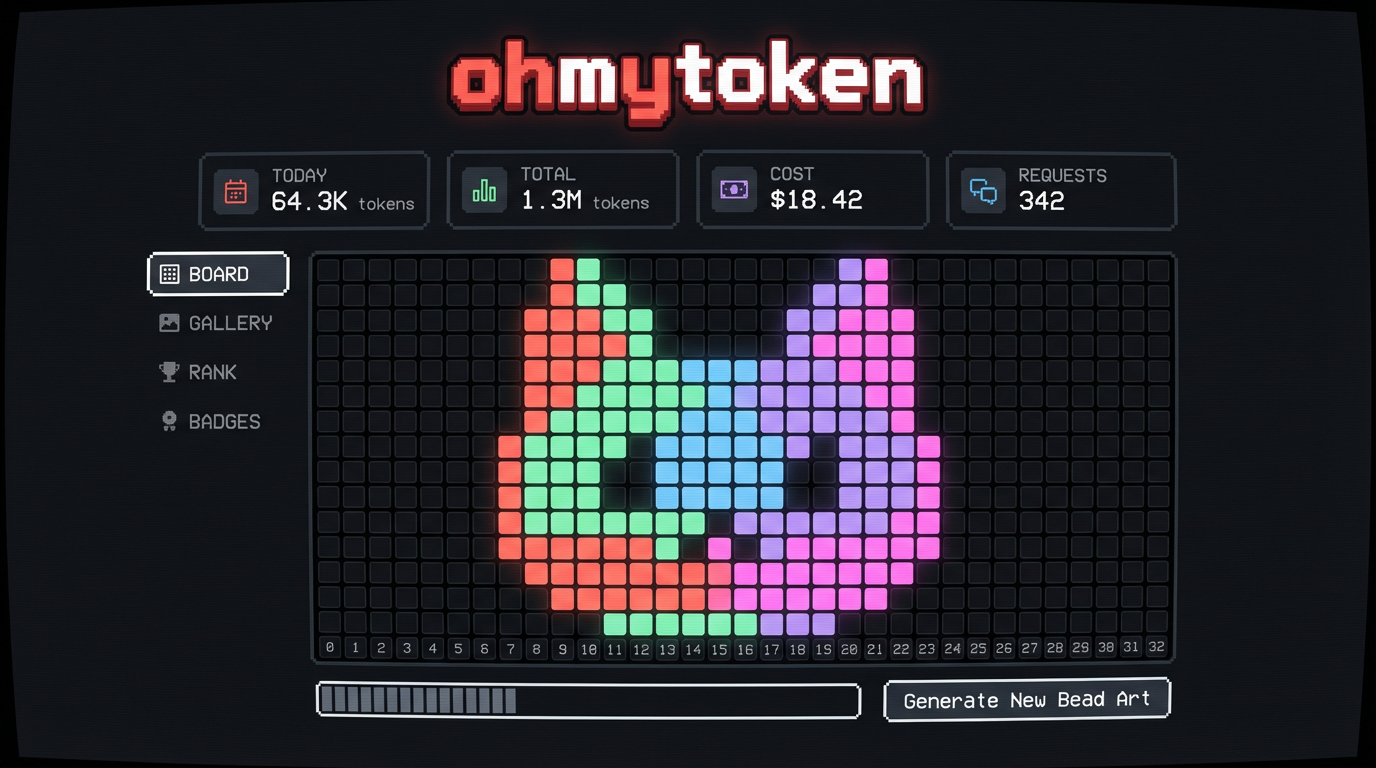
Installs into .claude/skills of the current project.
Are you the author of Ohmytoken Tracker?
Add the live security badge to your README. It updates with every re-scan.
[](https://www.skillsdirectory.com/skills/johnalbertini14-glitch-ohmytoken-tracker)
# ohmytoken-tracker
**Your AI spending, visualized as pixel art. In real-time.**
Ever wondered where all your tokens go? ohmytoken turns your invisible LLM spending into a mesmerizing pixel bead board that fills up as you chat, code, and create with AI.

## Why You'll Love It
**It's weirdly addictive.** Each model gets its own color — Claude is coral, GPT is green, Gemini is blue. Watch your board fill up in spiral patterns, rain down like Tetris, or bloom from the center. Pick a cat-shaped board, a heart, a Mario mushroom, or a star. Your token art is unique to you.
**It's social.** Share your board as a pixel art card with a QR code. See how you rank against other developers. Unlock achievements like "Night Owl" (coding at 2AM) or "Millionaire" (1M tokens burned). Browse the gallery of everyone's boards.
## Setup: 3 Steps, 2 Minutes
### Step 1: Get Your API Key
1. Go to [ohmytoken.dev](https://ohmytoken.dev)
2. Click **"GITHUB"** or **"GOOGLE"** to sign in (one click, no passwords)
3. You'll see a **Welcome** screen with your API Key — it looks like `omt_f9c399...`
4. Click **COPY** to copy it
### Step 2: Install the Skill
Run this in your terminal:
```bash
openclaw skill install @0x5446/ohmytoken-tracker
```
### Step 3: Add Your API Key
Open your `openclaw.json` and add this block:
```json
{
"skills": {
"ohmytoken-tracker": {
"config": {
"api_key": "omt_paste_your_key_here"
}
}
}
}
```
**Done!** Open [ohmytoken.dev](https://ohmytoken.dev) and watch the beads drop as you use AI.
## Privacy & Security
**We only collect token counts. Nothing else.**
| What we collect | What we DON'T collect |
|----------------|----------------------|
| Model name (e.g. "gpt-4o") | Your prompts |
| Token counts (prompt + completion) | Your responses |
| Timestamp | Your API keys to providers |
| | Your files, code, or data |
| | Your IP address |
| | Any conversation content |
The tracker sends **4 numbers per request**: model name, prompt token count, completion token count, and timestamp. That's it. Your prompts, responses, files, and code **never leave your machine**.
The source code is fully open: [github.com/0x5446/ohmytoken-oss](https://github.com/0x5446/ohmytoken-oss) — audit it yourself.
## What You Get
- **Real-time bead board** — tokens appear as colored pixels the moment you use them
- **7 board shapes** — square, cat, heart, star, circle, diamond, mushroom
- **7 fill animations** — sequential, spiral, center-out, random, snake, diagonal, rain
- **4 time views** — today, this month, this year, all-time
- **10 achievements** — from "First Burn" to "Millionaire"
- **Leaderboards** — total tokens, efficiency, model diversity, night owl
- **Share cards** — pixel art image + QR code + profile URL
- **Embeddable badges** — SVG badge for your GitHub README
- **Wrapped reports** — your personal token year-in-review
## Zero Friction
- Works with every model OpenClaw supports
- Runs silently in the background, never interrupts your workflow
- Google/GitHub OAuth login, no new account to create
- Completely free
---
Questions? Issues? [github.com/0x5446/ohmytoken-oss/issues](https://github.com/0x5446/ohmytoken-oss/issues)
Made with pixels and love. [ohmytoken.dev](https://ohmytoken.dev)

