Installs into .claude/skills of the current project.
Are you the author of Iblai Vibe Agent Llm?
Add the live security badge to your README. It updates with every re-scan.
[](https://www.skillsdirectory.com/skills/iblai-iblai-vibe-agent-llm)
---
name: iblai-vibe-agent-llm
description: Add the agent LLM tab (model provider selection) to your Next.js app
globs:
alwaysApply: false
metadata:
kind: ui
---
# /iblai-vibe-agent-llm
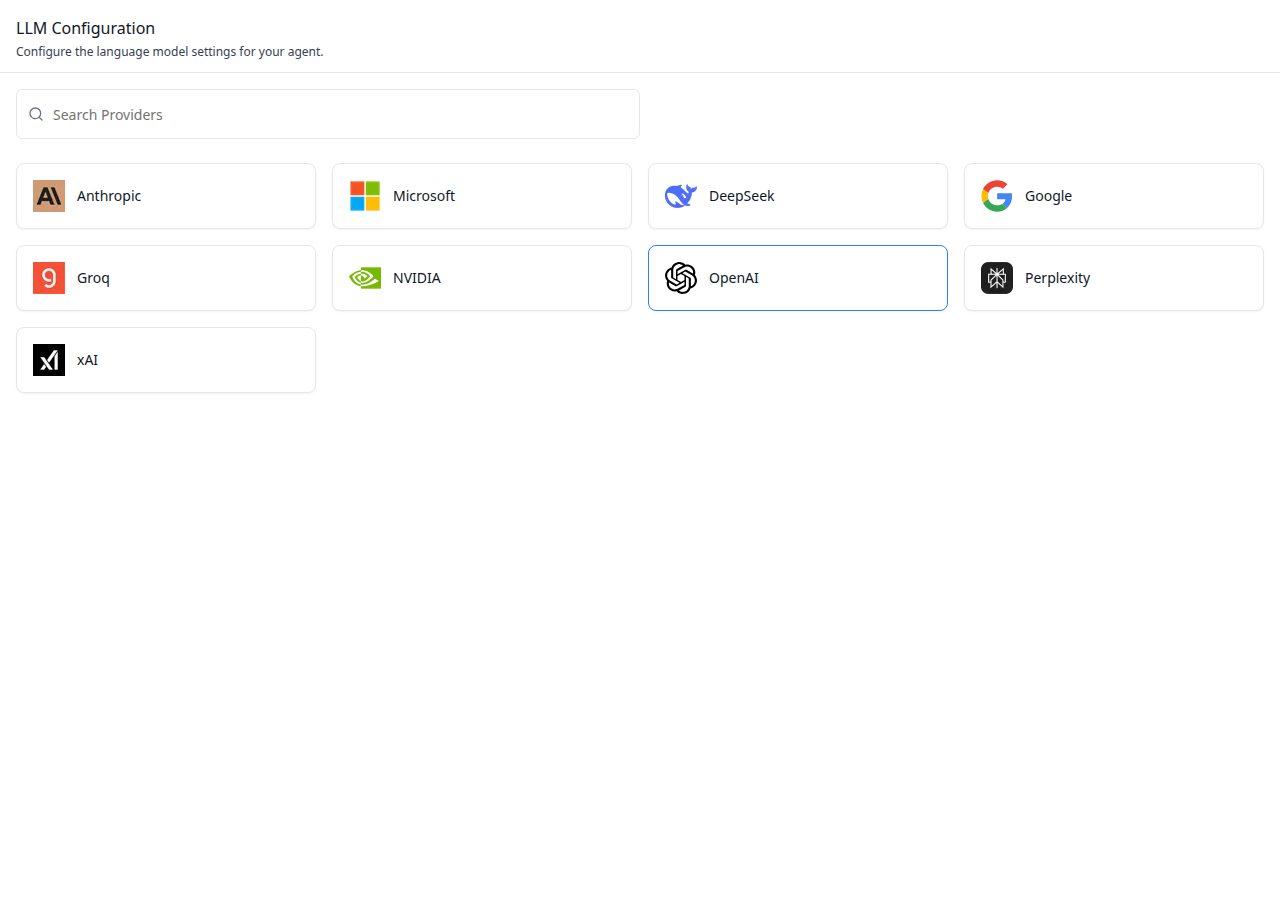
Add the agent **LLM tab** -- a searchable grid of LLM provider cards with
a modal for selecting specific models within a chosen provider. This is
one tab in the wider agent-settings family. All tabs share the same
`AgentSettingsProvider` wrapper.
> **Common setup (brand, conventions, env files, verification):** see [docs/skill-setup.md](https://raw.githubusercontent.com/iblai/vibe/refs/heads/main/docs/skill-setup.md).
## Prerequisites
- Auth must be set up first (`/iblai-vibe-auth`)
- MCP server + skills configured (`@iblai/mcp` in `.mcp.json`)
- `AgentSettingsProvider` must wrap the route (see `/iblai-vibe-agent-setting`
Step 2 if not already set up)
- Ask the user for a real `mentorId` (agent UUID). Do NOT invent one.
## Step 1: Check Environment
Before proceeding, check for an `iblai.env` in the project root. Look for
`PLATFORM`, `DOMAIN`, and `TOKEN` variables. If the file does not exist or
is missing these variables, tell the user:
"You need an `iblai.env` with your platform configuration. Download the
template and fill in your values:
`curl -o iblai.env https://raw.githubusercontent.com/iblai/vibe/refs/heads/main/iblai.env`"
## Step 2: Mount `AgentLLMTab`
`AgentLLMTab` has one required prop: `getLLMProviderDetails`. This maps a
provider name to display info (logo URL, display name). The host app
provides this because logos and display names are host-specific.
```tsx
// app/(app)/agents/[mentorId]/llm/page.tsx
"use client";
import {
AgentLLMTab,
type LLMProviderDetails,
} from "@iblai/iblai-js/web-containers/next";
function getLLMProviderDetails(
providerName: string,
llmName?: string,
): LLMProviderDetails {
const providers: Record<string, LLMProviderDetails> = {
openai: { name: "OpenAI", logo: "/logos/openai.svg" },
anthropic: { name: "Anthropic", logo: "/logos/anthropic.svg" },
google: { name: "Google", logo: "/logos/google.svg" },
};
return (
providers[providerName] ?? {
name: providerName,
logo: "/logos/default.svg",
}
);
}
export default function AgentLLMPage() {
return (
<div className="flex h-full flex-col bg-white">
<AgentLLMTab getLLMProviderDetails={getLLMProviderDetails} />
</div>
);
}
```
## Step 3: Customize Labels (Optional)
```tsx
import { AgentLLMTab } from "@iblai/iblai-js/web-containers/next";
<AgentLLMTab
getLLMProviderDetails={getLLMProviderDetails}
labels={{
header: { title: "Model configuration" },
}}
/>;
```
## Step 4: Use MCP Tools for Customization
```
get_component_info("AgentLLMTab")
get_component_info("AgentSettingsProvider")
```
## `<AgentLLMTab>` Props
Import from `@iblai/iblai-js/web-containers/next`.
| Prop | Type | Required | Description |
|------|------|----------|-------------|
| `getLLMProviderDetails` | `(providerName: string, llmName?: string) => LLMProviderDetails` | Yes | Maps provider name to display info (logo, display name) |
| `labels` | `DeepPartial<LLMTabLabels>` | No | Override user-visible strings |
| `showConfigurationHeader` | `boolean` | No | Show/hide the configuration header |
## Related Exports
From `@iblai/iblai-js/web-containers/next`:
- `AGENT_LLM_TAB_LABELS` -- the default agent-facing label bundle.
- `LLMTabLabels` -- type for the full label bundle.
- `LLMProviderDetails` -- type for the return value of `getLLMProviderDetails`.
- `LLMProvider`, `Provider` -- types for provider data structures.
## Step 5: Verify
Run `/iblai-vibe-ops-test` before telling the user the work is ready:
1. `pnpm build` -- must pass with zero errors
2. `pnpm test` -- vitest must pass
3. Start dev server and touch test:
```bash
pnpm dev &
npx playwright screenshot http://localhost:3000/agents/<id>/llm /tmp/agent-llm.png
```
## Important Notes
- **Redux store**: Must include `mentorReducer` and `mentorMiddleware`
- **`initializeDataLayer()`**: 5 args (v1.2+)
- **`@reduxjs/toolkit`**: Deduplicated via webpack aliases in `next.config.ts`
- **Peer deps**: `sonner` and `@iblai/iblai-web-mentor` must be installed
(`pnpm add sonner @iblai/iblai-web-mentor`)
- **Shared provider**: `AgentSettingsProvider` must wrap the route at a
layout level. See `/iblai-vibe-agent-setting` Step 2 for the full snippet.
- **Required prop**: `getLLMProviderDetails` is host-provided because
logos and display names vary per deployment.
- **Brand guidelines**: [BRAND.md](https://raw.githubusercontent.com/iblai/vibe/refs/heads/main/BRAND.md)



