Iblai Vibe Agent Create
ASecurityCreate an ibl.ai agent from inside your app — there is no SDK component for creation, so this is the server route (org authority, admin-verified) that calls the platform's mentor-with-settings endpoint, the browser helper that calls it, and the pick-or-create setup screen vibe-starter uses to choose the app's default agent; then hand off to /iblai-vibe-agent-setting and the agent tabs. Use when the user says create an agent, new agent, let admins create agents, agent from a template, or the a...
- 15 stars
- 0 votes
- 0 copies
- 0 views
- Added September 20, 2026
Works with
Security analysis
100/100Pro scans all 7 files and shows the line behind each finding
npx -y skills add iblai/vibe --skill iblai-vibe-agent-create --agent claude-codeAre you the author of Iblai Vibe Agent Create?
Add the live security badge to your README. It updates with every re-scan.
[](https://www.skillsdirectory.com/skills/iblai-iblai-vibe-agent-create)---
name: iblai-vibe-agent-create
description: Create an ibl.ai agent from inside your app — there is no SDK component for creation, so this is the server route (org authority, admin-verified) that calls the platform's mentor-with-settings endpoint, the browser helper that calls it, and the pick-or-create setup screen vibe-starter uses to choose the app's default agent; then hand off to /iblai-vibe-agent-setting and the agent tabs. Use when the user says create an agent, new agent, let admins create agents, agent from a template, or the app has no agent yet. For editing an existing agent see /iblai-vibe-agent; for chatting see /iblai-vibe-agent-chat.
globs:
alwaysApply: false
metadata:
core: true
kind: ui
---
# /iblai-vibe-agent-create
> **First time here?** If `iblai.env` has no `ARCHITECTURE=`, run `/iblai-vibe-start` first (four questions; two minutes) — it decides single-org / multi-org / headless and who signs in, and every skill reads the answer.
An agent is created with one platform call and returns a `unique_id` — the
UUID every other agent skill needs. The SDK has no creation component
(verified against `@iblai/web-containers` 1.16–1.19), so the pattern is a
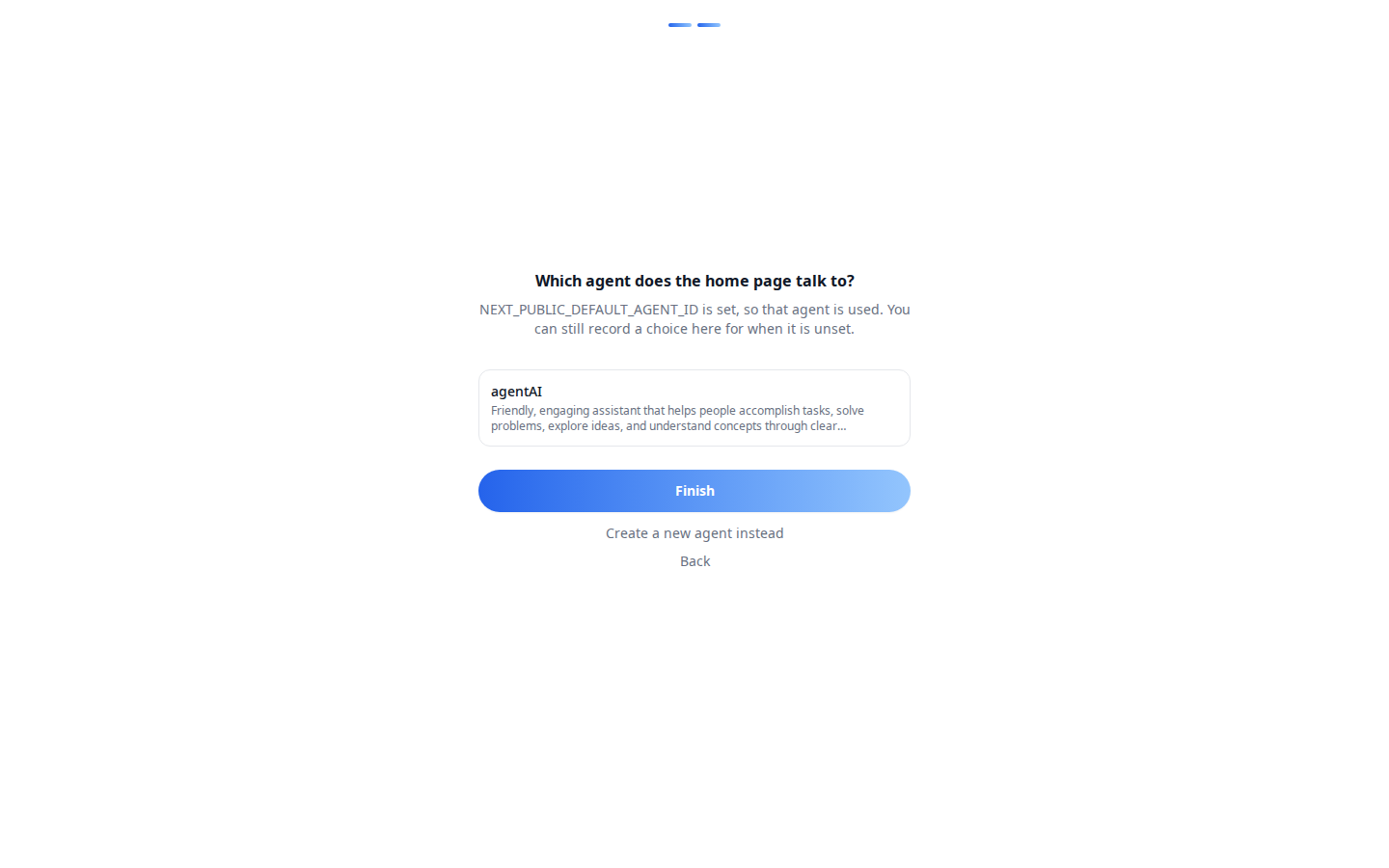
**server route** plus a small form. vibe-starter's `/setup` is that form.
> **Common setup (brand, conventions, env files, verification):** see [docs/skill-setup.md](https://raw.githubusercontent.com/iblai/vibe/refs/heads/main/docs/skill-setup.md).
## Prerequisites
- Auth in place; `IBLAI_API_KEY` in `.env.local` (server-only) — creation
needs the org's authority.
- `lib/iblai/platform.ts` from `/iblai-vibe-api` (`requireAdmin`,
`platformFetch`).
- The caller must be an org admin (or hold `MENTOR_CREATORS` — see
`/iblai-vibe-rbac`; the org toggle `rbac/student-agent-creation/status/`
decides whether plain members may create).
## Step 1: Install
Render the assets (strip `.j2`; no variables):
| Asset | Destination | Does |
|---|---|---|
| `admin-agents-route.ts.j2` | `app/api/admin/agents/route.ts` | `GET` lists the org's agents; `POST` creates one |
| `admin-client.ts.j2` | `lib/iblai/admin-client.ts` | browser `adminFetch()` that forwards the session token |
| `setup-screen.tsx.j2` | `components/setup/setup-screen.tsx` | name the app → pick or create the agent → save to org metadata |
| `setup-page.tsx.j2` | `app/setup/page.tsx` | admin-only page, outside the navbar |
The setup screen saves through `useOrgSettings` (`/iblai-vibe-org-metadata`)
and uses the SDK's `OnboardingShell` / `StepHeader`. Needs shadcn `input`, `label`.
## Step 2: The call
```ts
// server, after requireAdmin(req)
const agent = await platformFetch<{ unique_id: string; name: string }>(
`/dm/api/ai-mentor/orgs/${org}/users/${caller.username}/mentor-with-settings/`,
{
method: "POST",
body: {
template_name: "ai-mentor", // the default template on most orgs
new_mentor_name: name,
display_name: name,
description,
system_prompt, // optional; refine later in the Prompts tab
// llm_provider: "openai", // optional; set later in the LLM tab
},
},
);
```
Listing existing agents (for a picker):
`GET /dm/api/search/orgs/{org}/users/{username}/mentors/`.
From the browser:
```ts
import { adminFetch } from "@/lib/iblai/admin-client";
const { unique_id } = await adminFetch<{ unique_id: string }>("/api/admin/agents", {
method: "POST",
json: { name: "Support Assistant", description: "Answers order questions." },
});
```
To copy an existing agent instead, use **fork** in `/iblai-vibe-agent-setting`.
## Step 3: After creation
1. Store the id where the app reads it: `NEXT_PUBLIC_DEFAULT_AGENT_ID` (env,
wins) or the org setting `defaultAgentId` (what `/setup` writes).
2. Configure it: `/iblai-vibe-agent-setting` (identity, visibility), then
Prompts, LLM, Datasets, Tools, Memory — all via `/iblai-vibe-agent`.
3. Chat with it: the home page in vibe-starter, or `/iblai-vibe-agent-chat`.
## Verify
1. `pnpm typecheck && pnpm build`.
2. As an admin, open `/setup`, create an agent, land on `/` chatting with it;
the new agent appears on os.ibl.ai → Explore → Custom.
3. As a member, `POST /api/admin/agents` answers `403`.
## Platform data
| Call | Purpose |
|---|---|
| `POST …/orgs/{org}/users/{username}/mentor-with-settings/` | create from template → `unique_id` |
| `GET …/search/orgs/{org}/users/{username}/mentors/` | list agents |
| `GET …/orgs/{org}/users/{username}/mentor/categories/` | categories to assign afterwards |
| `POST …/users/{username}/mentors/{mentor}/fork/` | copy an agent |
REST references: [agent-create](https://raw.githubusercontent.com/iblai/vibe/refs/heads/main/skills/agents/iblai-api-agent-create/SKILL.md),
[agent-setting](https://raw.githubusercontent.com/iblai/vibe/refs/heads/main/skills/agents/iblai-api-agent-setting/SKILL.md).
## Related skills
- `/iblai-vibe-agent` — the tabs to configure it
- `/iblai-vibe-agent-setting` — identity, visibility, fork, delete
- `/iblai-vibe-agent-search` — the browser members pick from
- `/iblai-vibe-api` — the server-route pattern
Files in this skill
- SKILL.md
- assets/admin-agents-route.ts.j2
- assets/admin-client.ts.j2
- assets/setup-page.tsx.j2
- assets/setup-screen.tsx.j2
- iblai-vibe-agent-create-1-dialog.png
- test.json
Attribution



Comments
Loading comments…
Newsletter
Get the weekly list of safe new skills, and the ones we pulled.