 Skills Directory
Development
Programming, frameworks, implementation, frontend, backend, and app development
Browse development skills
Showing 59,449–59,472 of 60,156 skills
A documentation-focused skill for game architecture design. Produces technical selection, design, and planning documents through a structured pipeline. Use this skill to generate requirement analysis, technical design, and implementation planning documents for new game projects or major feature development.
Surprise MVP generator - conceive a novel idea and build a polished MVP without spoiling the surprise
Use this skill to audit iOS apps for accessibility compliance with Apple Human Interface Guidelines, WCAG 2.2 standards, and iOS accessibility best practices.
This skill generates Python scripts and shell scripts to control RGB LEDs on the Raspberry Pi 500+ keyboard. Use this skill when the user asks to create keyboard lighting effects, animations, color patterns, notification systems, or any program that controls the Pi 500+ keyboard LEDs. This skill should be used for requests like "turn F1-F12 keys blue", "create a typing speed indicator", or "make an email notification effect".
[Alexa](https://developer.amazon.com/alexa) is Amazon's cloud-based voice service. Most people are familiar with the service through using an [Amazon Echo or Echo dot](https://developer.amazon.com/alexa/echo) but the service can also be integrated in to custom internet-connected devices like this talking robotic fish: [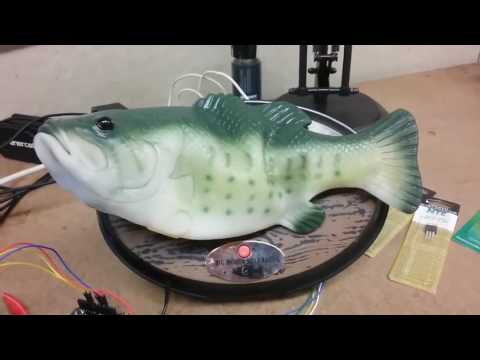](https://www.youtube.com/watch?v=bRxhgxH6FUI) When building a skill for Alexa there are two components - th...
KAN AI Skills are deployable packages to Edge devices. These packages are a cascade of stages or *nodes* where the video feed is consumed by an Edge device, inferences are calculated, results are filtered, and results and video clips are exported for further business logic processing or storage. There are three groups of nodes that comprise AI skills: 1. **Model** – All the machine learning models available for detection and classification. Models may be selected from the [Model Z
Workato developer using Platform CLI. Use when working with Workato locally.
Review code against KoroMind coding lessons. Use when reviewing code, checking for common issues, or validating changes against project best practices.
Complete GitHub workflow for Claude Code on the web. ALL GitHub operations MUST use REST API (never gh CLI). Includes branch naming (claude/*-sessionId), push retry logic, PR/issue management via API, and complete workflows. Use for all GitHub interactions in Claude Code web environment.
CRITICAL - Guide for using Claudish CLI ONLY through sub-agents to run Claude Code with any AI model (OpenRouter, Gemini, OpenAI, local models). NEVER run Claudish directly in main context unless user explicitly requests it. Use when user mentions external AI models, Claudish, OpenRouter, Gemini, OpenAI, Ollama, or alternative models. Includes mandatory sub-agent delegation patterns, agent selection guide, file-based instructions, and strict rules to prevent context window pollution.
Expert Midjourney prompt engineering skill. Use this skill when users need help crafting effective Midjourney prompts, converting natural language descriptions into optimized prompts, or want guidance on Midjourney parameters and techniques. Specializes in V7 best practices, the 7-Element Framework, and photography terminology.
Generate AI images using Midjourney through the Legnext API. Use this skill when users request Midjourney-style image generation, visual content creation, or ask to create/generate images with natural language descriptions. Handles prompt engineering, API calls, task polling, and result retrieval.
This skill should be used when working with Rust code, reviewing Rust code, managing Rust dependencies, creating Rust projects, or fixing Rust compilation errors. It provides strict coding standards (especially FAIL FAST error handling), workspace architecture guidance, dependency management automation, and common Rust patterns.
Textum PRD→Scaffold→Story workflow for Codex with low-noise outputs and gate checks.
Creates Python projects with proper structure, virtual environments, and dependency management. Use when users request to create a new Python project, set up a Python development environment, or initialize a Python application with standard tooling.
Shell scripting best practices for cross-platform CLI tools
Cross-platform development patterns for macOS, Windows, and Linux
Create dex task from markdown planning documents (plans, specs, design docs, roadmaps)
Create structured implementation plan in docs/plans/
Audit code and dependencies for security vulnerabilities. Use when reviewing PRs, checking dependencies, preparing for deployment, or when user mentions security, vulnerabilities, or audit.
Create a new release for grepai. Checks CI, determines version type, updates CHANGELOG and documentation, credits contributors, and creates GitHub release.
Replaces ALL built-in search tools. You MUST invoke this skill BEFORE using WebSearch, Grep, or Glob. NEVER use the built-in Grep tool - use `grepai` instead.
Use this skill when the user asks about creating videos with React, Remotion framework, programmatic video generation, video animations, or needs help with Remotion projects
Use when creating HTML email templates with React components - welcome emails, password resets, notifications, order confirmations, newsletters, or transactional emails.