Add the OS app's Code mode to a vibe Next.js + Tauri app — a "Code" pill in the chat composer that turns the agent into an agentic coding tool (opencode over ACP) editing files, running commands, and committing in a workspace on the user's machine, with per-operation Allow/Deny permission cards, a loopback proxy that never hands the agent the real token, per-agent skills synced from the platform, and phone access by pairing a mobile build to a desktop. Ships the Tauri Rust modules from src-ta...
Scanned 9/20/2026
Install to Claude Code
npx -y skills add iblai/vibe --skill iblai-vibe-os-agent-code-mode --agent claude-codeInstalls into .claude/skills of the current project.
Are you the author of Iblai Vibe Os Agent Code Mode?
Add the live security badge to your README — it updates automatically with every re-scan.
[](https://www.skillsdirectory.com/skills/iblai-iblai-vibe-os-agent-code-mode)More formats (shields.io, HTML) on the badges page.
---
name: iblai-vibe-os-agent-code-mode
description: Add the OS app's Code mode to a vibe Next.js + Tauri app — a "Code" pill in the chat composer that turns the agent into an agentic coding tool (opencode over ACP) editing files, running commands, and committing in a workspace on the user's machine, with per-operation Allow/Deny permission cards, a loopback proxy that never hands the agent the real token, per-agent skills synced from the platform, and phone access by pairing a mobile build to a desktop. Ships the Tauri Rust modules from src-tauri plus the OS chat pieces. Use when the user mentions 'code mode', 'coding mode', 'opencode', 'agentic coding', 'let the agent edit my files', 'run commands from chat', or 'use Code from my phone'. Needs /iblai-vibe-ops-build first; for on-device models see /iblai-vibe-local-llm.
globs:
alwaysApply: false
metadata:
kind: ui
---
# /iblai-vibe-os-agent-code-mode
Add **Code mode** — the OS app's agentic coding tool — to a vibe Next.js +
Tauri app. With the **Code** pill on in the chat composer, a chat turn no
longer goes to the hosted agent: the Tauri backend spawns
[opencode](https://github.com/sst/opencode) as a per-chat subprocess, drives
it over the Agent Client Protocol, and points its model calls at ibl.ai's
OpenAI-compatible API through a loopback proxy. The agent edits files, runs
shell commands, and commits changes in a git-backed **workspace** on the
user's machine, and every operation it wants surfaces as a **permission
card** inside the reply the user Allows or Denies (or, once chosen, approves
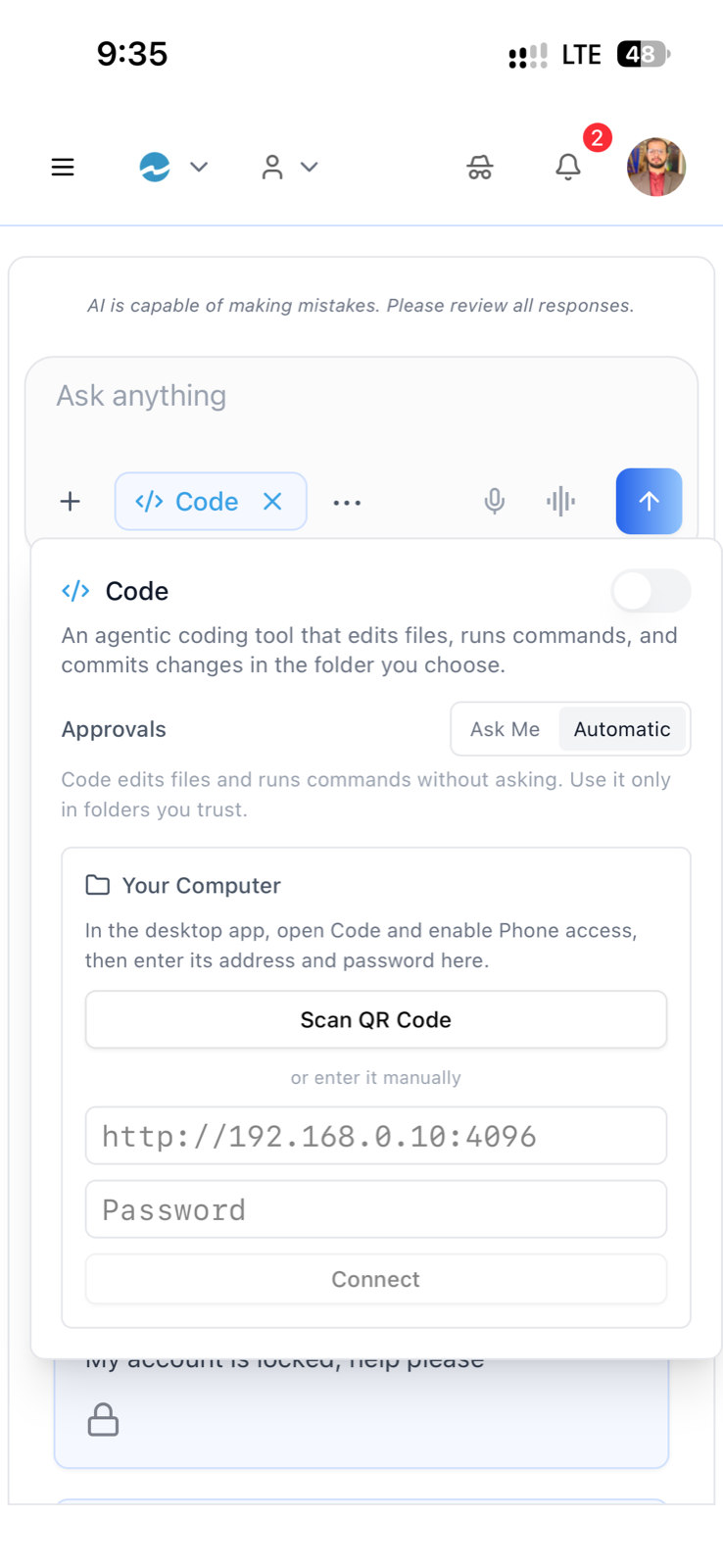
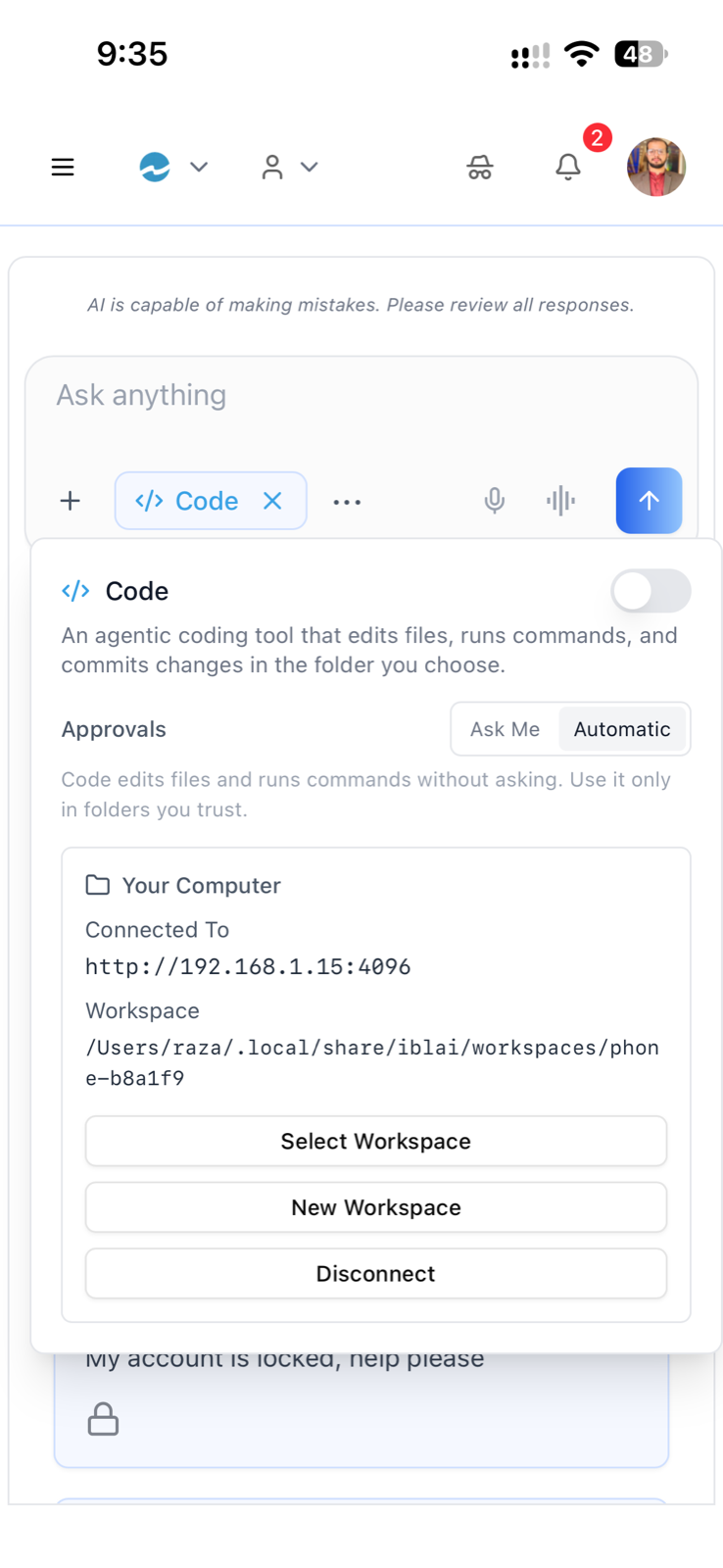
automatically). A mobile build can't spawn binaries, so a phone **pairs** to
a desktop over the LAN by QR and runs the same turns against it.
> **Ships code, not a contract.** Unlike [`/iblai-vibe-local-llm`](../iblai-vibe-local-llm/SKILL.md),
> this skill carries the OS app's actual implementation: the Rust modules
> in [`assets/tauri/src-tauri/`](assets/tauri/src-tauri/) (copy into your
> `src-tauri/`, same layout as `/iblai-vibe-ops-build`'s templates, no
> `.j2` to render) and the chat pieces in [`assets/nextjs/`](assets/nextjs/).
> The mechanics, every command and event, and the wiring are in
> [`references/`](references/).
> **Common setup (brand, conventions, env files, verification):** see
> [docs/skill-setup.md](https://raw.githubusercontent.com/iblai/vibe/refs/heads/main/docs/skill-setup.md).
## Prerequisites
1. **Tauri shell** via [`/iblai-vibe-ops-build`](../../ship/iblai-vibe-ops-build/SKILL.md)
— `src-tauri/` with the template `lib.rs`, plus the Rust toolchain.
2. **Sign-in** via [`/iblai-vibe-auth`](../../start/iblai-vibe-auth/SKILL.md)
— Code reads the org key and DM token from the SDK's auth storage.
3. **Platform**: macOS or Linux desktop for the agent itself (Linux also
needs `bwrap`/bubblewrap on PATH for the sandbox); iOS/Android only
as a *paired* client. **Windows is not supported** — `install_opencode`
returns an error and the pill hides. A **Mac App Store** build hides it
too: under the App Sandbox (`APP_SANDBOX_CONTAINER_ID` set) the app
can't spawn the downloaded binary, so ship Code in the Developer ID /
notarized `.dmg` build from `/iblai-vibe-ops-build`, not the MAS one.
4. **Your own chat surface.** The SDK's `<Chat>` transport already routes
Code turns, but `<Chat>` has no composer slot and does not render
reasoning, tool calls, or permission cards — the OS app owns those
pieces (shipped here). If your app mounts the SDK `<Chat>` unchanged,
you get streaming Code replies but no way to answer permission prompts:
every manual-mode operation times out as denied after 180 s. Either
host the shipped components in your own composer/message bubble, or
consciously choose `auto` approvals (see Security).
5. Ask the user for a real agent UUID for testing. Do NOT invent one.
## Step 1: Rust — drop in the modules
```bash
cp -R <skill>/assets/tauri/src-tauri/src/* src-tauri/src/
cp <skill>/assets/tauri/src-tauri/permissions/code-mode.toml src-tauri/permissions/
cp <skill>/assets/tauri/src-tauri/capabilities/mobile-pairing.json src-tauri/capabilities/
```
| File | What it is |
|---|---|
| `opencode_acp.rs` | The ACP transport: one `opencode acp` child per chat, sandboxing (macOS `sandbox-exec`, Linux `bwrap`), permission cards, workspaces, per-agent skills dir, session reuse and reaping |
| `opencode_proxy.rs` | Loopback token-injecting proxy the agent's model calls go through; mints the scoped `IBLAI_API_KEY`; composes `AGENTS.md` guidance |
| `opencode_installer.rs` | Downloads the pinned opencode release (`OPENCODE_VERSION`), writes `opencode.json`, syncs the latest `iblai/vibe` release into the agent's skills |
| `opencode_build_prompt.txt` | System-prompt line compiled in via `include_str!` — keep the name |
| `remote_code.rs` | Desktop phone-access host: `opencode serve` + pairing QR |
| `remote_code_client.rs` | Mobile: the same `opencode_*` commands proxied to a paired desktop over HTTP + SSE |
| `permissions/code-mode.toml` | One `allow-*` per command, grouped as the `code-mode` set |
| `capabilities/mobile-pairing.json` | Camera permissions for scanning the pairing QR (iOS/Android only) |
Then wire them — module declarations with their `cfg` gates, the
`emit_on_main` helper, `log_fe`, plugins, setup hooks, the two
`generate_handler!` lists, and the exit hook — exactly as in
[`references/lib-rs-wiring.md`](references/lib-rs-wiring.md). Add the
Cargo entries from [`references/cargo-deps.toml`](references/cargo-deps.toml)
and reference the `code-mode` set from `capabilities/default.json` per
[`references/capabilities.md`](references/capabilities.md).
**On-device models:** `opencode_acp.rs` can run Code against a local
Ollama/Foundry model and reaches into the local-LLM modules for that. If you
have not implemented [`/iblai-vibe-local-llm`](../iblai-vibe-local-llm/SKILL.md),
add the two small stubs in the wiring reference (§4) — cloud Code never
touches them.
```bash
cd src-tauri && cargo check # must compile before touching the frontend
```
## Step 2: Frontend — the transport is already in the SDK
`useChatV2` (in `@iblai/web-utils`, used by the SDK `<Chat>` and by the OS
chat) routes a turn to `opencode_chat_stream` whenever **both** hold:
- `isTauriCodeHost()` — a Tauri desktop, or a Tauri mobile app with
`localStorage.ibl_remote_code_ready === "true"` (set by pairing);
- `localStorage.ibl_coding_mode_enabled === "true"`.
It reads `ibl_coding_mode_model` (`provider/model`, default `openai/gpt-4o`)
and `ibl_coding_mode_mentor` (the active agent UUID, for that agent's synced
skills), calls the command with the DM token, and listens on `ollama:token`
/ `ollama:done` / `ollama:error` / `ollama:restart` plus `opencode:reasoning`
/ `opencode:tool_call`, populating `reasoningContent` and `toolCalls` on the
streaming message. Stop → `opencode_stop`; chat closed → `opencode_close`.
Nothing per-surface to wire for the transport.
## Step 3: Frontend — host the OS chat pieces
Copy [`assets/nextjs/`](assets/nextjs/) into your app and adapt the `@/…`
imports. These are the OS app's components (paths in the OS repo shown),
not SDK exports:
| Asset | OS path | Role |
|---|---|---|
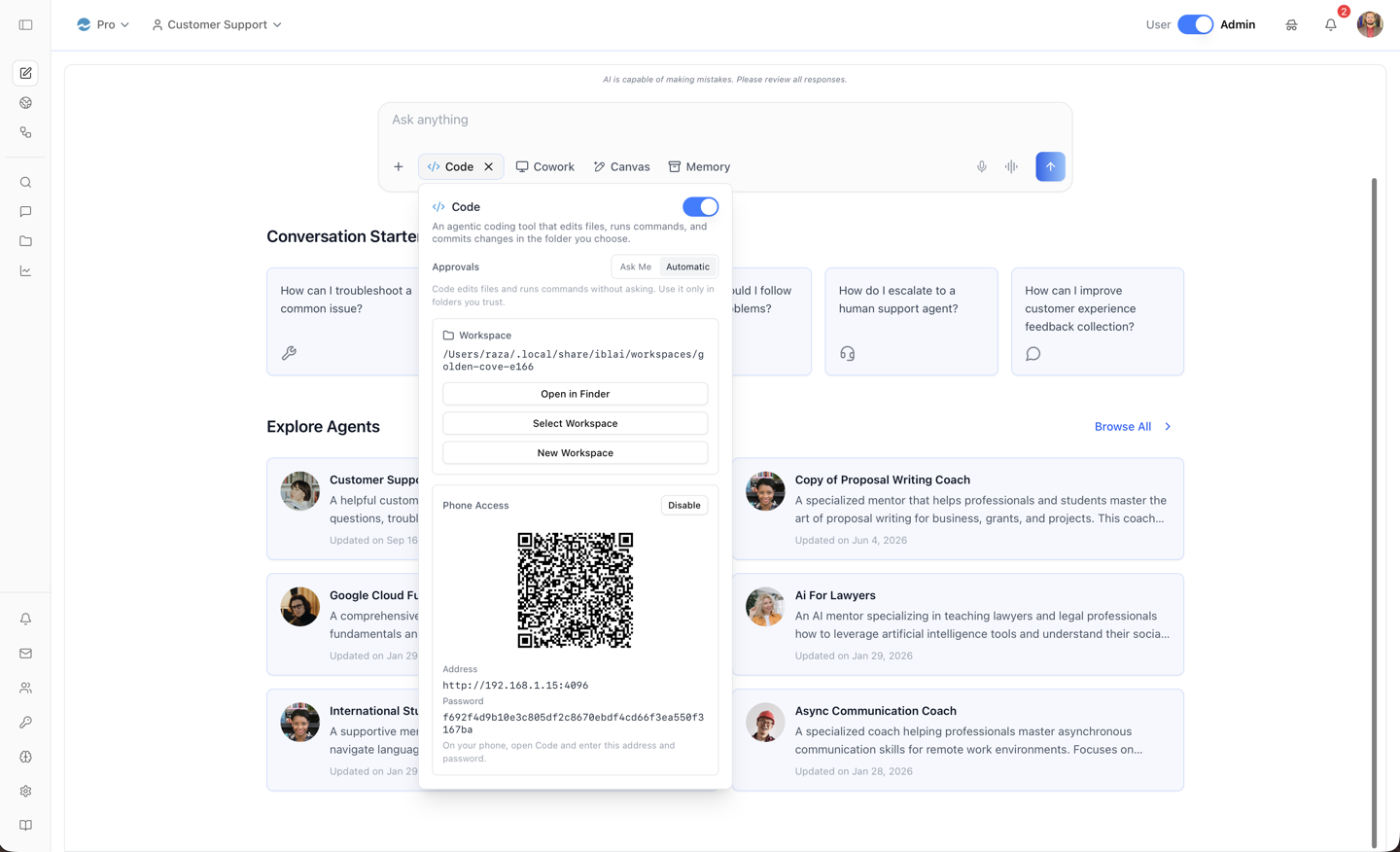
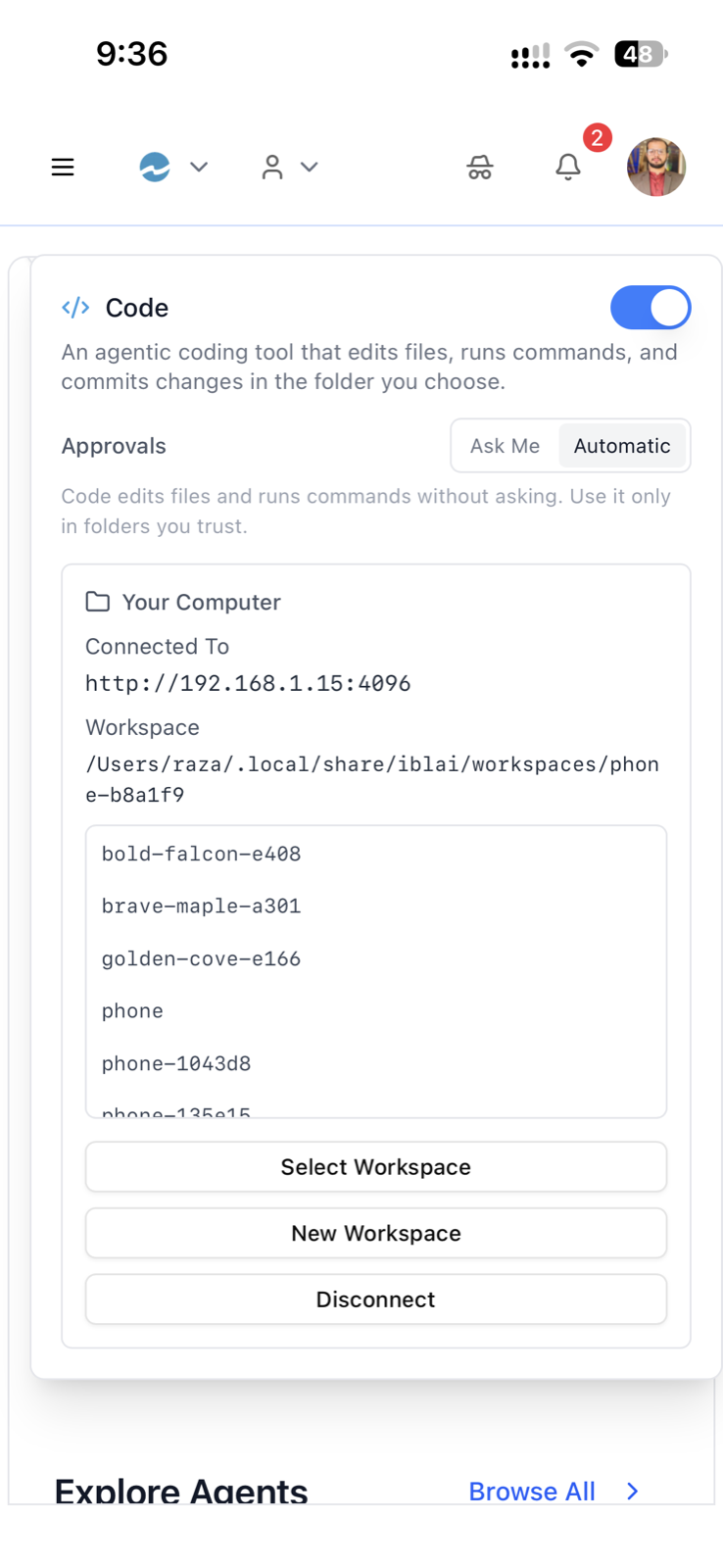
| `components/chat-input-form/coding-mode-button.tsx` | `components/chat-input-form/coding-mode-button.tsx` | The **Code** pill + popover: enable toggle, first-run **Approvals** dialog (Ask Me / Automatic), workspace picker (Select / New / open folder), install + vibe-skills status, desktop **phone access** (QR), mobile **pairing** (scan / manual, Your Computer card, Disconnect). Writes the `ibl_coding_mode_*` flags and mirrors `permission_mode` to platform user-metadata under `code_mode` |
| `components/chat/code-permission-card.tsx` | `components/chat/code-permission-card.tsx` | `<CodePermissionCards>` — listens on `opencode:permission_request` / `opencode:permission_resolved`, renders Allow / Deny inside the reply bubble, answers with `opencode_permission_respond`. **This is the security boundary** |
| `components/chat/tool-call-indicator.tsx`, `tool-call-item.tsx`, `tool-call-utils.ts` | `components/chat/…` | Collapsible tool-activity list for the `toolCalls` the transport fills (`TOOL_NAME_MAP` / `ToolCallInfo` from `@iblai/web-utils`) |
| `components/chat/reasoning-section.tsx` | `components/chat/reasoning-section.tsx` | Collapsible "thinking" panel for `reasoningContent` |
| `hooks/use-opencode-skill-sync.ts` | `hooks/use-opencode-skill-sync.ts` | Fetches the active agent's Agent Skills + resources (`useLazyGetAgentSkillsQuery`, `useLazyGetMentorSkillAssignmentsQuery`, `useLazyGetAgentSkillResourcesQuery` from `@iblai/data-layer`) and materialises them on disk via `begin_opencode_skills_sync` + `set_opencode_skills`, with bounded retries |
| `hooks/use-opencode-learner.ts` | `hooks/use-opencode-learner.ts` | On sign-in calls `set_opencode_learner` (who the agent acts as, DM base, platform domain, auth URL) and pre-warms `ensure_opencode_platform_key` |
| `messages/code-mode.en.json` | `messages/en.json` (`chatInputFormCodingModeButton`, `chatCodePermissionCard`) | The `next-intl` strings the button and cards use |
**Adapt these imports** (everything else is shadcn primitives + SDK):
| In the asset | In a vibe-starter app |
|---|---|
| `@/lib/config` → `config.dmUrl()`, `getEnv('NEXT_PUBLIC_AUTH_URL')` | `@/lib/iblai/config` — same `config.dmUrl()`, `config.authUrl()`, `config.platformBaseDomain()`, `getEnv` |
| `@/types/tauri` → `isTauriApp`, `isTauriMobile` | drop [`/iblai-vibe-local-llm`'s `types/tauri.ts`](../iblai-vibe-local-llm/assets/nextjs/types/tauri.ts) in, or copy the two probes (`__TAURI__` on `window`; `platform()` from `@tauri-apps/plugin-os` ∈ ios/android) |
| `@/hooks/use-mentors/use-mentor-settings` → `llmProvider`, `llmName` | `useGetMentorSettingsQuery` from `@iblai/data-layer` (used only to pre-select the agent's model) |
| `@/hooks/use-tauri-offline` → `isTauriOfflineMode()` | `() => localStorage.getItem('ibl_local_llm_enabled') === 'true'` if you have local models, else `() => false` |
| `@/lib/utils` → `getUserOS()` | `platform()` from `@tauri-apps/plugin-os` |
| `@/hooks/use-user`, `@/features/utils` → `useUsername`, `getUserEmail` | read `userData` from localStorage (`user_nicename`, `user_email`) |
| `@/components/markdown` | your Markdown renderer (the SDK `Chat` uses `react-markdown`) |
| `@/components/ui/{popover,switch,tooltip,alert-dialog,collapsible}` | `npx shadcn@latest add popover switch tooltip alert-dialog collapsible` |
| `next-intl` `useTranslations('…')` | `pnpm add next-intl` and load `messages/code-mode.en.json`, or inline the strings |
Mount them: `<CodingModeButton sessionId={…} skillSync={useOpencodeSkillSync({ org, mentorUniqueId })} />`
in your composer's button row (the OS gates it to Tauri after mount, never
during hydration), `<CodePermissionCards generationId={…} />` +
`<ReasoningSection>` + `<ToolCallIndicator>` inside the assistant bubble,
and `useOpencodeLearner()` once near the app root. Frontend deps:
```bash
pnpm add @tauri-apps/plugin-os @tauri-apps/plugin-dialog @tauri-apps/plugin-opener
pnpm add @tauri-apps/plugin-barcode-scanner # mobile builds only
```
## Step 4: Use MCP tools for the SDK side
```
get_hook_info("useChatV2")
get_component_info("Chat")
get_api_query_info("useGetAgentSkillsQuery")
```
## Linked SDK exports
From `@iblai/iblai-js/web-utils` (the transport lives here):
- `useChatV2` — routes turns to Code when the flags are set; fills
`reasoningContent` / `toolCalls` on the streaming message.
- `isTauriDesktop()`, `isTauriEmbeddedLLMHost()` — the public platform
predicates (the streaming internals of `opencode-client.ts` are
deliberately private; `isTauriCodeHost` is used by `useChatV2`).
- `TOOL_NAME_MAP`, `ToolCallInfo` — what the tool-call components render.
From `@iblai/iblai-js/data-layer`:
- `useLazyGetAgentSkillsQuery`, `useLazyGetMentorSkillAssignmentsQuery`,
`useLazyGetAgentSkillResourcesQuery` — the skills sync source
([`/iblai-vibe-agent-skills`](../iblai-vibe-agent-skills/SKILL.md)).
- `useGetUserPlatformMetadataQuery`, `useUpdateUserPlatformMetadataMutation`
— the `code_mode.permission_mode` preference that follows the user
([`/iblai-vibe-user-metadata`](../../users/iblai-vibe-user-metadata/SKILL.md)).
- `useGetMentorSettingsQuery` — the agent's LLM provider/model, pre-selected
as the Code model.
## Security (read before shipping)
- **Permission cards are the boundary.** The agent runs at the user's own
privilege; the sandbox only hides secrets and confines writes. Rust pins
`permission: "ask"` into the config on every spawn — it cannot be
loosened on disk. Render the cards.
- **No default approval mode.** `get_opencode_permission_mode()` is
`null` until the user chooses; the button raises the first-run dialog.
Never pick `auto` for them.
- **The DM token never reaches the agent** — the loopback proxy injects
it. The one credential handed over is a scoped, week-long, revocable
platform API key (`IBLAI_API_KEY`), so the synced `iblai-*` skills can act
on the platform; non-admins get none and turns continue.
- **Phone access** binds `0.0.0.0` with a fresh password per enable and is
killed with the app. Show the QR only to the person at the desk.
Full rationale, on-disk layout, and the agent's environment:
[`references/architecture.md`](references/architecture.md).
## Verify
1. `cd src-tauri && cargo check` — zero errors.
2. `pnpm build` — zero errors; `pnpm test` passes.
3. `pnpm exec tauri dev` (desktop): open a chat, click **Code** — first
click installs opencode (log lines on `model:installation-log`) and
asks for an approval mode; ask the agent to *"create hello.txt with one
line"*; a **permission card** appears in the reply; Allow; the file
exists under `~/.local/share/iblai/workspaces/…`.
4. `pnpm exec tauri ios dev "<device>"` after **phone access** is on
the desktop: scan the QR, send the same prompt, see the same card.
5. Screenshot the composer with the pill on:
```bash
npx playwright screenshot http://localhost:3000/ /tmp/code-mode.png
```
## Platform data
| Call | Purpose |
|---|---|
| `POST {asgi}/api/ai-mentor/orgs/{org}/v1/chat/completions` | the agent's model calls, via the loopback proxy with the DM token injected |
| `GET {dm}/api/ai-mentor/orgs/{org}/v1/models` | the Code model picker |
| `GET …/orgs/{org}/agent-skills/`, `…/agents/{uuid}/skills/`, `…/agent-skill-resources/` | the agent's skills synced to disk — [`/iblai-api-agent-skill`](../iblai-api-agent-skill/SKILL.md) |
| `POST {dm}/api/core/platform/api-tokens/` (by `platform_api_key`) | the scoped `IBLAI_API_KEY` — [`/iblai-api-token`](../../organizations/iblai-api-token/SKILL.md) |
| `GET/POST {dm}/api/core/users/platform-metadata/` (`code_mode.permission_mode`) | approval mode following the user — [`/iblai-api-profile-metadata`](../../users/iblai-api-profile-metadata/SKILL.md) |
| `https://github.com/iblai/vibe/releases/latest` | the vibe skills the agent gets, resolved at every launch |
## Related skills
- [`/iblai-vibe-ops-build`](../../ship/iblai-vibe-ops-build/SKILL.md) — the Tauri shell this drops into.
- [`/iblai-vibe-local-llm`](../iblai-vibe-local-llm/SKILL.md) — on-device models Code can run against; also the `types/tauri.ts` probes.
- [`/iblai-vibe-agent-chat`](../iblai-vibe-agent-chat/SKILL.md) — the SDK chat surface whose transport carries Code turns.
- [`/iblai-vibe-agent-skills`](../iblai-vibe-agent-skills/SKILL.md) — the Agent Skills the sync hook materialises for the agent.
- [`/iblai-vibe-agent-sandbox`](../iblai-vibe-agent-sandbox/SKILL.md) — the *platform-side* sandbox kinds (Computing Runtime / VM Shell / Claw); Code mode is the *desktop-side* runtime and is independent of them.
Is this your skill, or is something wrong with this listing? Request removal or report an issue. Author removals are honored within 72 hours.
No comments yet. Be the first to comment!
 Skills Directory