Send and receive Bitcoin Lightning payments using LNI (Lightning Node Interface). Supports LND, CLN, Phoenixd, NWC, and custodial services (Strike, Blink, Speed).
Scanned 9/7/2026
Install to Claude Code
npx -y skills add Demerzels-lab/elsamultiskillagent --skill lightning --agent claude-codeInstalls into .claude/skills of the current project.
Are you the author of Lightning?
Add the live security badge to your README — it updates automatically with every re-scan.
[](https://www.skillsdirectory.com/skills/demerzels-lab-lightning)More formats (shields.io, HTML) on the badges page.
---
name: lightning
description: Send and receive Bitcoin Lightning payments using LNI (Lightning Node Interface). Supports LND, CLN, Phoenixd, NWC, and custodial services (Strike, Blink, Speed).
user-invocable: true
metadata: {"clawdbot":{"emoji":"⚡"}}
---
# Lightning (⚡)
Send and receive Bitcoin over Lightning Network using LNI.
*Made in 🤠 Texas ❤️ [PlebLab](https://pleblab.dev)*
---
> ⚠️ **RECKLESS MODE - READ THIS FIRST** ⚠️
>
> **Giving a bot access to your money is dangerous.**
>
> - Use a wallet with a **small amount** you can afford to lose
> - **NEVER** enable this on a bot that outsiders can access via chat
> - This skill is intended for **personal/internal use only**
> - The bot can send payments on your behalf — treat credentials like cash
> - Start small, test thoroughly, proceed with extreme caution
>
> **You have been warned. This is reckless mode.**
## Supported Backends
| Backend | Type | BOLT11 | BOLT12 | LNURL |
|---------|------|--------|--------|-------|
| CLN | Self-hosted | ✅ | ✅ | ✅ |
| LND | Self-hosted | ✅ | ⚠️ | ✅ |
| Phoenixd | Self-hosted | ✅ | ✅ | ✅ |
| NWC | Nostr Wallet | ✅ | ❌ | ✅ |
| Spark | Breez SDK | ✅ | ❌ | ✅ |
| Strike | Custodial | ✅ | ❌ | ✅ |
| Blink | Custodial | ✅ | ❌ | ✅ |
| Speed | Custodial | ✅ | ❌ | ✅ |
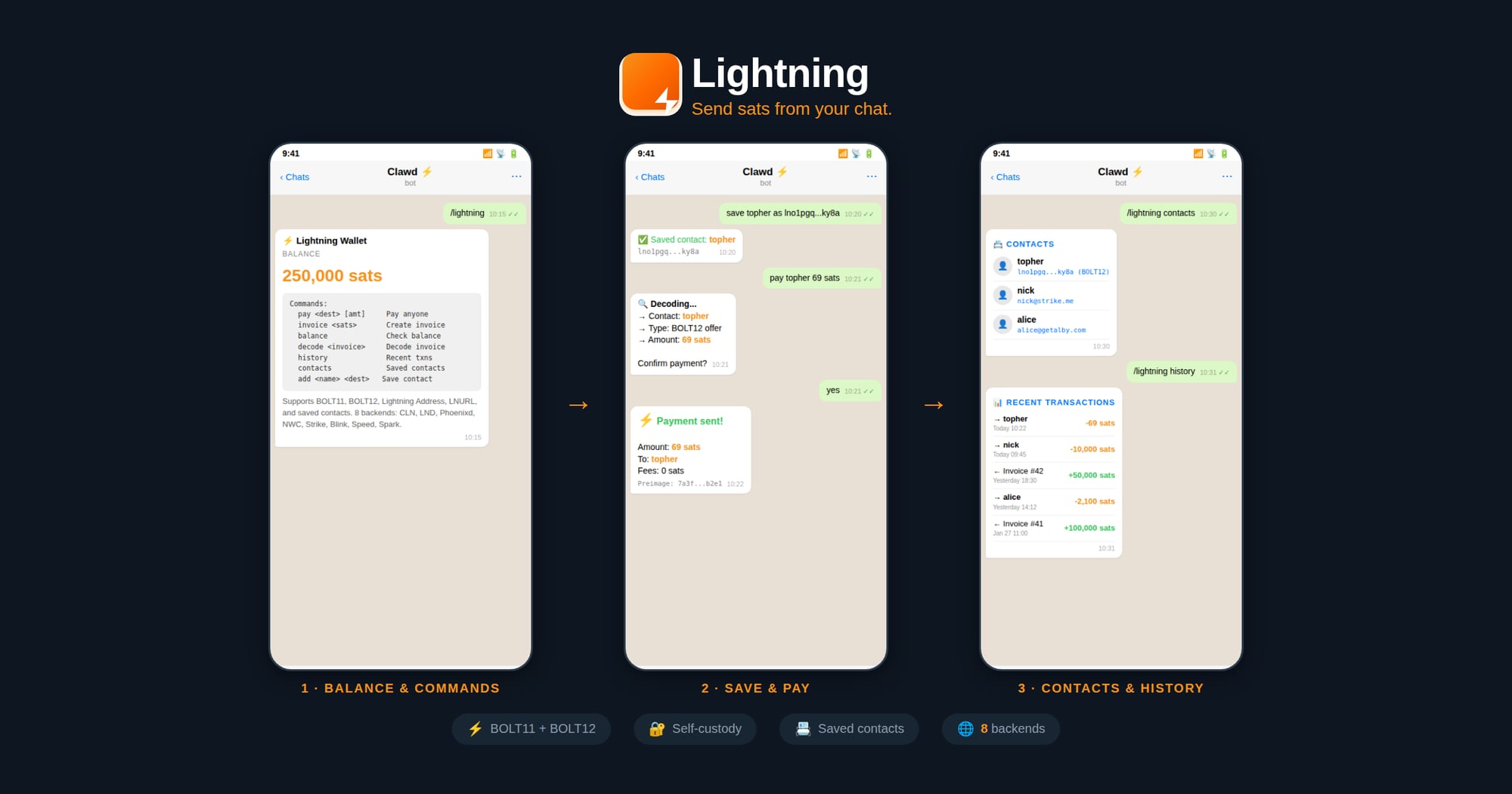
## Commands
| Command | Description |
|---------|-------------|
| `/lightning` | Show wallet info & balance |
| `/lightning invoice <sats> [memo]` | Create invoice |
| `/lightning pay <dest> [amount]` | Pay (BOLT11/BOLT12/LNURL/Address) |
| `/lightning confirm <dest> [amount]` | Confirm & send payment |
| `/lightning decode <invoice>` | Decode invoice details |
| `/lightning history [limit]` | List recent transactions |
| `/lightning contacts` | List saved contacts |
| `/lightning add <name> <dest>` | Save a contact |
## Supported Payment Destinations
The `pay` command auto-detects:
- **BOLT11**: `lnbc10u1p5...`
- **BOLT12**: `lno1pg...` (CLN/Phoenixd only)
- **Lightning Address**: `user@domain.com`
- **LNURL**: `lnurl1...`
- **Contacts**: Saved names like `topher`
## Installation
### 1. Download LNI Binary
```bash
cd ~/workspace/skills/lightning
npm run download
```
This downloads the prebuilt native binary for your platform from [GitHub Releases](https://github.com/lightning-node-interface/lni/releases).
### 2. Configure Backend
Create `~/.lightning-config.json`:
**CLN (Core Lightning):**
```json
{
"backend": "cln",
"url": "https://your-cln-node:3010",
"rune": "your-rune-token",
"acceptInvalidCerts": true
}
```
**LND:**
```json
{
"backend": "lnd",
"url": "https://your-lnd-node:8080",
"macaroon": "hex-encoded-admin-macaroon",
"acceptInvalidCerts": true
}
```
**Phoenixd:**
```json
{
"backend": "phoenixd",
"url": "http://127.0.0.1:9740",
"password": "your-phoenixd-password"
}
```
**NWC (Nostr Wallet Connect):**
```json
{
"backend": "nwc",
"nwcUri": "nostr+walletconnect://..."
}
```
**Spark (Breez SDK):**
```json
{
"backend": "spark",
"apiKey": "your-breez-api-key",
"mnemonic": "your 12 word seed",
"storageDir": "/home/clawd/lightning-data",
"network": "mainnet"
}
```
#### Provisioning a New Spark Wallet
If the user doesn't have a Spark wallet yet, walk them through these steps:
**Step 1: Generate a 12-word mnemonic seed**
Use the built-in LNI helper:
```js
const lni = require('./lib/lni_js.node');
const mnemonic = lni.generateMnemonic();
console.log(mnemonic);
```
⚠️ Tell the user to **back up their seed phrase securely** — it controls their funds.
**Step 2: Request a Breez API key**
The user must request an API key from Breez for the nodeless (Spark) SDK implementation:
1. Go to: https://breez.technology/request-api-key/#contact-us-form-sdk
2. Fill in their **email** and select the **Nodeless (Greenlight)** implementation
3. Submit the form — Breez will email the API key
**Step 3: Retrieve the API key**
After submitting the form, ask the user:
> "Do you have an email skill configured (e.g., ProtonMail)? I can check your inbox for the Breez API key if you'd like."
If they approve, use the email skill to search for the Breez API key email and extract it.
**Step 4: Create the config**
Once you have the mnemonic and API key, write `~/.lightning-config.json`:
```json
{
"backend": "spark",
"apiKey": "<breez-api-key>",
"mnemonic": "<12-word-seed>",
"storageDir": "/home/clawd/lightning-data",
"network": "mainnet"
}
```
**Step 5: Connect and verify**
```js
const node = new lni.SparkNode(config);
await node.connect();
const info = await node.getInfo();
```
**Strike/Blink/Speed (Custodial):**
```json
{
"backend": "strike",
"apiKey": "your-api-key"
}
```
### Tor Support (SOCKS5 Proxy)
Connect to your node over Tor for enhanced privacy, or to reach nodes on `.onion` addresses.
**Requirements:**
1. **Tor must be running locally** — install and start the Tor service on your machine
2. Your node must be reachable via Tor (either a `.onion` address or clearnet through Tor)
**Install Tor:**
```bash
# macOS
brew install tor && brew services start tor
# Ubuntu/Debian
sudo apt install tor && sudo systemctl start tor
# Arch
sudo pacman -S tor && sudo systemctl start tor
```
**Configure with SOCKS5 proxy:**
Add `socks5Proxy` to any backend config:
```json
{
"backend": "cln",
"url": "http://your-node.onion:3010",
"rune": "your-rune-token",
"socks5Proxy": "socks5h://127.0.0.1:9050"
}
```
**Common proxy addresses:**
| Service | Address |
|---------|---------|
| Tor daemon | `socks5h://127.0.0.1:9050` |
| Tor Browser | `socks5h://127.0.0.1:9150` |
> 💡 Use `socks5h://` (not `socks5://`) so `.onion` addresses are resolved through Tor, not locally.
## Examples
```bash
# Check balance
/lightning
# Create invoice
/lightning invoice 1000 "Coffee payment"
# Pay Lightning Address
/lightning pay nicktee@strike.me 100
# Pay BOLT12 offer
/lightning pay lno1pg... 50
# Save & pay contact
/lightning add topher lno1pg...
/lightning pay topher 69
```
## Files
- `~/.lightning-config.json` - Backend credentials
- `~/.lightning-contacts.json` - Saved contacts
## Security Notes
- Never share macaroons, runes, seeds, or API keys
- Use `acceptInvalidCerts` only for self-signed certs on trusted networks
- Contacts file contains payment destinations only, no secrets
## Credits
Built on [LNI](https://github.com/lightning-node-interface/lni) (Lightning Node Interface).
Is this your skill, or is something wrong with this listing? Request removal or report an issue. Author removals are honored within 72 hours.
No comments yet. Be the first to comment!
 Skills Directory