1774 Readme Cn 3041db78
CSecurityollama serve ``` ```json // Ollama { "vlm": { "provider": "litellm", "model": "ollama/llama3.1", "api_base": "http://localhost:11434" } } ``` 完整的模型支持,请参见 [LiteLLM 提供商文档](https://docs.litellm.ai/docs/providers)。 </details> 创建配置文件 `~/.openviking/ov.conf`,复制前请删除注释: ```json { "storage": { "workspace": "/home/your-name/openviking_workspace" }, "log": { "level": "INFO", "output": "stdout" // 日志输出:"stdout" 或 "file" }, "embedding": { "dense": { "api_base" : "<api-endpoint>", // API ...
- 9 stars
- 0 votes
- 0 copies
- 1 view
- Added May 31, 2026
Works with
Security analysis
67/100- Pipes output to a shell interpreter
- Uses curl or wget to download content
- Downloads and executes remote scripts — classic supply chain attack
- Installs packages at runtime which could introduce malicious dependencies
Pro scans all 2 files and shows the line behind each finding
npx -y skills add tools-only/X-Skills --skill 1774-readme_cn_3041db78 --agent claude-codeAre you the author of 1774 Readme Cn 3041db78?
Add the live security badge to your README. It updates with every re-scan.
[](https://www.skillsdirectory.com/skills/tools-only-1774-readme-cn-3041db78)<div align="center">
<picture>
<img alt="OpenViking" src="docs/images/banner.jpg" width="100%" height="auto">
</picture>
### OpenViking:AI 智能体的上下文数据库
[English](README.md) / 中文
<a href="https://www.openviking.ai">官网</a> · <a href="https://github.com/volcengine/OpenViking">GitHub</a> · <a href="https://github.com/volcengine/OpenViking/issues">问题反馈</a> · <a href="https://www.openviking.ai/docs">文档</a>
[![][release-shield]][release-link]
[![][github-stars-shield]][github-stars-link]
[![][github-issues-shield]][github-issues-shield-link]
[![][github-contributors-shield]][github-contributors-link]
[![][license-shield]][license-shield-link]
[![][last-commit-shield]][last-commit-shield-link]
👋 加入我们的社区
📱 <a href="./docs/en/about/01-about-us.md#lark-group">飞书群</a> · <a href="./docs/en/about/01-about-us.md#wechat-group">微信群</a> · <a href="https://discord.com/invite/eHvx8E9XF3">Discord</a> · <a href="https://x.com/openvikingai">X</a>
</div>
---
## 概述
### 智能体开发面临的挑战
在 AI 时代,数据丰富,但高质量的上下文却难以获得。在构建 AI 智能体时,开发者经常面临以下挑战:
- **上下文碎片化**:记忆存储在代码中,资源在向量数据库中,技能分散在各处,难以统一管理。
- **上下文需求激增**:智能体的长运行任务在每次执行时都会产生上下文。简单的截断或压缩会导致信息丢失。
- **检索效果不佳**:传统 RAG 使用扁平化存储,缺乏全局视图,难以理解信息的完整上下文。
- **上下文不可观察**:传统 RAG 的隐式检索链像黑盒,出错时难以调试。
- **记忆迭代有限**:当前记忆只是用户交互的记录,缺乏智能体相关的任务记忆。
### OpenViking 解决方案
**OpenViking** 是专为 AI 智能体设计的开源**上下文数据库**。
我们的目标是为智能体定义一个极简的上下文交互范式,让开发者完全告别上下文管理的烦恼。OpenViking 抛弃了传统 RAG 的碎片化向量存储模型,创新性地采用**"文件系统范式"**来统一组织智能体所需的记忆、资源和技能。
使用 OpenViking,开发者可以像管理本地文件一样构建智能体的大脑:
- **文件系统管理范式** → **解决碎片化**:基于文件系统范式统一管理记忆、资源和技能。
- **分层上下文加载** → **降低 Token 消耗**:L0/L1/L2 三层结构,按需加载,显著节省成本。
- **目录递归检索** → **提升检索效果**:支持原生文件系统检索方式,结合目录定位和语义搜索,实现递归精准的上下文获取。
- **可视化检索轨迹** → **可观察上下文**:支持目录检索轨迹可视化,让用户清晰观察问题根源,指导检索逻辑优化。
- **自动会话管理** → **上下文自迭代**:自动压缩对话中的内容、资源引用、工具调用等,提取长期记忆,让智能体越用越聪明。
---
## 快速开始
### 前置条件
在开始使用 OpenViking 之前,请确保您的环境满足以下要求:
- **Python 版本**:3.10 或更高版本
- **操作系统**:Linux、macOS、Windows
- **网络连接**:需要稳定的网络连接(用于下载依赖和访问模型服务)
### 1. 安装
#### Python 包
```bash
pip install openviking
```
#### Rust CLI(可选)
```bash
curl -fsSL https://raw.githubusercontent.com/volcengine/OpenViking/main/crates/ov_cli/install.sh | bash
```
或从源码构建:
```bash
cargo install --git https://github.com/volcengine/OpenViking ov_cli
```
### 2. 模型准备
OpenViking 需要以下模型能力:
- **VLM 模型**:用于图像和内容理解
- **Embedding 模型**:用于向量化和语义检索
#### 支持的 VLM 提供商
OpenViking 支持三种 VLM 提供商:
| 提供商 | 描述 | 获取 API Key |
|----------|-------------|-------------|
| `volcengine` | 火山引擎豆包模型 | [Volcengine 控制台](https://console.volcengine.com/ark) |
| `openai` | OpenAI 官方 API | [OpenAI 平台](https://platform.openai.com) |
| `litellm` | 统一调用多种第三方模型 (Anthropic, DeepSeek, Gemini, vLLM, Ollama 等) | 参见 [LiteLLM 提供商](https://docs.litellm.ai/docs/providers) |
> 💡 **提示**:
> - `litellm` 支持通过统一接口调用多种模型,model 字段需遵循 [LiteLLM 格式规范](https://docs.litellm.ai/docs/providers)
> - 系统自动检测常见模型(如 `claude-*`, `deepseek-*`, `gemini-*`, `hosted_vllm/*`, `ollama/*` 等),其他模型需按 LiteLLM 格式填写完整前缀
#### 提供商特定说明
<details>
<summary><b>Volcengine (豆包)</b></summary>
Volcengine 支持模型名称和端点 ID。为简单起见,建议使用模型名称:
```json
{
"vlm": {
"provider": "volcengine",
"model": "doubao-seed-1-6-240615",
"api_key": "your-api-key",
"api_base": "https://ark.cn-beijing.volces.com/api/v3"
}
}
```
您也可以使用端点 ID(可在 [Volcengine ARK 控制台](https://console.volcengine.com/ark) 中找到):
```json
{
"vlm": {
"provider": "volcengine",
"model": "ep-20241220174930-xxxxx",
"api_key": "your-api-key",
"api_base": "https://ark.cn-beijing.volces.com/api/v3"
}
}
```
</details>
<details>
<summary><b>OpenAI</b></summary>
使用 OpenAI 的官方 API:
```json
{
"vlm": {
"provider": "openai",
"model": "gpt-4o",
"api_key": "your-api-key",
"api_base": "https://api.openai.com/v1"
}
}
```
您也可以使用自定义的 OpenAI 兼容端点:
```json
{
"vlm": {
"provider": "openai",
"model": "gpt-4o",
"api_key": "your-api-key",
"api_base": "https://your-custom-endpoint.com/v1"
}
}
```
</details>
<details>
<summary><b>LiteLLM (Anthropic, DeepSeek, Gemini, Qwen, vLLM, Ollama 等)</b></summary>
LiteLLM 提供对各种模型的统一访问。`model` 字段应遵循 LiteLLM 的命名约定。以下以 Claude 和 Qwen 为例:
**Anthropic:**
```json
{
"vlm": {
"provider": "litellm",
"model": "claude-3-5-sonnet-20240620",
"api_key": "your-anthropic-api-key"
}
}
```
**Qwen (DashScope):**
```json
{
"vlm": {
"provider": "litellm",
"model": "dashscope/qwen-turbo",
"api_key": "your-dashscope-api-key",
"api_base": "https://dashscope.aliyuncs.com/compatible-mode/v1"
}
}
```
> 💡 **Qwen 提示**:
> - **中国/北京** 区域,使用 `api_base`:`https://dashscope.aliyuncs.com/compatible-mode/v1`
> - **国际** 区域,使用 `api_base`:`https://dashscope-intl.aliyuncs.com/compatible-mode/v1`
**常见模型格式:**
| 提供商 | 模型示例 | 说明 |
|----------|---------------|-------|
| Anthropic | `claude-3-5-sonnet-20240620` | 自动检测,使用 `ANTHROPIC_API_KEY` |
| DeepSeek | `deepseek-chat` | 自动检测,使用 `DEEPSEEK_API_KEY` |
| Gemini | `gemini-pro` | 自动检测,使用 `GEMINI_API_KEY` |
| Qwen | `dashscope/qwen-turbo` | 根据区域设置 `api_base`(见上方说明) |
| OpenRouter | `openrouter/openai/gpt-4o` | 需要完整前缀 |
| vLLM | `hosted_vllm/llama-3.1-8b` | 设置 `api_base` 为 vLLM 服务器 |
| Ollama | `ollama/llama3.1` | 设置 `api_base` 为 Ollama 服务器 |
**本地模型 (vLLM / Ollama):**
```bash
# 启动 Ollama
ollama serve
```
```json
// Ollama
{
"vlm": {
"provider": "litellm",
"model": "ollama/llama3.1",
"api_base": "http://localhost:11434"
}
}
```
完整的模型支持,请参见 [LiteLLM 提供商文档](https://docs.litellm.ai/docs/providers)。
</details>
### 3. 环境配置
#### 服务器配置模板
创建配置文件 `~/.openviking/ov.conf`,复制前请删除注释:
```json
{
"storage": {
"workspace": "/home/your-name/openviking_workspace"
},
"log": {
"level": "INFO",
"output": "stdout" // 日志输出:"stdout" 或 "file"
},
"embedding": {
"dense": {
"api_base" : "<api-endpoint>", // API 端点地址
"api_key" : "<your-api-key>", // 模型服务 API Key
"provider" : "<provider-type>", // 提供商类型:"volcengine" 或 "openai"(当前支持)
"dimension": 1024, // 向量维度
"model" : "<model-name>" // Embedding 模型名称(如 doubao-embedding-vision-250615 或 text-embedding-3-large)
},
"max_concurrent": 10 // 最大并发 embedding 请求(默认:10)
},
"vlm": {
"api_base" : "<api-endpoint>", // API 端点地址
"api_key" : "<your-api-key>", // 模型服务 API Key
"provider" : "<provider-type>", // 提供商类型 (volcengine, openai, deepseek, anthropic 等)
"model" : "<model-name>", // VLM 模型名称(如 doubao-seed-1-8-251228 或 gpt-4-vision-preview)
"max_concurrent": 100 // 语义处理的最大并发 LLM 调用(默认:100)
}
}
```
> **注意**:对于 embedding 模型,目前支持 `volcengine`(豆包)、`openai` 和 `jina` 提供商。对于 VLM 模型,我们支持三种提供商:`volcengine`、`openai` 和 `litellm`。``litellm` 提供商支持各种模型,包括 Anthropic (Claude)、DeepSeek、Gemini、Moonshot、Zhipu、DashScope、MiniMax、vLLM、Ollama 等。
#### 服务器配置示例
👇 展开查看您的模型服务的配置示例:
<details>
<summary><b>示例 1:使用 Volcengine(豆包模型)</b></summary>
```json
{
"storage": {
"workspace": "/home/your-name/openviking_workspace"
},
"log": {
"level": "INFO",
"output": "stdout" // 日志输出:"stdout" 或 "file"
},
"embedding": {
"dense": {
"api_base" : "https://ark.cn-beijing.volces.com/api/v3",
"api_key" : "your-volcengine-api-key",
"provider" : "volcengine",
"dimension": 1024,
"model" : "doubao-embedding-vision-250615"
},
"max_concurrent": 10
},
"vlm": {
"api_base" : "https://ark.cn-beijing.volces.com/api/v3",
"api_key" : "your-volcengine-api-key",
"provider" : "volcengine",
"model" : "doubao-seed-1-8-251228",
"max_concurrent": 100
}
}
```
</details>
<details>
<summary><b>示例 2:使用 OpenAI 模型</b></summary>
```json
{
"storage": {
"workspace": "/home/your-name/openviking_workspace"
},
"log": {
"level": "INFO",
"output": "stdout" // 日志输出:"stdout" 或 "file"
},
"embedding": {
"dense": {
"api_base" : "https://api.openai.com/v1",
"api_key" : "your-openai-api-key",
"provider" : "openai",
"dimension": 3072,
"model" : "text-embedding-3-large"
},
"max_concurrent": 10
},
"vlm": {
"api_base" : "https://api.openai.com/v1",
"api_key" : "your-openai-api-key",
"provider" : "openai",
"model" : "gpt-4-vision-preview",
"max_concurrent": 100
}
}
```
</details>
#### 设置服务器配置环境变量
创建配置文件后,设置环境变量指向它(Linux/macOS):
```bash
export OPENVIKING_CONFIG_FILE=~/.openviking/ov.conf # 默认值
```
在 Windows 上,使用以下任一方式:
PowerShell:
```powershell
$env:OPENVIKING_CONFIG_FILE = "$HOME/.openviking/ov.conf"
```
命令提示符 (cmd.exe):
```bat
set "OPENVIKING_CONFIG_FILE=%USERPROFILE%\.openviking\ov.conf"
```
> 💡 **提示**:您也可以将配置文件放在其他位置,只需在环境变量中指定正确路径。
#### CLI/客户端配置示例
👇 展开查看您的 CLI/客户端的配置示例:
示例:用于访问本地服务器的 ovcli.conf
```json
{
"url": "http://localhost:1933",
"timeout": 60.0,
"output": "table"
}
```
创建配置文件后,设置环境变量指向它(Linux/macOS):
```bash
export OPENVIKING_CLI_CONFIG_FILE=~/.openviking/ovcli.conf # 默认值
```
在 Windows 上,使用以下任一方式:
PowerShell:
```powershell
$env:OPENVIKING_CLI_CONFIG_FILE = "$HOME/.openviking/ovcli.conf"
```
命令提示符 (cmd.exe):
```bat
set "OPENVIKING_CLI_CONFIG_FILE=%USERPROFILE%\.openviking\ovcli.conf"
```
### 4. 运行您的第一个示例
> 📝 **前置条件**:确保您已完成上一步的配置(ov.conf 和 ovcli.conf)。
现在让我们运行一个完整的示例,体验 OpenViking 的核心功能。
#### 启动服务器
```bash
openviking-server
```
或者您可以在后台运行
```bash
nohup openviking-server > /data/log/openviking.log 2>&1 &
```
#### 运行 CLI
```bash
ov status
ov add-resource https://github.com/volcengine/OpenViking # --wait
ov ls viking://resources/
ov tree viking://resources/volcengine -L 2
# 如果没有使用 --wait,等待一段时间以进行语义处理
ov find "what is openviking"
ov grep "openviking" --uri viking://resources/volcengine/OpenViking/docs/zh
```
恭喜!您已成功运行 OpenViking 🎉
---
## 服务器部署详情
对于生产环境,我们建议将 OpenViking 作为独立的 HTTP 服务运行,为您的 AI 智能体提供持久、高性能的上下文支持。
🚀 **在云端部署 OpenViking**:
为确保最佳的存储性能和数据安全,我们建议在 **火山引擎弹性计算服务 (ECS)** 上使用 **veLinux** 操作系统进行部署。我们准备了详细的分步指南,帮助您快速上手。
👉 **[查看:服务器部署与 ECS 设置指南](./docs/en/getting-started/03-quickstart-server.md)**
## OpenClaw 记忆插件详情
* 测试集:基于 LoCoMo10(https://github.com/snap-research/locomo) 的长程对话进行效果测试(去除无真值的 category5 后,共 1540 条 case)
* 实验组:因用户在使用 OpenViking 时可能不关闭 OpenClaw 原生记忆,所以增加是否开关原生记忆的实验组
* OpenViking 版本:0.1.18
* 模型:seed-2.0-code
* 评测脚本:https://github.com/ZaynJarvis/openclaw-eval/tree/main
| 实验组 | 任务完成率 | 成本:输入 token (总计) |
|----------|------------------|------------------|
| OpenClaw(memory-core) | 35.65% | 24,611,530 |
| OpenClaw + LanceDB (-memory-core) | 44.55% | 51,574,530 |
| OpenClaw + OpenViking Plugin (-memory-core) | 52.08% | 4,264,396 |
| OpenClaw + OpenViking Plugin (+memory-core) | 51.23% | 2,099,622 |
* 实验结论:
结合 OpenViking 后,若仍开启原生记忆,效果在原 OpenClaw 上提升 43%,输入 token 成本降低 91%;在 LanceDB 上效果提升 15%,输入 token 降低 92%。若关闭原生记忆,效果在原 OpenClaw 上提升 49%,输入 token 成本降低 83%;在 LanceDB 上效果提升 17%,输入 token 降低 96%。
👉 **[查看:OpenClaw 记忆插件](examples/openclaw-memory-plugin/README.md)**
## VikingBot 部署详情
OpenViking 有一个类似 nanobot 的机器人用于交互工作,现已可用。
👉 **[查看:使用 VikingBot 部署服务器](bot/README.md)**
--
## 核心概念
运行第一个示例后,让我们深入了解 OpenViking 的设计理念。这五个核心概念与前面提到的解决方案一一对应,共同构建了一个完整的上下文管理系统:
### 1. 文件系统管理范式 → 解决碎片化
我们不再将上下文视为扁平的文本切片,而是将它们统一到一个抽象的虚拟文件系统中。无论是记忆、资源还是能力,都映射到 `viking://` 协议下的虚拟目录中,每个都有唯一的 URI。
这种范式赋予智能体前所未有的上下文操作能力,使它们能够像开发者一样,通过 `ls` 和 `find` 等标准命令精确、确定地定位、浏览和操作信息。这将上下文管理从模糊的语义匹配转变为直观、可追踪的"文件操作"。了解更多:[Viking URI](./docs/en/concepts/04-viking-uri.md) | [上下文类型](./docs/en/concepts/02-context-types.md)
```
viking://
├── resources/ # 资源:项目文档、代码库、网页等
│ ├── my_project/
│ │ ├── docs/
│ │ │ ├── api/
│ │ │ └── tutorials/
│ │ └── src/
│ └── ...
├── user/ # 用户:个人偏好、习惯等
│ └── memories/
│ ├── preferences/
│ │ ├── writing_style
│ │ └── coding_habits
│ └── ...
└── agent/ # 智能体:技能、指令、任务记忆等
├── skills/
│ ├── search_code
│ ├── analyze_data
│ └── ...
├── memories/
└── instructions/
```
### 2. 分层上下文加载 → 降低 Token 消耗
一次性将大量上下文塞入提示不仅昂贵,而且容易超出模型窗口并引入噪声。OpenViking 在写入时自动将上下文处理为三个级别:
- **L0 (摘要)**:一句话摘要,用于快速检索和识别。
- **L1 (概览)**:包含核心信息和使用场景,用于智能体在规划阶段的决策。
- **L2 (详情)**:完整的原始数据,供智能体在绝对必要时深度阅读。
了解更多:[上下文分层](./docs/en/concepts/03-context-layers.md)
```
viking://resources/my_project/
├── .abstract # L0 层:摘要(~100 tokens)- 快速相关性检查
├── .overview # L1 层:概览(~2k tokens)- 理解结构和关键点
├── docs/
│ ├── .abstract # 每个目录都有对应的 L0/L1 层
│ ├── .overview
│ ├── api/
│ │ ├── .abstract
│ │ ├── .overview
│ │ ├── auth.md # L2 层:完整内容 - 按需加载
│ │ └── endpoints.md
│ └── ...
└── src/
└── ...
```
### 3. 目录递归检索 → 提升检索效果
单一向量检索难以应对复杂的查询意图。OpenViking 设计了创新的**目录递归检索策略**,深度集成多种检索方法:
1. **意图分析**:通过意图分析生成多个检索条件。
2. **初始定位**:使用向量检索快速定位初始切片所在的高分目录。
3. **精细探索**:在该目录内进行二次检索,并将高分结果更新到候选集。
4. **递归深入**:如果存在子目录,则逐层递归重复二次检索步骤。
5. **结果聚合**:最终获取最相关的上下文返回。
这种"先锁定高分目录,再精细化内容探索"的策略不仅找到语义最佳匹配的片段,还能理解信息所在的完整上下文,从而提高检索的全局性和准确性。了解更多:[检索机制](./docs/en/concepts/07-retrieval.md)
### 4. 可视化检索轨迹 → 可观察上下文
OpenViking 的组织采用分层虚拟文件系统结构。所有上下文以统一格式集成,每个条目对应一个唯一的 URI(如 `viking://` 路径),打破了传统的扁平黑盒管理模式,具有清晰易懂的层次结构。
检索过程采用目录递归策略。每次检索的目录浏览和文件定位轨迹被完整保留,让用户能够清晰观察问题的根源,指导检索逻辑的优化。了解更多:[检索机制](./docs/en/concepts/07-retrieval.md)
### 5. 自动会话管理 → 上下文自迭代
OpenViking 内置了记忆自迭代循环。在每个会话结束时,开发者可以主动触发记忆提取机制。系统将异步分析任务执行结果和用户反馈,并自动更新到用户和智能体记忆目录。
- **用户记忆更新**:更新与用户偏好相关的记忆,使智能体响应更好地适应用户需求。
- **智能体经验积累**:从任务执行经验中提取操作技巧和工具使用经验等核心内容,辅助后续任务的高效决策。
这使得智能体能够通过与世界的交互"越用越聪明",实现自我进化。了解更多:[会话管理](./docs/en/concepts/08-session.md)
---
## 深入阅读
### 文档
更多详情,请访问我们的[完整文档](./docs/en/)。
### 社区与团队
更多详情,请参见:**[关于我们](./docs/en/about/01-about-us.md)**
### 加入社区
OpenViking 仍处于早期阶段,有许多改进和探索的空间。我们真诚邀请每一位对 AI 智能体技术充满热情的开发者:
- 为我们点亮一颗珍贵的 **Star**,给我们前进的动力。
- 访问我们的[**官网**](https://www.openviking.ai)了解我们传达的理念,并通过[**文档**](https://www.openviking.ai/docs)在您的项目中使用它。感受它带来的变化,并给我们最真实的体验反馈。
- 加入我们的社区,分享您的见解,帮助回答他人的问题,共同创造开放互助的技术氛围:
- 📱 **飞书群**:扫码加入 → [查看二维码](./docs/en/about/01-about-us.md#lark-group)
- 💬 **微信群**:扫码添加助手 → [查看二维码](./docs/en/about/01-about-us.md#wechat-group)
- 🎮 **Discord**:[加入 Discord 服务器](https://discord.com/invite/eHvx8E9XF3)
- 🐦 **X (Twitter)**:[关注我们](https://x.com/openvikingai)
- 成为**贡献者**,无论是提交错误修复还是贡献新功能,您的每一行代码都将是 OpenViking 成长的重要基石。
让我们共同努力,定义和构建 AI 智能体上下文管理的未来。旅程已经开始,期待您的参与!
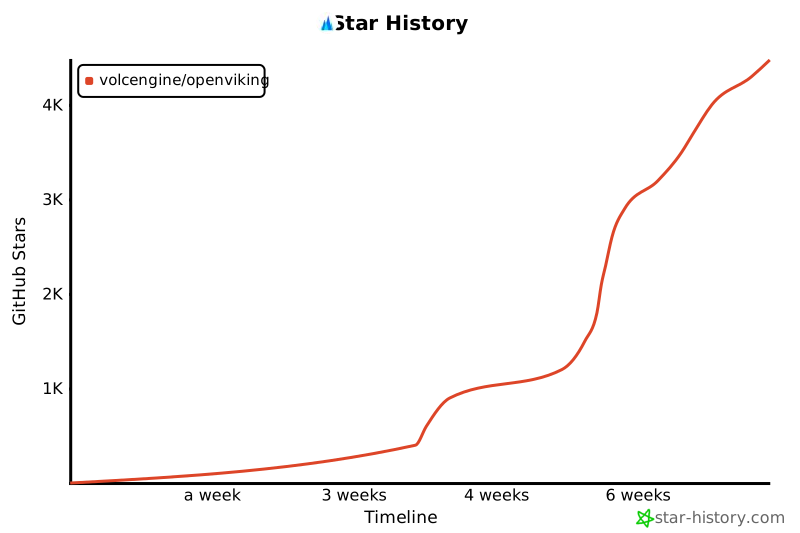
### Star 趋势
[](https://www.star-history.com/#volcengine/OpenViking&type=timeline&legend=top-left)
## 许可证
本项目采用 Apache License 2.0 许可证 - 详情请参见 [LICENSE](./LICENSE) 文件。
<!-- Link Definitions -->
[release-shield]: https://img.shields.io/github/v/release/volcengine/OpenViking?color=369eff&labelColor=black&logo=github&style=flat-square
[release-link]: https://github.com/volcengine/OpenViking/releases
[license-shield]: https://img.shields.io/badge/license-apache%202.0-white?labelColor=black&style=flat-square
[license-shield-link]: https://github.com/volcengine/OpenViking/blob/main/LICENSE
[last-commit-shield]: https://img.shields.io/github/last-commit/volcengine/OpenViking?color=c4f042&labelColor=black&style=flat-square
[last-commit-shield-link]: https://github.com/volcengine/OpenViking/commcommits/main
[github-stars-shield]: https://img.shields.io/github/stars/volcengine/OpenViking?labelColor&style=flat-square&color=ffcb47
[github-stars-link]: https://github.com/volcengine/OpenViking
[github-issues-shield]: https://img.shields.io/github/issues/volcengine/OpenViking?labelColor=black&style=flat-square&color=ff80eb
[github-issues-shield-link]: https://github.com/volcengine/OpenViking/issues
[github-contributors-shield]: https://img.shields.io/github/contributors/volcengine/OpenViking?color=c4f042&labelColor=black&style=flat-square
[github-contributors-link]: https://github.com/volcengine/OpenViking/graphs/contributors
Files in this skill
- README.md
- skill.md
Attribution



Comments
Loading comments…
Newsletter
Get the weekly list of safe new skills, and the ones we pulled.