Add the agent Sandbox tab (sandbox type selection — Computing Runtime, Virtual Machine Shell, or Claw — plus OpenClaw instance management and agent prompt configuration) to your Next.js app
Installs into .claude/skills of the current project.
Are you the author of Iblai Vibe Agent Sandbox?
Add the live security badge to your README. It updates with every re-scan.
[](https://www.skillsdirectory.com/skills/iblai-iblai-vibe-agent-sandbox)
---
name: iblai-vibe-agent-sandbox
description: Add the agent Sandbox tab (sandbox type selection — Computing Runtime, Virtual Machine Shell, or Claw — plus OpenClaw instance management and agent prompt configuration) to your Next.js app
globs:
alwaysApply: false
metadata:
kind: ui
---
# /iblai-vibe-agent-sandbox
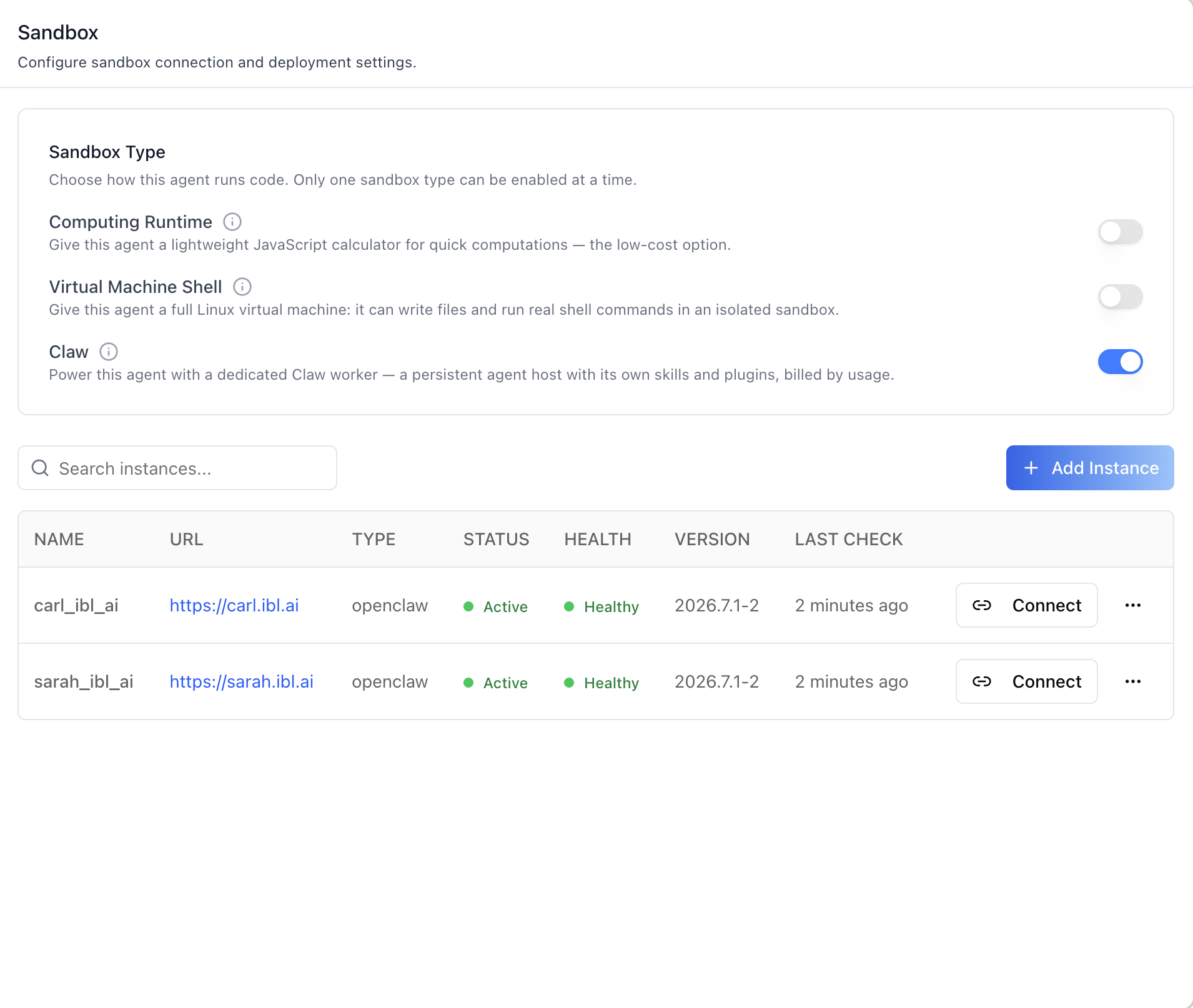
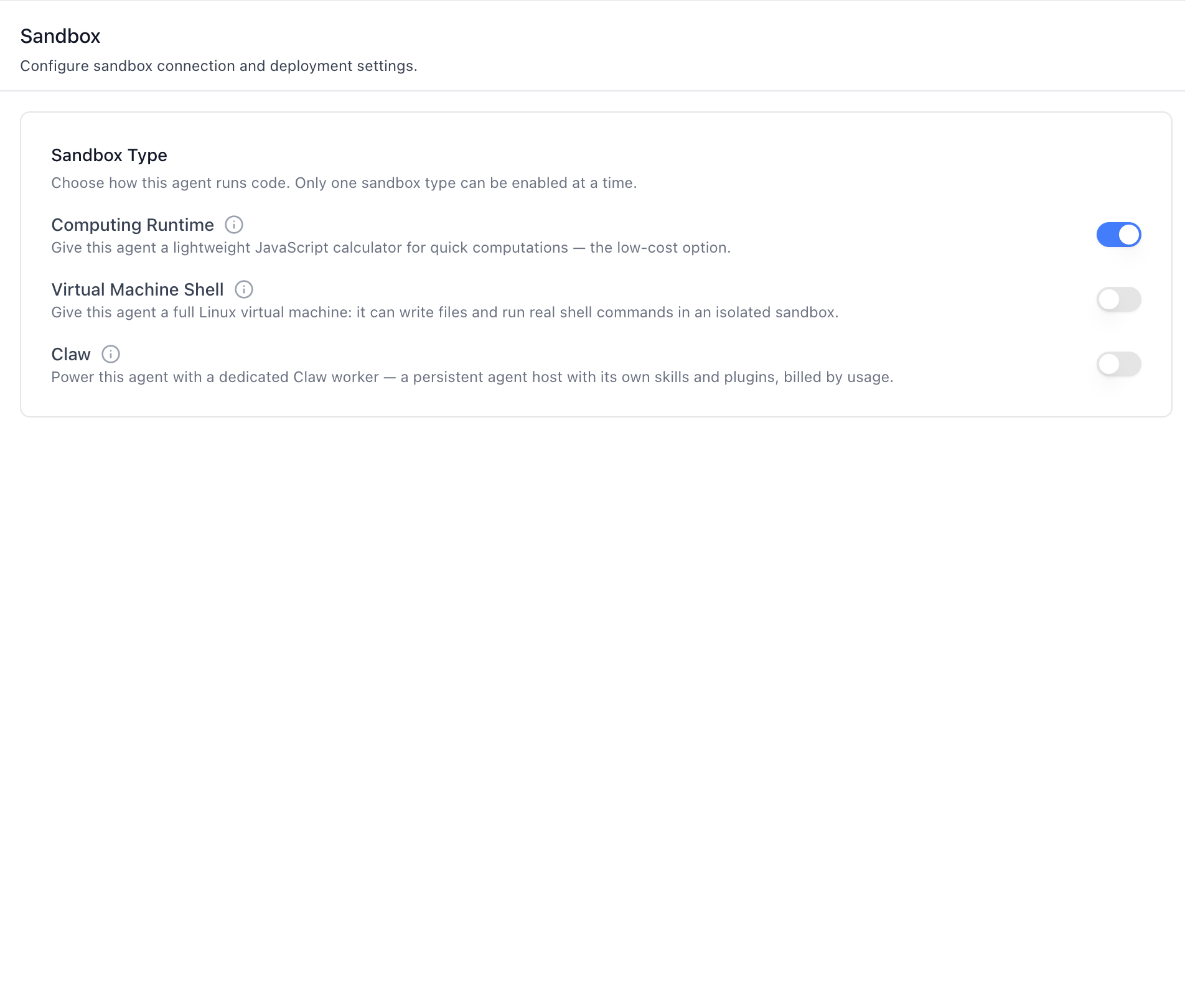
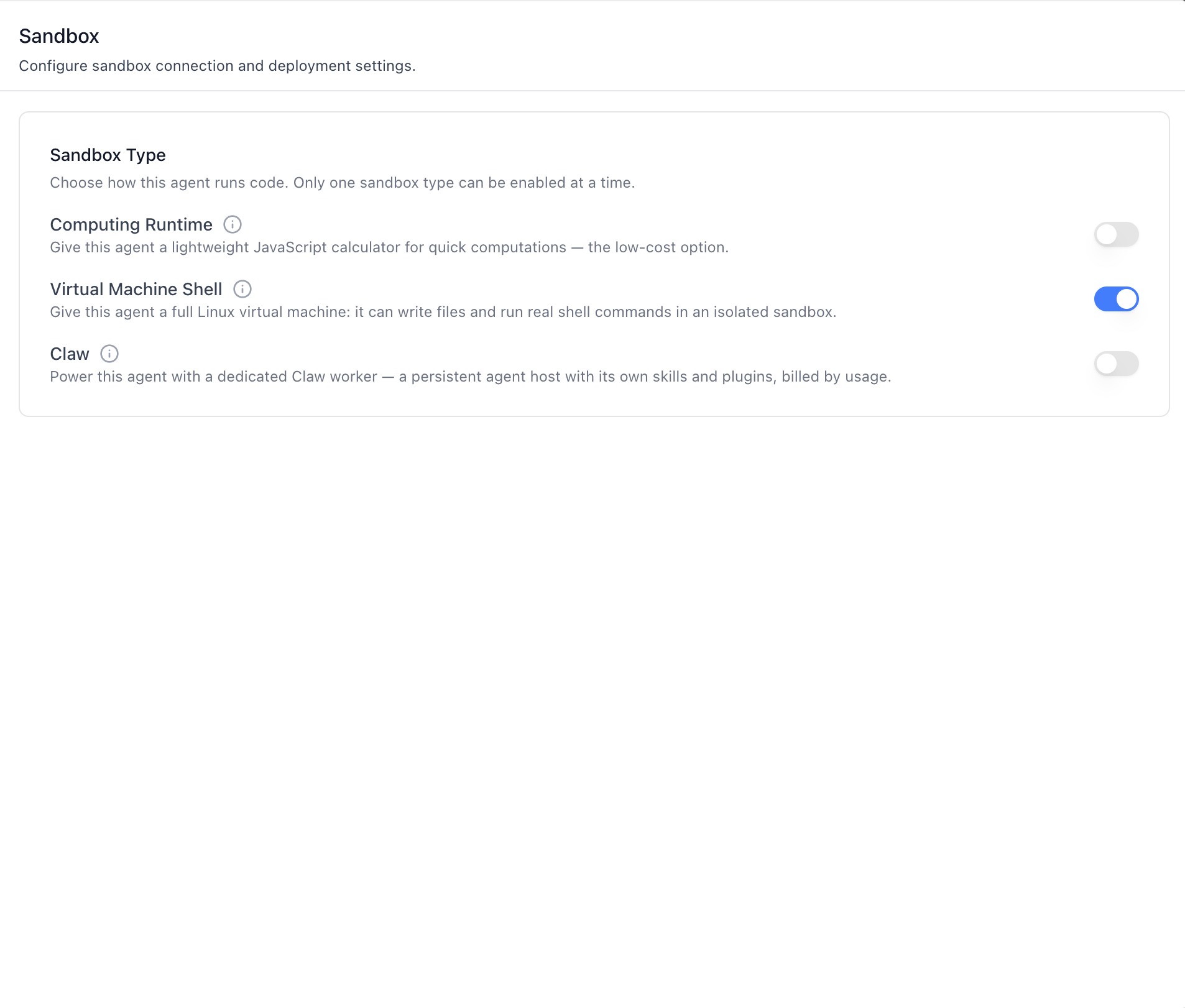
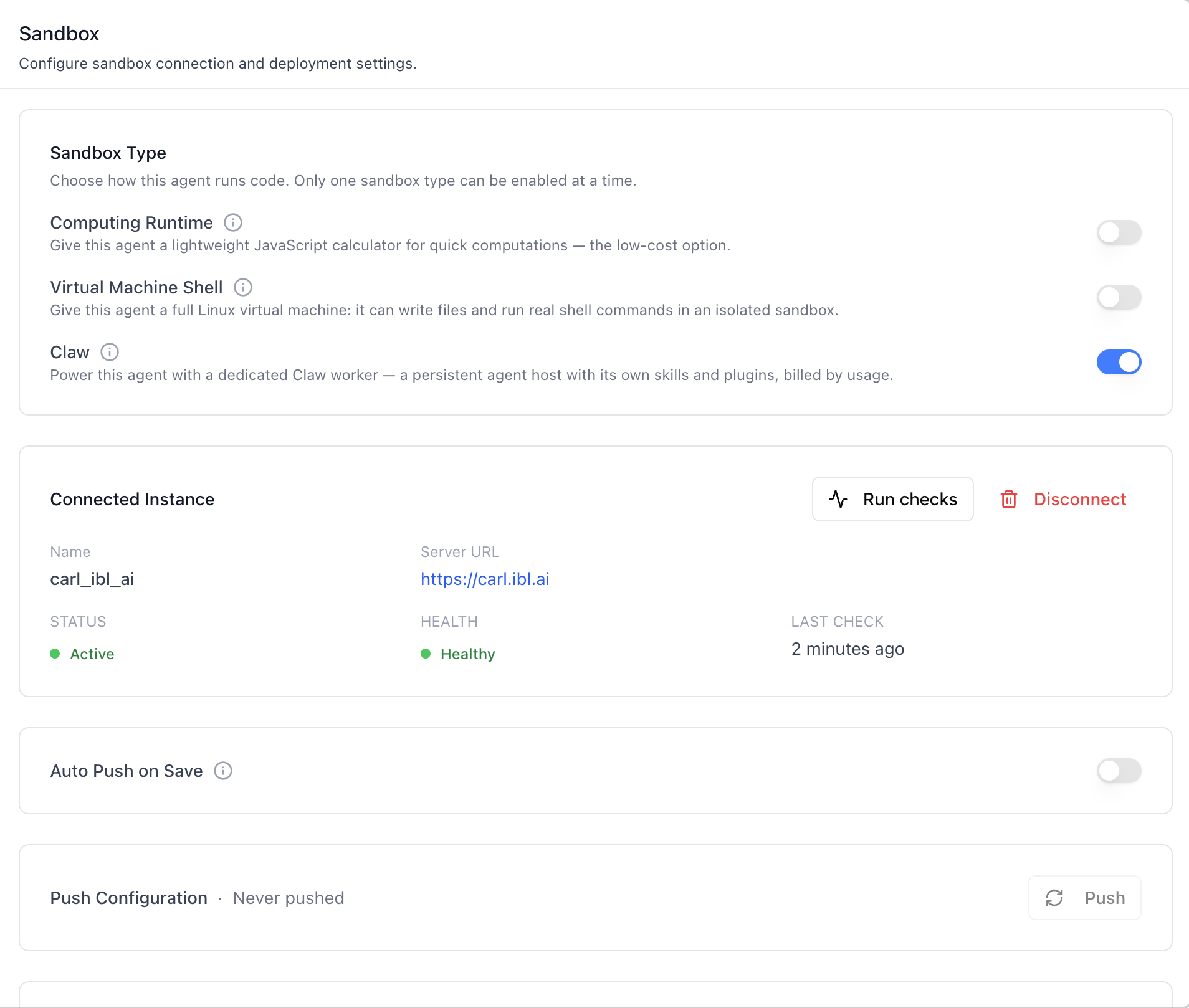
Add the agent **Sandbox tab** -- choose how the agent runs code and,
for Claw, manage its sandbox workspace. A **Sandbox Type** card picks
one of three mutually exclusive kinds:
- **Computing Runtime** — a lightweight JavaScript calculator for
quick computations; the low-cost option.
- **Virtual Machine Shell** — a full Linux virtual machine: the agent
can write files and run real shell commands in an isolated sandbox.
- **Claw** — a dedicated Claw worker: a persistent agent host with
its own skills and plugins, billed by usage. This is the original
OpenClaw sandbox flow — selecting it reveals the instance
management sections below the card.
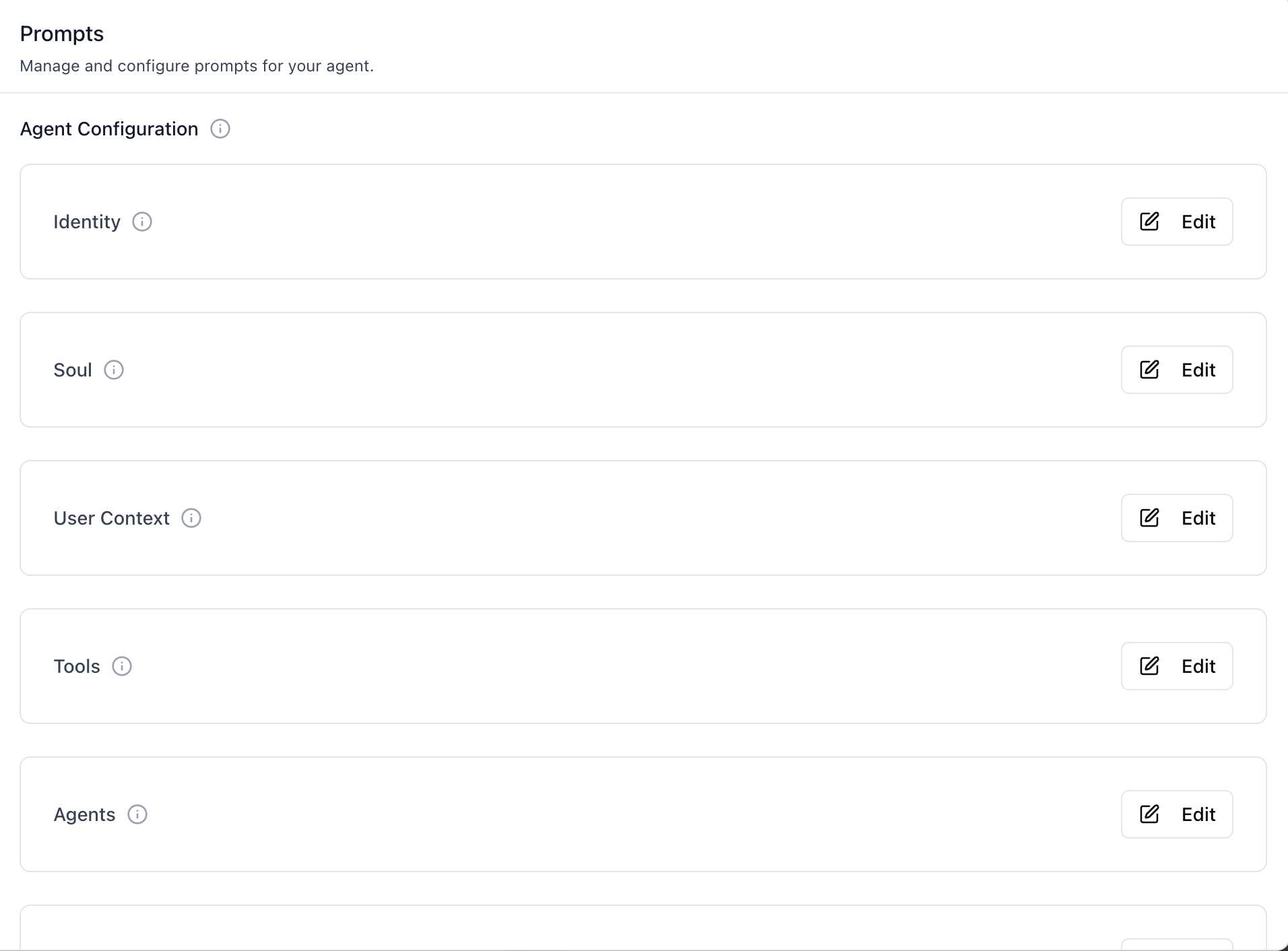
With **Claw** selected, the tab connects the agent to an OpenClaw
instance and edits the agent-workspace prompt files (Identity, Soul,
User Context, Tools, Agents, Bootstrap, Heartbeat, Memory) backing
the agent's runtime behaviour. Push pulls the current configuration
onto the connected sandbox; Auto Push on Save pushes after every
edit.
With **Virtual Machine Shell** selected, a **Network Access** section
appears under the card — the VM's egress profile, its network policy
and its secrets. That section has its own skill:
`/iblai-vibe-agent-virtual-machine` (and
`/iblai-vibe-virtual-machine` for the organization-wide policies and
secrets it draws on).
Agent Skills are managed independently of the sandbox — see
`/iblai-vibe-agent-skills` for the Skills surface (skills catalog,
per-agent assignment, skill resources, and the chat `/` picker).
> **Common setup (brand, conventions, env files, verification):** see [docs/skill-setup.md](https://raw.githubusercontent.com/iblai/vibe/refs/heads/main/docs/skill-setup.md).
## OpenClaw workspace & sandbox runtime
- **Post-installation setup** — install this repo's skills into the OpenClaw
agent and swap the workspace `AGENTS.md`:
[`references/openclaw-post-installation-setup.md`](references/openclaw-post-installation-setup.md).
- **NemoClaw sandbox hardening** — running the agent inside a NemoClaw /
OpenShell sandbox: [`references/nemoclaw-sandbox.md`](references/nemoclaw-sandbox.md).
## Prerequisites
- Auth must be set up first (`/iblai-vibe-auth`)
- MCP server + skills configured (`@iblai/mcp` in `.mcp.json`)
- Ask the user for a real `mentorId` (agent UUID). Do NOT invent one.
- **Only for the Claw kind**: a reachable OpenClaw instance URL plus a
Gateway Token to register the first instance. Without one, the
Sandbox section sits empty ("Add Instance") and the Prompts section
is gated until a config is connected. Computing Runtime and Virtual
Machine Shell need no external instance — they are single toggles.
## Step 1: Check Environment
Before proceeding, check for an `iblai.env` in the project root. Look for
`PLATFORM`, `DOMAIN`, and `TOKEN` variables. If the file does not exist or
is missing these variables, tell the user:
"You need an `iblai.env` with your platform configuration. Download the
template and fill in your values:
`curl -o iblai.env https://raw.githubusercontent.com/iblai/vibe/refs/heads/main/iblai.env`"
## Step 2: Mount the two sections
`SandboxConfig` and `AgentConfigPrompts` are independent
components — neither reads from `AgentSettingsProvider`. They each
take `platformKey` and `mentorUniqueId` as required props. Compose them
on a single page so the user sees Sandbox → Prompts, top to
bottom.
```tsx
// app/(app)/agents/[mentorId]/sandbox/page.tsx
"use client";
import { useEffect, useState } from "react";
import { useParams } from "next/navigation";
import {
SandboxConfig,
AgentConfigPrompts,
} from "@iblai/iblai-js/web-containers";
export default function AgentSandboxPage() {
const { mentorId } = useParams<{ mentorId: string }>();
const [platformKey, setPlatformKey] = useState("");
const [username, setUsername] = useState("");
useEffect(() => {
try {
const raw = localStorage.getItem("userData");
if (raw) {
const parsed = JSON.parse(raw);
setUsername(parsed.user_nicename ?? parsed.username ?? "");
}
const resolvedTenant =
localStorage.getItem("app_tenant") ??
(() => {
try {
return JSON.parse(localStorage.getItem("current_tenant") ?? "{}").key;
} catch { return undefined; }
})() ??
localStorage.getItem("tenant") ??
"";
setPlatformKey(resolvedTenant);
} catch {}
}, []);
if (!platformKey) return null;
return (
<div className="flex h-full flex-col gap-8 bg-white p-6">
<SandboxConfig
platformKey={platformKey}
mentorUniqueId={mentorId}
username={username}
/>
<AgentConfigPrompts
platformKey={platformKey}
mentorUniqueId={mentorId}
/>
</div>
);
}
```
`AgentConfigPrompts` self-gates on the connected sandbox config — it
calls `useGetClawMentorConfigQuery` and short-circuits when no config
exists, so it is safe (and intended) to mount both together. The
Prompts section appears only after the user connects an instance.
`SandboxConfig`'s `username` prop is optional — if omitted, the
component falls back to `getUserName()` (which reads from
`localStorage.userData`). Pass it explicitly when you already have it
to avoid the extra read.
## Step 2.5: Sandbox types (`enable_computational_runtime` / `enable_virtual_machine` / `enable_claw`)
The **Sandbox Type** card at the top of `SandboxConfig` selects how
the agent runs code. Three boolean flags back it, all read from the
agent's settings and written through the standard agent-settings
update endpoint:
| Kind | Flag | What it gives the agent |
|---|---|---|
| Computing Runtime | `enable_computational_runtime` | A lightweight JavaScript calculator for quick computations — the low-cost option |
| Virtual Machine Shell | `enable_virtual_machine` | A full Linux VM: file writes and real shell commands in an isolated sandbox |
| Claw | `enable_claw` | A dedicated Claw worker (persistent agent host with its own skills and plugins, billed by usage) — unlocks the OpenClaw sections below |
**The kinds are mutually exclusive** — only one can be enabled at a
time. The component enforces this client-side: enabling one kind
turns the other two off **in the same PATCH**, and toggling the
active kind off leaves none enabled. Switches flip optimistically and
revert with an error toast if the save fails.
`SandboxConfig` handles all of this itself (via
`useGetMentorSettingsQuery` + `useEditMentorMutation`), so the host
app no longer needs to gate the Sandbox tab on `enable_claw` — mount
the tab and let users pick a type. Custom UI toggling the flags
directly should mirror the exclusivity:
```tsx
import { useEditMentorMutation } from "@iblai/iblai-js/data-layer";
const [editMentor] = useEditMentorMutation();
// Select Virtual Machine Shell (turning the other kinds off):
await editMentor({
mentor: mentorUniqueId,
org: platformKey,
userId: username,
formData: {
enable_claw: false,
enable_computational_runtime: false,
enable_virtual_machine: true,
},
}).unwrap();
```
Pre-existing Claw instances and bound configs are preserved when
switching kinds — the flags only affect which sandbox the agent uses
and which sections render, not the stored data.
## Step 3: Use MCP Tools for Customization
```
get_component_info("SandboxConfig")
get_component_info("AgentConfigPrompts")
get_component_info("LLMProviderModal")
```
## Component Props
Both components import from `@iblai/iblai-js/web-containers`.
### `<SandboxConfig>`
| Prop | Type | Required | Description |
|------|------|----------|-------------|
| `platformKey` | `string` | Yes | Organization key (org slug) |
| `mentorUniqueId` | `string` | Yes | Agent UUID |
| `username` | `string \| null` | No | Current user. Falls back to `getUserName()` from `localStorage` when omitted |
### `<AgentConfigPrompts>`
| Prop | Type | Required | Description |
|------|------|----------|-------------|
| `platformKey` | `string` | Yes | Organization key (org slug) |
| `mentorUniqueId` | `string` | Yes | Agent UUID |
## What each section renders
### Sandbox Type (kind selection)
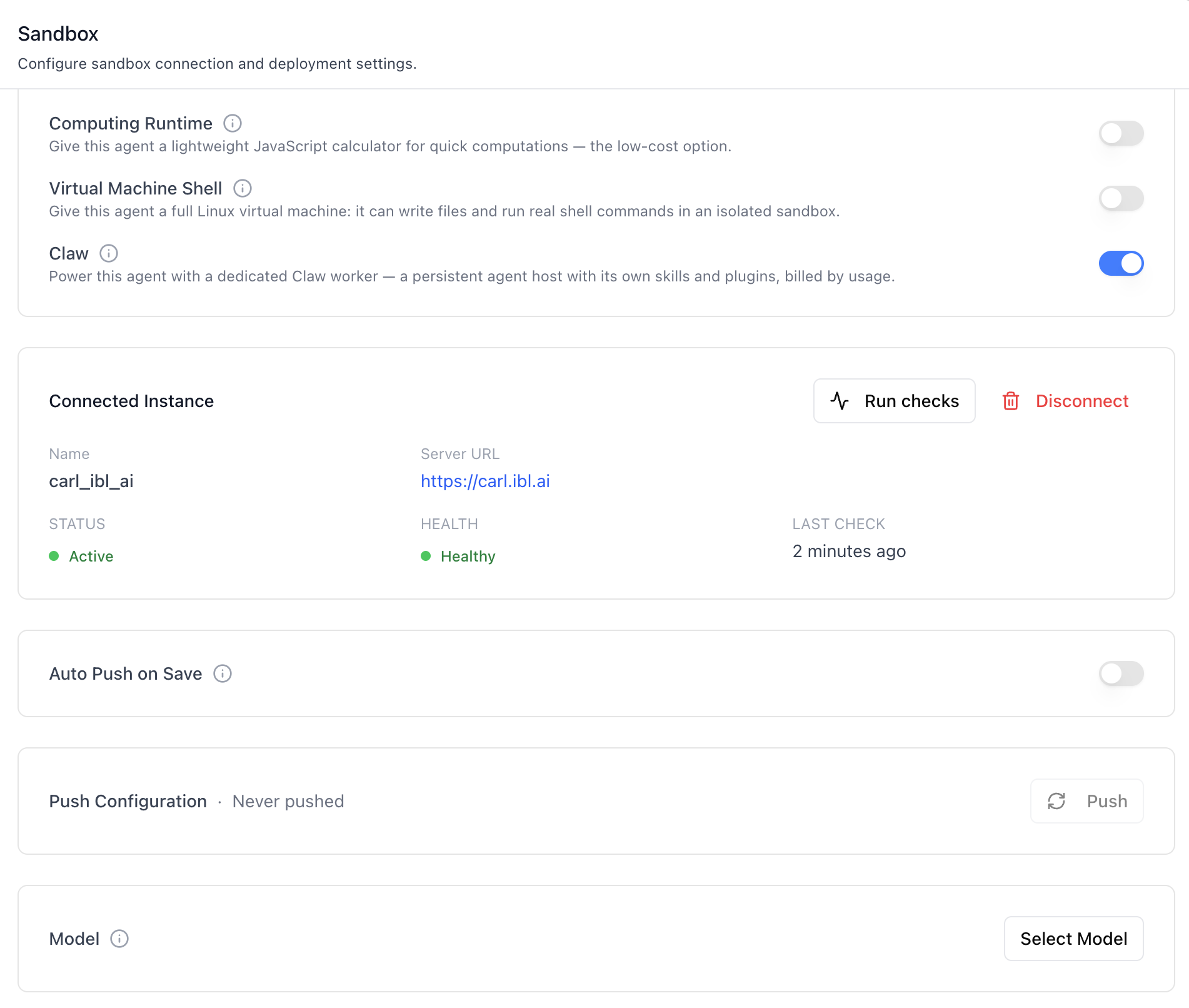
- **Three toggle rows** — Computing Runtime, Virtual Machine Shell,
Claw — each with an info tooltip carrying the longer explanation.
"Only one sandbox type can be enabled at a time": enabling one
turns the others off in the same save; switches update
optimistically and revert on failure.
- Everything below the card (instances, connected card, Auto Push,
Push, Model) renders **only while Claw is the selected kind** — the
claw-config query is skipped entirely for the other kinds.
### Sandbox (instance management + connection — Claw only)
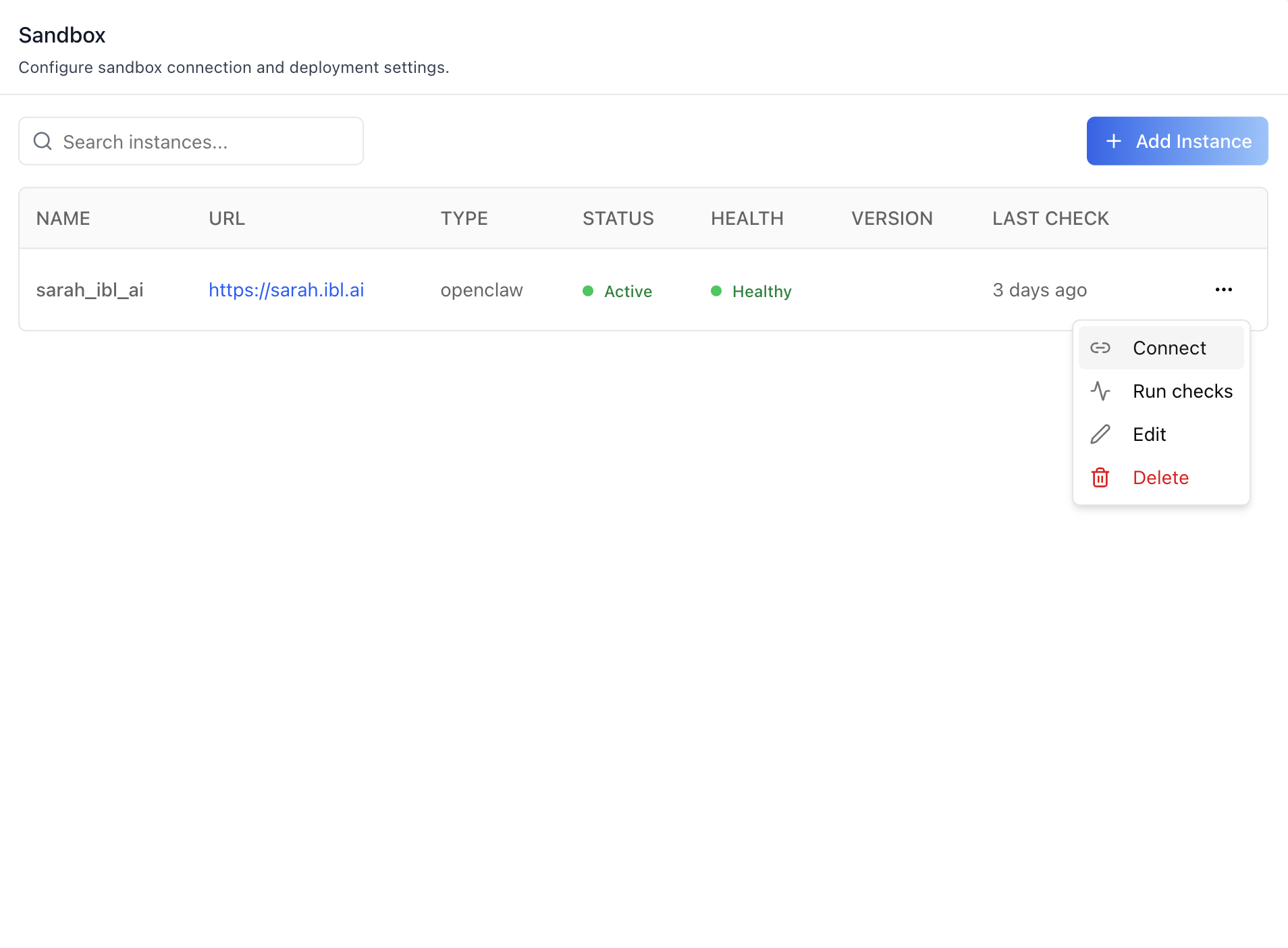
- **Instances table** — searchable, paginated (5 per page). Columns:
Name, URL, Type, Status (Active / Error), Health (Healthy /
Unhealthy with full error in tooltip), Version, Last Check.
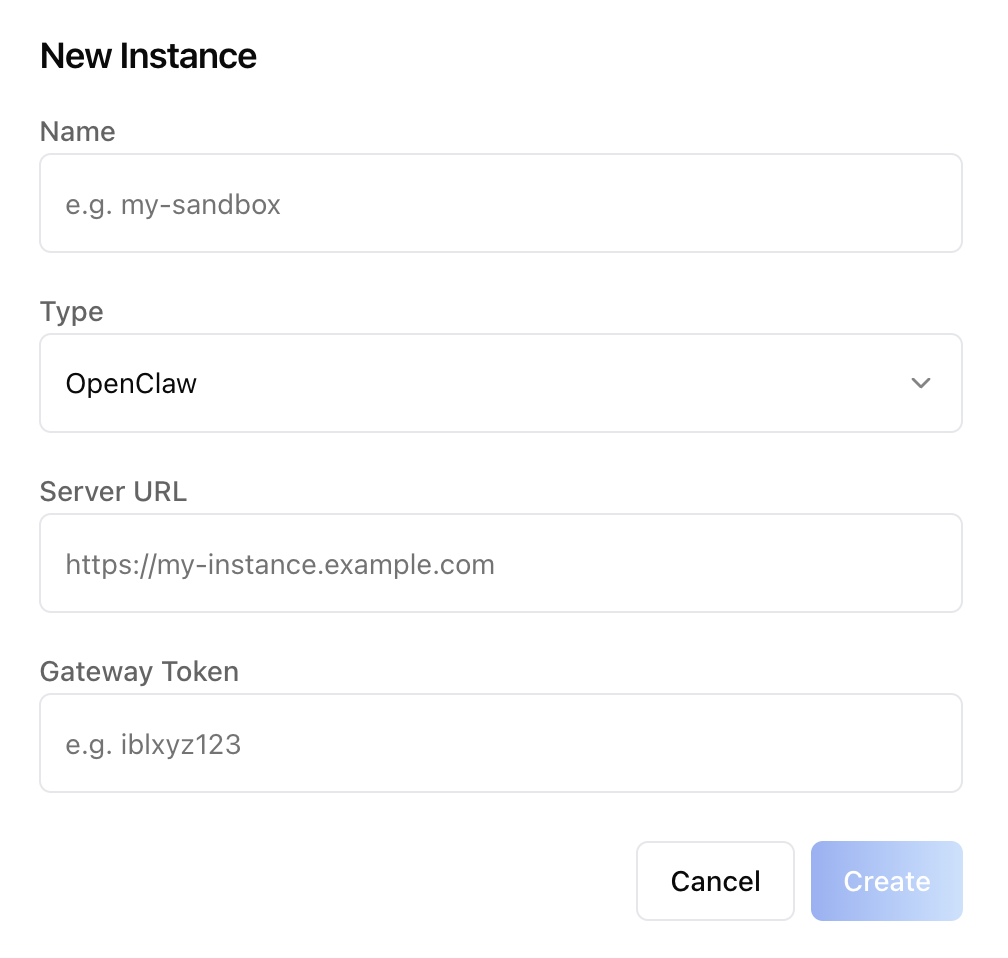
- **Add Instance** — opens a "New Instance" dialog: Name, Type
(`OpenClaw`), Server URL, Gateway Token. The token write-only —
never read back from the API.
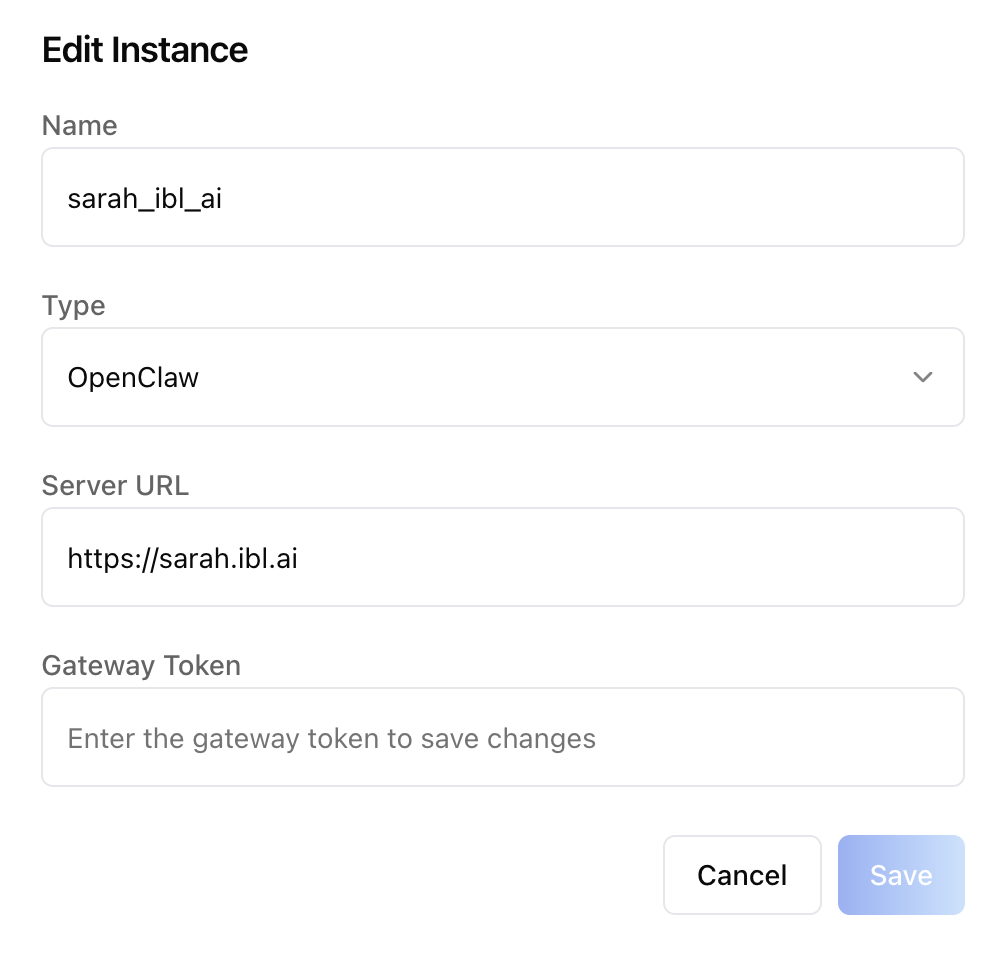
- **Per-row actions** (kebab menu): **Connect** (binds this instance
to the current agent), **Run checks** (health + connectivity
ping), **Edit** (gateway token re-prompt; leave blank to keep
existing), **Delete**.
- **Connected Instance card** — once an agent is bound, the table
collapses into a card showing Name, URL, Status, Health, Last
Check, with **Run checks** and **Disconnect** actions.
- **Auto Push on Save** — when on, every prompt edit pushes to the
sandbox. When off, the user pushes manually.
- **Push Configuration** — manual **Push** button + "Last pushed"
/ "Never pushed" indicator. Disabled when the agent has no
populated prompt fields (the API rejects empty pushes server-side
and we mirror that locally).
- **Model** — opens the `LLMProviderModal` to pick a provider /
model (`{provider}/{name}`). Writes to the agent config's `model`
field.
### Prompts (agent workspace files)
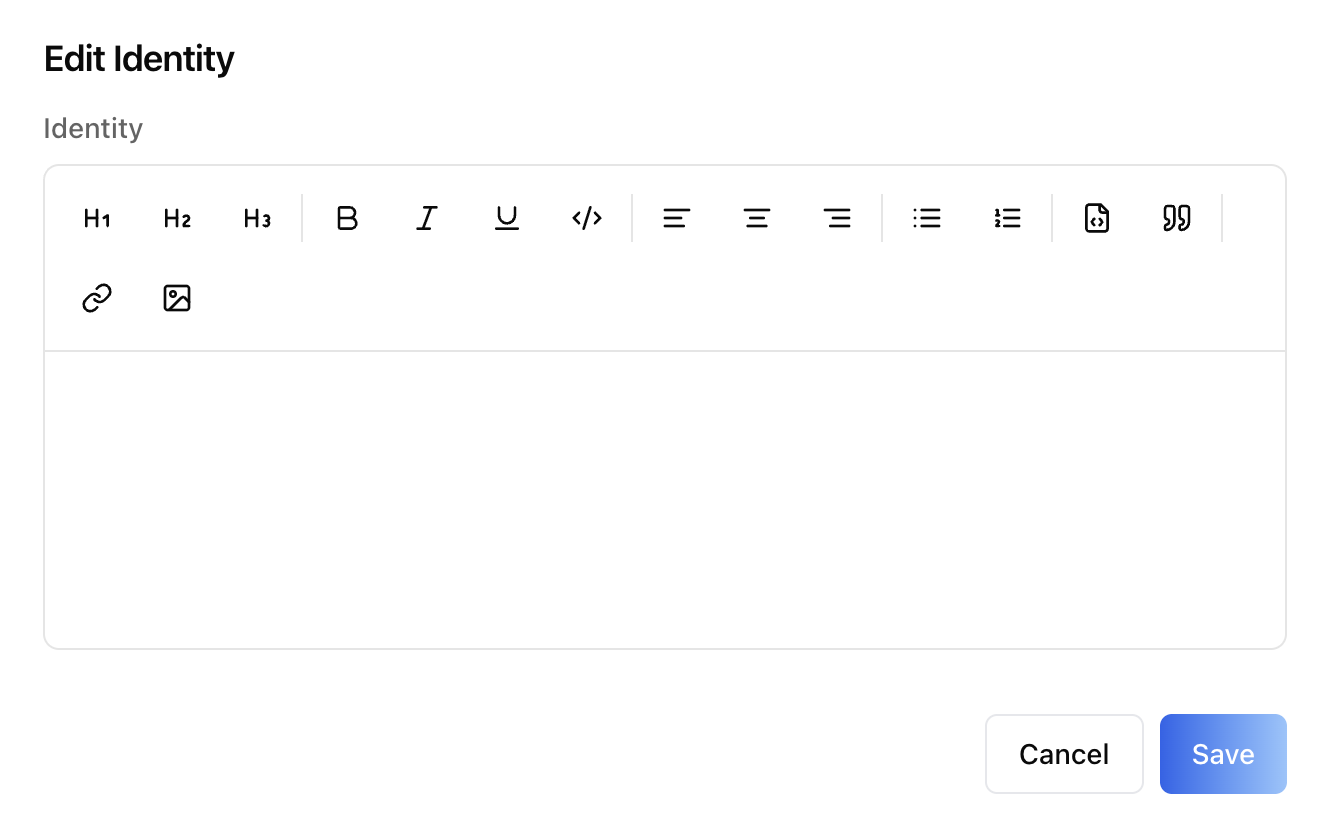
Eight rows, each with a **(i)** info tooltip and an **Edit** button
that opens a `RichTextEditor` modal:
| Field | Backed by | Purpose |
|---|---|---|
| Identity | `IDENTITY.md` | Agent persona, name, creature type, visual description |
| Soul | `SOUL.md` | Behavioural guidelines, personality, communication style |
| User Context | `USER.md` | Deployment context, SSH hosts, device names, TTS voices |
| Tools | `TOOLS.md` | Tool usage notes, device names, API aliases |
| Agents | `AGENTS.md` | Multi-agent routing, agent ids, workspaces |
| Bootstrap | `BOOTSTRAP.md` | One-time first-run instructions |
| Heartbeat | `HEARTBEAT.md` | Periodic task definitions |
| Memory | `MEMORY.md` | Seed memory, curated long-term facts |
Updates are upserts — the first PATCH bootstraps the row.
## Related Exports
From `@iblai/iblai-js/web-containers`:
- `SandboxConfig`, `AgentConfigPrompts` — the two section components.
- `LLMProviderModal` — provider/model picker used by the Model row.
Mountable standalone (e.g. for an "override default model" flow
outside the sandbox).
- `getLLMProviderDetails`, `canSwitchLLm`, `canSwitchProvider` —
helpers for custom UI that needs to mirror the model-picker rules.
- `LLMProvider`, `Provider` — types for the picker.
From `@iblai/data-layer`:
- `useGetClawMentorConfigQuery`,
`useCreateClawMentorConfigMutation`,
`useDeleteClawMentorConfigMutation`,
`usePushClawConfigMutation` — connect / disconnect / push.
- `useGetClawInstancesQuery`,
`useCreateClawInstanceMutation`,
`useUpdateClawInstanceMutation`,
`useDeleteClawInstanceMutation`,
`useHealthCheckClawInstanceMutation`,
`useTestConnectivityClawInstanceMutation` — instance CRUD + checks.
- `useGetAgentConfigQuery`, `useUpdateAgentConfigMutation` — prompt
fields + model.
Skills hooks and types (`useGetAgentSkillsQuery`, `AgentSkill`, …)
are documented in `/iblai-vibe-agent-skills`.
## Step 4: Verify
Run `/iblai-vibe-ops-test` before telling the user the work is ready:
1. `pnpm build` -- must pass with zero errors
2. `pnpm test` -- vitest must pass
3. Start dev server and touch test:
```bash
pnpm dev &
npx playwright screenshot http://localhost:3000/agents/<id>/sandbox /tmp/agent-sandbox.png
```
## Important Notes
- **Redux store**: Must include `mentorReducer` and `mentorMiddleware`
- **`initializeDataLayer()`**: 5 args (v1.2+)
- **`@reduxjs/toolkit`**: Deduplicated via webpack aliases in `next.config.ts`
- **Peer deps**: `sonner` and `@iblai/iblai-web-mentor` must be installed
(`pnpm add sonner @iblai/iblai-web-mentor`)
- **No `AgentSettingsProvider`**: Both components take raw props.
If your app already mounts `AgentSettingsProvider` for sibling tabs,
read its values via `useAgentSettings()` in the page wrapper and
forward them.
- **`mentorUniqueId` vs `mentorId`**: The sandbox endpoints key on the
agent's UUID (called `mentorUniqueId` in the SDK), not the integer
pk. Pass the same UUID you use everywhere else in the agent-* family.
- **Gateway token write-only**: The token is required to add an
instance and required again when editing if you want to rotate it,
but the API never returns it. Leaving the field blank on edit keeps
the existing value.
- **Push gating**: `usePushClawConfigMutation` returns
`400 No configuration to push` when every agent-config field is
empty. The component mirrors that gate locally — the manual Push
button is disabled until the user has saved at least one prompt.
- **404 ≠ error**: `useGetClawMentorConfigQuery` 404s when no agent
has been bound to a sandbox — that's the "not connected" state, not
a failure. The component treats `isError` as `null` here. Custom
consumers should do the same.
- **Sandbox kinds are mutually exclusive**: `SandboxConfig` owns the
three flags (`enable_computational_runtime`, `enable_virtual_machine`,
`enable_claw`) and enforces the one-at-a-time rule in each PATCH
(see Step 2.5) — host-side tab gating on `enable_claw` is no longer
required. Custom UI writing the flags directly must clear the other
two when enabling one. Existing Claw instances and configs are
preserved across kind switches.
- **Flag homes**: `enable_claw` and `enable_virtual_machine` live on
`MentorSettings`; `enable_computational_runtime` lives on `Mentor` —
all three are readable from the settings response and writable
through the same agent-settings update (`useEditMentorMutation`).
- **Brand guidelines**: [BRAND.md](https://raw.githubusercontent.com/iblai/vibe/refs/heads/main/BRAND.md)
## Sandbox REST API
For custom UI beyond these three components. All endpoints are
prefixed with `${dmUrl}/api/ai-mentor/orgs/{org}/` where `dmUrl` is
`NEXT_PUBLIC_API_BASE_URL`. Auth: `Authorization: Token <token>`.
### Sandbox type flags (agent settings)
| Method | Path | Body |
|---|---|---|
| GET | `users/{username}/mentors/{mentor_unique_id}/settings/` | Returns the full settings object, including `enable_claw`, `enable_virtual_machine`, and `enable_computational_runtime` (booleans) |
| PUT | `users/{username}/mentors/{mentor_unique_id}/settings/` | e.g. `{ "enable_virtual_machine": true, "enable_claw": false, "enable_computational_runtime": false }` |
The kinds are mutually exclusive by convention, enforced client-side:
when enabling one flag, send the other two as `false` in the same
request. Only `enable_claw` unlocks the OpenClaw endpoints below.
### Instances (organization-scoped)
| Method | Path | Purpose |
|---|---|---|
| GET | `claw-instances/` | List instances |
| POST | `claw-instances/` | Register a new instance |
| PATCH | `claw-instances/{id}/` | Update name / URL / type / token |
| DELETE | `claw-instances/{id}/` | Delete |
| POST | `claw-instances/{id}/health-check/` | Run a health probe |
| POST | `claw-instances/{id}/test-connectivity/` | Run a connectivity probe |
**Create / update body:**
```json
{
"name": "sarah_ibl_ai",
"server_url": "https://sarah.ibl.ai",
"claw_type": "openclaw",
"gateway_token": "ibl..."
}
```
`gateway_token` is write-only. Omit on update to keep the existing value.
### Sandbox binding (binds an instance to an agent)
| Method | Path | Purpose |
|---|---|---|
| GET | `mentors/{mentor_unique_id}/claw-config/` | Read current binding (404 = not connected) |
| POST | `mentors/{mentor_unique_id}/claw-config/` | Connect — body `{ "server": <instanceId>, "enabled": true }` |
| DELETE | `mentors/{mentor_unique_id}/claw-config/` | Disconnect |
| POST | `mentors/{mentor_unique_id}/claw-config/push/` | Push current agent config to the sandbox |
`push` returns `400 No configuration to push` when every agent-config
field is empty. Pre-flight by checking the agent config locally.
### Agent configuration (prompts + model)
| Method | Path | Purpose |
|---|---|---|
| GET | `mentors/{mentor_unique_id}/agent-config/` | Read prompts + model |
| PATCH | `mentors/{mentor_unique_id}/agent-config/` | Upsert — first write bootstraps the row |
**Body fields:** `identity`, `soul`, `user_context`, `tools`,
`agents`, `bootstrap`, `heartbeat`, `memory` (each is the markdown
body of the corresponding `*.md` workspace file), plus `model`
(`"{provider}/{name}"`).
Agent Skills endpoints (catalog, resources, per-agent assignments)
are documented in `/iblai-vibe-agent-skills`.
### Virtual machine network policies & secrets
The **Virtual Machine Shell** kind runs each chat in an isolated Linux VM
with no network by default. What it may reach is chosen per agent through
three settings fields — `virtual_machine_egress`
(`none` | `registries` | `public` | `custom`),
`virtual_machine_network_policy_id` and `virtual_machine_secret_ids` — and
the organization-wide network policies and VM secrets they point at live
under `/api/ai-account/orgs/{org}/`.
That whole surface has its own skills:
- **`/iblai-vibe-agent-virtual-machine`** — the Sandbox tab's **Network
Access** section: egress profile, policy picker, secrets multi-select,
the rules the UI enforces before saving, and the agent settings fields.
- **`/iblai-vibe-virtual-machine`** — organization settings → **Virtual
Machine**: the network policy and VM secret tables, their dialogs,
validation limits, RBAC verbs and the REST endpoints.
**Billing:** VM lifetime is charged to the chatting user's credits at
`SANDBOX_COST_USD_PER_10_MINUTES` (global configuration, default `$1`,
overridable per organization), prorated per second and recorded on the
`sandbox_session` observation in Langfuse.
### Common errors
- `404 Not Found` on `claw-config/` — the agent isn't connected.
Treat as the "not connected" state, not a failure.
- `400 No configuration to push` — at least one prompt field must be
populated before pushing.
- `400 Gateway token required` — required on instance create; on
edit only when rotating.
Files in this skill
SKILL.md20.4 KB
assets/nemoclaw/.nemoclaw-preload.js3.4 KB
assets/nemoclaw/bashrc-snippet.sh1.3 KB
assets/openclaw/AGENTS.md7.5 KB
iblai-vibe-agent-sandbox-edit-instance.png77.5 KB
iblai-vibe-agent-sandbox-edit-prompt.png57.5 KB
iblai-vibe-agent-sandbox-new-instance.png78.1 KB
references/nemoclaw-sandbox.md6.5 KB
references/openclaw-install.md3.2 KB
references/openclaw-post-installation-setup.md672 B



